Releases: samaBR85/Gen6CTRPFrameworkOverhauled
v0.6.0 — O-Power Center

✨ New in v0.6.0 — O-Power Center
A new visual panel for your O-Powers, in Online Features → O-Power Center:
- See all 18 O-Powers as a color-coded grid and set each one's level.
- A live 10-charge gauge with one-tap Refill, plus Max All / Unlock / Lock.
- A Keep toggle that keeps the gauge always full — no recharge wait.
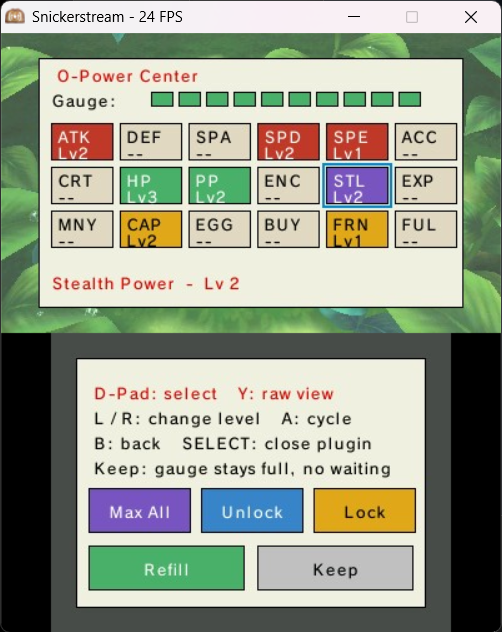
Everything else from v0.5.0 is unchanged — one .3gx for X / Y / Omega Ruby / Alpha Sapphire, 7 languages, and it runs on real 3DS hardware and on the Azahar emulator (desktop & Android).
Install
- Easiest (3DS): scan the Universal-Updater QR — see the README.
- Manual: download
Gen6CTRPluginFramework-v0.6.0.zipbelow and extract itsluma/andGen6CTRPluginFramework/folders to your SD card root. Full steps (3DS + Azahar) are in the Installation wiki.
The
Gen6CTRPluginFramework-unistore.zipasset is only for Universal-Updater's auto-update (it's a stable-named copy) — you don't need to download it manually.
If you find it useful for you, consider:

v0.5.0 — Four games, full Kalos teleport & 7 languages
A friendly box of superpowers for Pokémon X, Y, Omega Ruby and Alpha Sapphire — now all four at once.
What's new in v0.5.0
- 🎮 Multi-game. One
.3gxauto-detects your game; each of the four Gen 6 titles gets tailored content (guides + assets) in its own Title-ID folder — Kalos for X/Y, Hoenn for OR/AS. - 🗺️ Full Kalos teleport map for X/Y: 27 locations with categories, a graph map, Routes 1–22 and an overview grid — matching the Hoenn map.
- 🌐 7 languages in the plugin UI (bottom buttons, Tools menu & submenus, About): 🇺🇸 English · 🇫🇷 French · 🇩🇪 German · 🇮🇹 Italian · 🇯🇵 Japanese · 🇧🇷 Portuguese (Brazil) · 🇪🇸 Spanish — switchable in-plugin.
- 📖 App Guide & Game Guide follow your language, with a friendly translated header; the App Guide's menu paths use the exact on-screen localized labels.
Install
- Have Luma3DS + the Rosalina plugin loader on your 3DS.
- Unzip to the root of your SD card. It adds
luma/plugins/<your game's Title ID>/(the.3gx) andGen6CTRPluginFramework/(language files & data) — both at the SD root. - Launch your Pokémon Gen 6 game, press SELECT to open the menu, and read the built-in App Guide.
Works on Title IDs: X 0004000000055D00 · Y 0004000000055E00 · Omega Ruby 000400000011C400 · Alpha Sapphire 000400000011C500.
If you find it useful for you, consider:
v0.4.2 — Teleportation overhaul
Gen6CTRPFramework Overhauled — v0.4.2
The headline of this release is a completely reworked Teleportation feature, plus a tidy-up of the plugin's folders.
✨ Teleportation, reborn
- Two-screen place picker — a picture grid (or a plain list, toggle with Y) of every town, route and landmark, sorted into tabs: All · Towns · Other (Caves / Forests / Landmarks / Mirage) · Routes (101–134) · Map.
- Navigable Map — walk a little connected map tile by tile (town → route → town), and press Y there for a full picture-grid overview of every place, laid out roughly like Hoenn, with multi-select filter chips.
- Make it yours — X jumps to where you're standing, Start saves your exact warp point (this is what makes a route teleportable), and ZL tags an area so "you are here" recognises it. Everything you teach is saved to a hand-editable
MyTeleport.txtin the plugin folder, and it survives updates.
🗂️ Housekeeping
- The plugin's image/data folders are now grouped under a single
Assets/folder. - A few polish passes on the PC Box ++ slot editor and the on-screen HUD.
📦 Install
Extract the zip to the root of your SD card (it merges luma/ and Language/). Requires Luma3DS + the Rosalina plugin loader.
Title ID covered: Pokémon Alpha Sapphire.
X, Y and OR are on the way!
Full feature tour: see the README or the in-plugin App Guide (23 pages).
If you find it useful for you, consider:
v0.3.3 — In-Battle Tools, PC Box ++ & the Mini Game Corner
In-Battle Tools, the PC Box ++ editor & the Mini Game Corner.
New in this release
- In-Battle Tools — read your rival mid-fight (Enemy Helper: type matchup, a stat-compare tab, item & move tips), edit your own team without leaving the battle (Change Party Stats), and the Display Enemy Stats overlay.
- PC Box ++ — a visual editor for your storage: a grid of your boxes where you move / swap / clone / search, then a tabbed editor (Main / Stats / Moves / Origins / Misc) with no-keyboard pickers for species, IVs/EVs, moves, ability, held item, ball and more.
- ★ Mini Game Corner ★ — a seven-game arcade (Random Challenge, Loot Box, Top Trumps, Spin the Wheel, Slot Machine, Higher or Lower, Team Generator) with a global FREE / PAID toggle.
- Polish across PokéMart Anywhere, the editors and the menus.
Heads up
This release only has content for Pokémon Alpha Sapphire (Title ID 000400000011C500). The framework targets X, Y, Omega Ruby and Alpha Sapphire — X, Y and Omega Ruby are already in the works!
Install
Extract the .zip to the root of your SD card (it adds Gen6CTRPluginFramework/ and luma/). See the README for details.
If you find it useful for you, consider:
v0.3.2 — Screenshot the menu, favorites that survive updates
A small quality-of-life release on top of v0.3.1.
What's new
- Screenshot the plugin UI. The screenshot hotkey (default ZR) can now capture the plugin's own screens — the framework menu and the full-screen tools (Wild Spawner, PokéMart Anywhere, View Party Summary, Respawn Legendary, HUD pickers) — layered over the game. Enable it under Tools → Screenshots → "Capture plugin UI (menu & tools)". A brief on-screen confirmation shows the saved file.
- Favorites, enabled cheats and hotkeys now survive plugin updates. They used to vanish silently whenever you replaced the
.3gxwith a new build (they were keyed by an internal id that shifts when the menu changes). They're now stored by a stable key, so they persist across updates. One-time note: upgrading from v0.3.1 keeps yourData.bin, but you'll need to re-set your favorites/cheats/hotkeys once — from then on they stick across every future build.
Install
- Update to the latest Luma3DS.
- Extract
Gen6CTRPluginFramework-v0.3.2.zipto the root of your SD card, keeping the folder layout.
The menu header should read [0.3.2].
If you find it useful for you, consider:
v0.3.1 — PokéMart Anywhere, list sort & sleep/wake fix
✨ What's new in v0.3.1
🛒 PokéMart Anywhere
The in-bag item-adder is now a real shop. Every row shows its icon, how many you already own, and its price. Press START to switch modes:
- FREE — add anything, any amount, at no cost (the classic behavior).
- PAY — a real Poké Mart: the list narrows to items you can actually buy in-game, and each one costs Money. Buy on the spot, or build a cart and review it all at Checkout before you pay. You can never overspend.
🔃 Sort the bag
Order the list by name, price, type, or how many you own — ascending or descending.
🌙 Sleep / wake fix
Closing and reopening the lid while a full-screen tool is open — Wild Pokémon Spawner, PokéMart Anywhere, View Party Summary, Respawn Legendary or the HUD pickers — no longer leaves a black screen on wake.
🖼️ Screenshots with overlays
Screenshots can now optionally include your HUD, enemy stats and notifications (Tools › Screenshot › Include overlays; hotkey ZR).
📖 Docs & polish
- New App Guide overview page — "The grand tour" (now 21 pages); page 03 refreshed for PokéMart Anywhere.
- Re-diagrammed PAY / FREE chooser; the list cursor snaps back to the top when you change a filter.
- About credits refreshed (item prices via PokéAPI; Poké Mart buy lists cross-checked against the oraswiki and Bulbapedia shop pages).
📥 Install
Extract the whole .zip to the root of your SD card (it adds luma/ and Gen6CTRPluginFramework/, sprites included). Make sure Gen6CTRPluginFramework.3gx is the only .3gx for the title.
On-screen menu + .3gx header now read [0.3.1].
If you find it useful for you, consider:
v0.3.0 — Find anything, in seconds
Gen6CTRPluginFrameworkOverhauled v0.3.0 — the biggest update yet. Three new dual-screen finders turn "I wish I could just get that Pokémon / item" into a few taps, the whole menu is re-organised around what you actually want to do, and there's a stack of polish and safety on top. All built in — no internet, no typing long names.
🔵 This release is tuned for Pokémon Alpha Sapphire / Omega Ruby; X / Y are supported too.
✨ Three new flagship tools
- 🔎 Wild Pokémon Spawner — browse every wild Pokémon and spawn the one you pick. The top screen is a live, counted result list; the bottom screen is a filter hub — narrow by name / National Dex #, generation, type (1st and 2nd), traits (evo stage, category, Mega), or just what you already own. Open any result for a full sheet — sprite, types, abilities (including the Hidden one), base stats and the four moves it knows at your chosen level — then set form, level and Normal / Shiny and spawn it. Step into grass, water or a cave, and there it is.
- 🎒 Add Item to Inventory — the same picker for your whole bag (Items, Medicines, Berries, TMs & HMs, Key Items) in one searchable list, each row showing its icon and how many you already own. Filter by pocket / category, type, or even status (find every Burn / Sleep / Poison item — cures, orbs and status-move TMs alike). Set a quantity and add — it lands in the first free slot and never wipes what you have.
- ✨ Respawn Legendary — knocked one out or watched it flee? Now a clean pick-from-a-list hub: every legendary in your game with its own character sheet and real location — pick it and send it back.
🗂️ A completely re-organised menu
Concept-based top level: Pokémon Spawner & Trainer (PKHeX) · View Party Summary · In Battle Tweaks · Overworld & Quality of Life · Screen Overlays · Online Features (PSS). The old generic "Battle Cheats / Other Cheats" buckets and the extra "PC Editor" layer are gone; folders were renamed for clarity (Encounters & Catching, Trainer & Money, Unlocks (advanced), Change Party Stats, Movement & Travel, Visuals & Display).
🛡️ Safety guard-rails
The four save-altering cheats — all TMs/HMs + Key Items, 31 Boxes, Full Fly Map, Unlock Full Dex — are flagged red and now open a BEWARE / save-first confirmation before they apply.
⌨️ Keyboard revamp
The in-game keyboard now inherits your theme, with a framed bold input field and squarer, lower QWERTY keys.
🐛 Fixes & tweaks
- Fast Walk is now a true 60 fps speed-up on ORAS (hold ZL to drop back to 30 fps for precision).
- No Outlines fully removes the outline (both write addresses).
- Tinted-header INFO (i) notes for the new finders; level control on the Spawner sheet (D-Pad / L / R); Pop Art theme button polish.
📖 Docs & credits
App Guide, README and the in-plugin About are all refreshed to the new menu tree, with proper image & data-source credits (Pokémon Database sprites, PokéAPI item icons, Pokémon Showdown / PokéAPI / PKHeX data). Pokémon images and names © Nintendo / Game Freak / The Pokémon Company.
📥 Install
- Update to the latest Luma3DS.
- Extract the whole
.zipto the root of your SD card, keeping its layout. - New in v0.3.0: the zip adds SD sprite folders (
Spawner/,BagSprites/,LegendaryIcons/) underluma/plugins/000400000011C500/— extract the whole archive so they come along, or the finders won't show icons. - Make sure
Gen6CTRPluginFramework.3gxis the only.3gxfor the title, and the language pack sits atSD:/Gen6CTRPluginFramework/Language/<Language>.txt.
🤖 Generated with Claude Code
If you find it useful for you, consider:
Gen6CTRPluginFrameworkOverhauled v0.2.1
A beginner-friendly update on top of v0.2.0.
What's new
- View Party Summary — sortable stat cards. Move a selector over a stat (Up/Down), press A to jump to the team member with the HIGHER (or LOWER) value, flip the mode with L, and read ▲/▼ best/worst markers.
- Every in-plugin INFO (i) note rewritten in a warm, beginner-friendly voice, with the correct buttons.
- Save-guards on risky cheats. Key Items + TMs/HMs, Unlock Full Dex and Full Fly Map now show in a warning colour and open with a clear BEWARE / save first note.
- App Guide rebuilt as a 20-page guided journey, sequenced to your real progression through ORAS.
- Illustrated README with feature and theme screenshots, the project's story, and full credits.
- Rebranded the user-facing name to Gen6CTRPluginFrameworkOverhauled (display only — internal files/paths unchanged, so existing installs keep working).
Install
Extract the zip to the root of your SD card (adds luma/ and Gen6CTRPluginFramework/). See the README for details.
🤖 Built in collaboration with Claude.
If you find it useful for you, consider:
Gen 6 CTRPluginFramework v0.2.0
New to modding? This release was made for you. v0.2.0 keeps every feature from v0.1.2 and wraps it in a friendly, guided experience.
🎯 This release focuses on Pokémon Alpha Sapphire — tailored content for X, Y and Omega Ruby is on the way. Stay tuned!
Highlights
- 📖 Built-in App Guide (19 beginner pages) and a built-in Game Guide (Professor Oak Challenge walkthrough by Mewlax)
- ℹ️ A clear description on every function via the info (i) button
- 🧭 Every menu rewritten and reordered into 5 clear sections
- 📊 On-screen HUD (money, clock, BP, status, Pokémiles, party, X/Y)
- 🔍 Smarter See Enemy Pokémon Stats overlay (gender, shiny, Nature, Ability/HA, Hidden Power, max HP, color-coded IVs/EVs)
- 🔔 On-screen notifications, 🎯 configurable shortcuts, 🎨 22 color themes, 🖼️ theme-aware visuals
Install
Extract the .zip to the root of your SD card. It adds:
luma/— the plugin (luma/plugins/000400000011C500/), with the App Guide and Game GuideGen6CTRPluginFramework/— the language pack atSD:/Gen6CTRPluginFramework/Language/<Language>.txt(the plugin loads its language from here — don't skip it)
Make sure Gen6CTRPluginFramework.3gx is the only .3gx for the title. Requires the latest Luma3DS.
Built on the work of biometrix76 and many others — see the README Credits.
If you find it useful for you, consider: