Skip to content

Releases: sammdot/alleycat

v0.4.4

24 Aug 04:22

Choose a tag to compare

Fixes an issue in which Plover's memory usage increases and performance slows down when AlleyCAT Link is enabled, even when AlleyCAT is not connected.

v0.4.3

14 Aug 22:39

Choose a tag to compare

This pre-release fixes issues with connectivity on both AlleyCAT itself and Link.

v0.4.1

14 Aug 06:21

Choose a tag to compare

Hopefully this fixes issues with Link working intermittently on some systems.

v0.4.0

13 Aug 08:04

Choose a tag to compare

Now AlleyCAT can read all of the input from Plover and import it into the document editor. This includes most outlines, corrections, and even orthographic spellings. There may be a few edge cases I haven't covered, though, so beware of those and let me know.

v0.3.4

12 Aug 00:37

Choose a tag to compare

  • Fixed an issue where the Link plugin did not install properly
  • Added an option to show steno notes inline
  • Highlighted untranslates in the transcript

v0.3.1

11 Aug 18:52

Choose a tag to compare

Nothing too big, just had to fix a few tiny tiny bugs.

v0.3.0

11 Aug 03:53

Choose a tag to compare

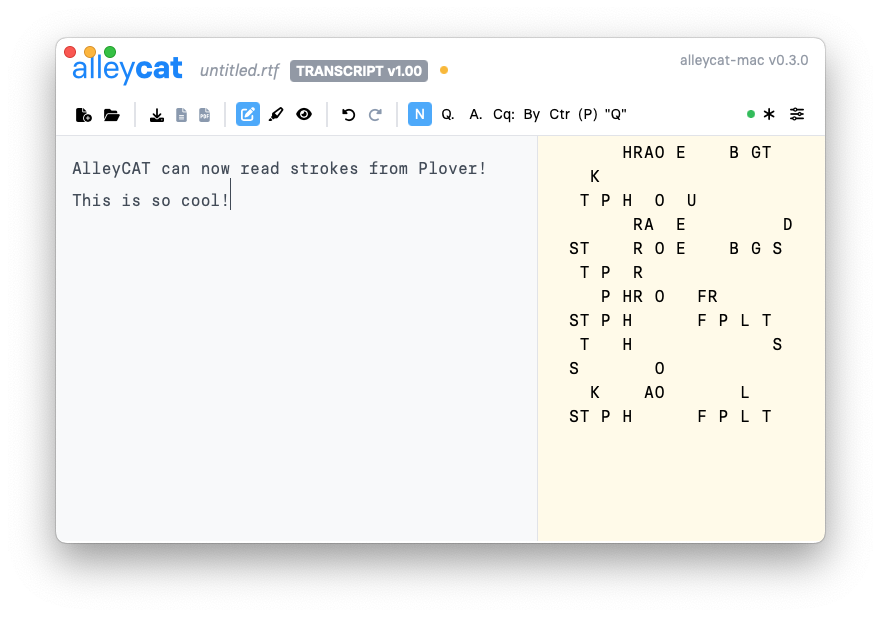
AlleyCAT can now read strokes from Plover! It doesn't work for all outlines, only ones that only insert text, but it's something.

Screenshot of steno strokes entered into AlleyCAT through Plover

v0.2.4

10 Aug 03:05

Choose a tag to compare

AlleyCAT Link now sends more data, including translations from your own dictionaries, in order to better understand the contents of your writing. You still can't easily access this info right now, but work on that is coming along nicely. :)

v0.2.3

09 Aug 10:54

Choose a tag to compare

This pre-release introduces AlleyCAT Link, a Plover plugin to synchronize steno and translation data between Plover and AlleyCAT. Unfortunately, AlleyCAT hasn't been trained to interpret the steno data just yet, but the code is there. :)

v0.2.1

08 Aug 10:54

Choose a tag to compare

Still in the pre-releases, but this version introduces a few changes:

  • The desktop version can now open files in multiple windows
  • Settings were added for light/dark theme, font size, and steno number key display, and all of these are persisted locally
  • The inline toolbar shows the steno outline in the selection