MetaScope is a genome browser with integrative functions and a highly flexible, interactive user interface, by which molecular biologists with minimal computational skills can visualize their genome-scale datasets along with canonical genomic annotations, and analyze, curate and integrate with data operation functions of MetaScope. The datasets MetaScope can handle include tiling array data (ChIP-chip and expression profiling), calculated peak data, transcription start site data, and genomic annotation in GFF format.
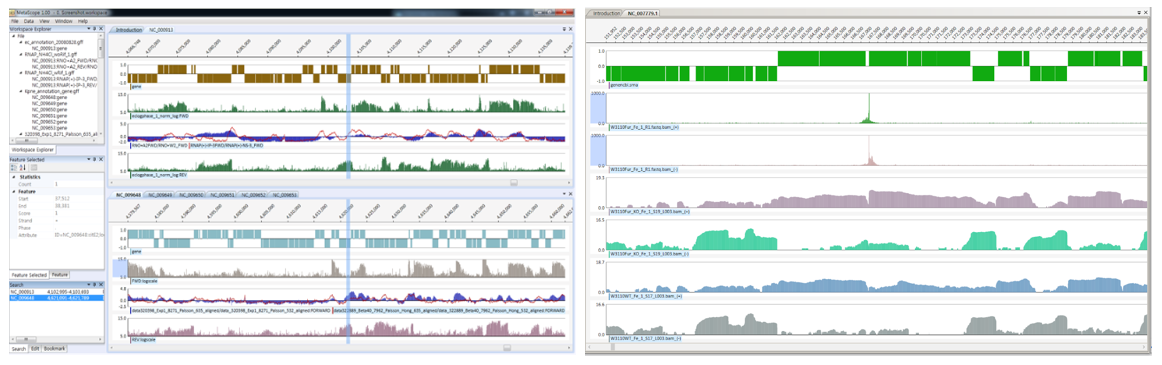
- Visualize datasets including ChIP-chip data, expression profiling data and transcription start site data
- Analyze, validate, curate and integrate datasets by cross-referencing multiple -omic data
- Build and share genome annotations
- Compare multiple -omics data from two or more species
| Platform | Version | Download |
|---|---|---|
| Windows x64 | v1.1.11 (recommended) | MetaScope_v1.1.11_Windows_x64.zip |
| Windows x64 | v1.2.1 | MetaScope_v1.2.1_Windows_x64.zip |
| macOS Apple Silicon | v1.2.1 | MetaScope_v1.2.1_macOS_arm64.zip |
- Interactive genomic map with pan, zoom, and feature selection
- GFF / GZ / ZIP file support with automatic read-only mode for large files
- Memory-optimized for datasets with millions of features
- Workspace save/restore with auto-save and crash recovery
- Export to PNG (300 dpi) and SVG
- Docking panel layout with drag-to-reorder tabs
- Single executable deployment (no external dependencies)
| Format | Mode |
|---|---|
.gff |
Editable (read-only if >= 20 MB) |
.gz / .gzip |
Read-only (in-memory decompression) |
.zip |
Read-only (in-memory decompression) |
| Windows | macOS | Action |
|---|---|---|
Left / Right |
Left / Right |
Scroll left / right |
Shift+Left / Shift+Right |
Shift+Left / Shift+Right |
Scroll left / right (large) |
Home / End |
Home / End |
Go to genome start / end |
Ctrl+G |
Cmd+G |
Go to position |
| Windows | macOS | Action |
|---|---|---|
Ctrl++ / Ctrl+- |
Cmd++ / Cmd+- |
Zoom in / out |
Ctrl+0 |
Cmd+0 |
Zoom to custom level |
Ctrl+Scroll |
Cmd+Scroll |
Zoom in / out (mouse) |
| Windows | macOS | Action |
|---|---|---|
Ctrl+O |
Cmd+O |
Open file |
Ctrl+Tab / Ctrl+Shift+Tab |
Cmd+Tab / Cmd+Shift+Tab |
Next / previous tab |
Ctrl+T |
Cmd+T |
Split view |
Ctrl+F |
Cmd+F |
Search |
F5 |
F5 |
Refresh view |
| Windows | macOS | Action |
|---|---|---|
Ctrl+Shift+Up / Down |
Cmd+Shift+Up / Down |
Move track up / down |
Ctrl+Shift+C |
Cmd+Shift+C |
Set track color |
Ctrl+Shift+H |
Cmd+Shift+H |
Set track height |
Ctrl+Shift+B / P / L |
Cmd+Shift+B / P / L |
Display as bar / point / line |
| Windows | macOS | Action |
|---|---|---|
NumPad 1 / Alt+Left |
Option+Left |
Move feature left |
NumPad 2 / Alt+Right |
Option+Right |
Move feature right |
NumPad 4 / Alt+Down |
Option+Down |
Shrink start |
NumPad 5 / Alt+Up |
Option+Up |
Expand end |
v1.2.1
- Platform-specific window chrome: macOS uses system title bar integration, Windows uses standard window frame
- Keyboard shortcuts show Ctrl on Windows, Cmd on macOS
v1.2.0
- macOS Apple Silicon native port using AvaloniaUI (cross-platform -- build for Windows with
dotnet publish -r win-x64) - Drag-to-reorder document tabs with close button
- macOS-native UI redesign
v1.1.11
- Workspace: auto-creates a temporary workspace when opening GFF files, enabling auto-save and crash recovery
v1.1.10
- Auto Save: automatic saving after feature edits (persists across sessions)
- Alt+Arrow keys for feature editing (move, expand, shrink)
- UI/UX improvements and bug fixes
v1.1.9
- Export Image: PNG (300 dpi) and SVG vector export (
Ctrl+Shift+E)
v1.1.8
- Feature tooltip on hover (position, score, strand, name)
v1.1.7
- NumPad feature adjustment: move (NumPad 1/2) and resize (NumPad 4/5) for single selected feature
- Read-only track feature selection blocked
v1.1.6
- Recent Files list in File menu (up to 10 files)
- Status bar showing position, zoom level, feature count, and sequence ID
- Read-only threshold increased to 20 MB
v1.1.5
- Keyboard shortcuts: Arrow keys scroll, Home/End navigation, Ctrl+Tab switching, F5 refresh
v1.1.4
- Global exception handlers to prevent silent crashes
- Stream resource leak protection for GZip/ZIP/Save operations
- Parse error logging with skipped line count summary
v1.1.3
- Single executable deployment (AvalonDock embedded)
- Version display in title bar and Introduction page
v1.1.2
- Major memory optimization (~76% reduction for large GFF files)
v1.1.1
- Read-only mode for large files with lock icon indicator
- Compressed file support (.gz, .zip) with in-memory decompression
Open src/windows/VugMap.sln in Visual Studio 2022+ and build in Release configuration.
Output: VugMap/bin/Release/MetaScope.exe
cd src/mac
dotnet run --project MetaScope          # Run
dotnet build -c Release                 # Build
dotnet publish -c Release -r osx-arm64 --self-contained  # Publish (macOS)
dotnet publish -c Release -r win-x64 --self-contained # Publish (Windows)All rights reserved.