Real-time SNMP interface monitoring from the terminal. Built for watching interfaces during change windows.


trafikwatch polls SNMP interface counters and displays live traffic rates, sparkline history, utilization, and interface descriptions in a terminal dashboard. Select any interface to open a split-screen detail view with scrolling line charts of inbound and outbound traffic history.
Designed for network engineers who need eyes on a handful of critical interfaces during maintenance windows, migrations, and cutovers.
- Discover interfaces on a device via SNMP walk
- Generate YAML config from discovery output
- Monitor grouped interfaces in a live TUI dashboard
- Drill down into any interface for 1-hour historical trend charts
- Mixed SNMP versions — v1, v2c, and v3 (authPriv) per-target in a single config
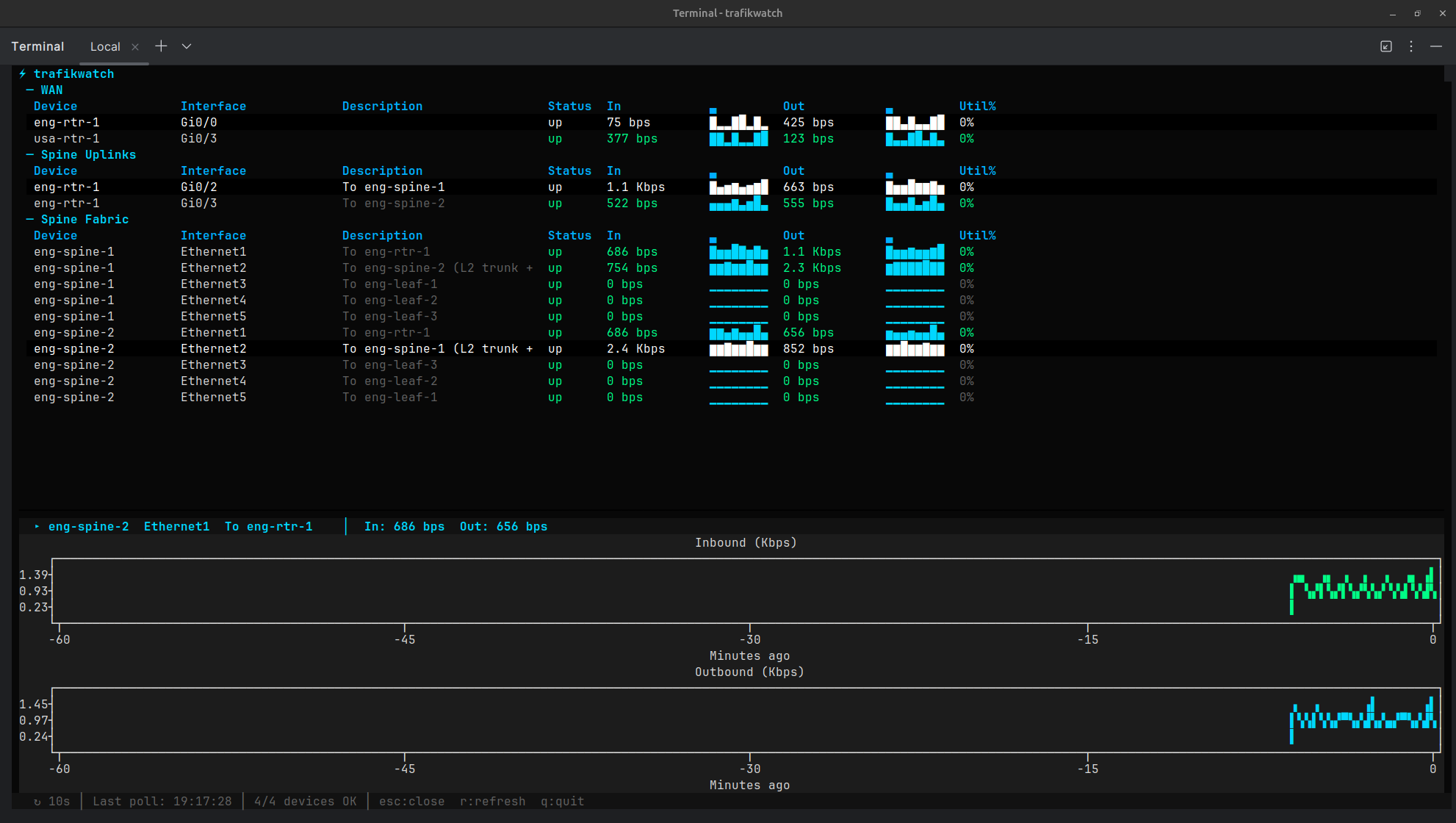
Press Enter on any row to open a split-screen detail panel with historical line charts. Charts show up to 1 hour of history, building from the right as data accumulates. Both directions auto-scale to the same unit (bps/Kbps/Mbps/Gbps) for easy comparison. Press Esc to close the detail view.
| Key | Action |
|---|---|
Enter |
Open detail view for selected interface |
Esc |
Close detail view (or quit if detail is closed) |
q |
Quit |
r |
Force immediate refresh |
pip install trafikwatchgit clone https://github.com/scottpeterman/trafikwatch.git
cd trafikwatch
python -m venv .venv
source .venv/bin/activate
pip install -e .# Discover interfaces (v2c)
python -m trafikwatch --discover 172.16.128.6 --community lab
# Discover interfaces (v3)
python -m trafikwatch --discover 172.16.2.2 --snmp-version 3 \
--v3-user cisco --v3-auth-password cisco123 --v3-priv-password cisco123
# Generate a config snippet
python -m trafikwatch --discover 172.16.128.6 --community lab --yaml
# Launch the dashboard
python -m trafikwatch --config trafikwatch.yaml
# Launch with debug logging (TUI-safe, logs to file)
python -m trafikwatch --config trafikwatch.yaml --log /tmp/tw.log- Python 3.9 or higher
- SNMP v2c or v3 access to target devices (IF-MIB)
| Package | Purpose |
|---|---|
| pysnmp ≥ 7.1 | Async SNMP polling (v2c and v3) |
| textual ≥ 7.0 | Terminal UI framework |
| pyyaml ≥ 6.0 | Config file parsing |
| rich ≥ 14.0 | Text styling and formatting |
| textual-plotext ≥ 1.0 | Split-screen historical line charts |
# trafikwatch.yaml — v2c only
community: "lab"
version: "2c"
interval: 10s
timeout: 5s
port: 161
max_history: 360    # samples to retain (360 × 10s = 1 hour)

groups:
  - name: "WAN"
    targets:
      - host: "172.16.128.6"
        label: "eng-rtr-1"
        interfaces:
          - "Gi0/0"              # To usa-rtr-1

      - host: "172.16.128.5"
        label: "usa-rtr-1"
        interfaces:
- "Gi0/3" # To eng-rtr-1Version is resolved per-target: a target's version overrides the global default, and snmpv3 credentials cascade the same way. Targets without a version override inherit the global setting, so you can migrate devices to v3 incrementally.
# trafikwatch.yaml — mixed v2c and v3
community: "lab"
version: "2c"
interval: 10s
timeout: 5s
port: 161
max_history: 360

# Global v3 credentials — used by any target with version: "3"
snmpv3:
  username: "cisco"
  auth_protocol: "sha"         # sha, md5
  auth_password: "cisco123"
  priv_protocol: "aes128"      # aes128, aes192, aes256, des
  priv_password: "cisco123"

groups:
  - name: "WAN"
    targets:
      - host: "172.16.128.6"
        label: "eng-rtr-1"
        # No version override — inherits global "2c" + community "lab"
        interfaces:
          - "Gi0/0"

  - name: "Spine Fabric"
    targets:
      - host: "172.16.2.2"
        label: "eng-spine-1"
        version: "3"             # v3 — uses global snmpv3 creds
        interfaces:
          - "Ethernet1"
          - "Ethernet2"

      - host: "172.16.2.6"
        label: "eng-spine-2"
        version: "3"
        # Per-target v3 override (inherits unspecified fields from global)
        snmpv3:
          username: "monitoring"
          auth_password: "other_pass"
          priv_password: "other_pass"
        interfaces:
          - "Ethernet1"
          - "Ethernet2"
Per-target community, port, version, and snmpv3 overrides are supported. Use --discover with --yaml to generate target blocks from live devices.
| Field | Default | Values |
|---|---|---|
username |
(required) | SNMPv3 USM username |
auth_protocol |
sha |
sha, md5 |
auth_password |
Authentication passphrase | |
priv_protocol |
aes128 |
aes128, aes192, aes256, des |
priv_password |
Privacy passphrase |
Security level is inferred: if priv_password is set, authPriv; if only auth_password, authNoPriv; otherwise noAuthNoPriv.
Note: AES-192 and AES-256 require pysnmp to be built with Blumenthal AES support. Most net-snmp CLI tools (snmpget, snmpwalk) only support AES-128 — use AES-128 for lab environments or test with pysnmp directly.
Walk a device to see all interfaces:
# v2c discovery
python -m trafikwatch --discover 172.16.2.2 --community lab

# v3 discovery
python -m trafikwatch --discover 172.16.2.2 --snmp-version 3 \
  --v3-user cisco --v3-auth-password cisco123 --v3-priv-password cisco123

  Host: 172.16.2.2 — 18 interfaces discovered

  Index    ifName       ifDescr      ifAlias                              Speed      Status
  ──────── ──────────── ──────────── ──────────────────────────────────── ────────── ──────
  1        Ethernet1    Ethernet1    To eng-rtr-1                          1 Gbps    up
  2        Ethernet2    Ethernet2    To eng-spine-2 (L2 trunk + L3 VLAN)  1 Gbps    up
  3        Ethernet3    Ethernet3    To eng-leaf-1                         1 Gbps    up
  4        Ethernet4    Ethernet4    To eng-leaf-2                         1 Gbps    up
  5        Ethernet5    Ethernet5    To eng-leaf-3                         1 Gbps    up
  2000011  Vlan11       Vlan11       Management                                     up
  2000050  Vlan50       Vlan50       Inter-Spine L3 Communication                   up
  2000210  Vlan210      Vlan210      ENG-Servers-1                                  up
  2000211  Vlan211      Vlan211      ENG-Servers-2                                  up
  2000212  Vlan212      Vlan212      ENG-Servers-3                                  up
Generate a config snippet:
python -m trafikwatch --discover 172.16.2.2 --community lab --yamlUse --all to include interfaces that are operationally down.
usage: trafikwatch [-h] [--config CONFIG] [--version] [--discover HOST]
                   [--community COMMUNITY] [--port PORT] [--yaml] [--all]
                   [--snmp-version {1,2c,3}]
                   [--v3-user USER] [--v3-auth-protocol {sha,md5}]
                   [--v3-auth-password PASS] [--v3-priv-protocol {aes,aes128,aes192,aes256,des}]
                   [--v3-priv-password PASS]
                   [--debug] [--log FILE]

Modes:
  Monitor:   trafikwatch --config trafikwatch.yaml
  Discover:  trafikwatch --discover 10.0.1.1 --community public
  YAML gen:  trafikwatch --discover 10.0.1.1 --community public --yaml
  v3 disc:   trafikwatch --discover 10.0.1.1 --snmp-version 3 --v3-user cisco \
               --v3-auth-password pass --v3-priv-password pass

Options:
  --config, -c           Path to config file (default: trafikwatch.yaml)
  --version, -V          Print version and exit
  --discover, -d         Discover interfaces on a host
  --community            SNMP community string for v2c (default: public)
  --port                 SNMP port (default: 161)
  --yaml, -y             Output YAML config snippet from discovery
  --all, -a              Include down interfaces in discovery
  --snmp-version         SNMP version: 1, 2c, or 3 (default: 2c)
  --v3-user              SNMPv3 username
  --v3-auth-protocol     SNMPv3 auth: sha or md5 (default: sha)
  --v3-auth-password     SNMPv3 auth passphrase
  --v3-priv-protocol     SNMPv3 priv: aes128, aes192, aes256, des (default: aes128)
  --v3-priv-password     SNMPv3 priv passphrase
  --debug                Enable debug logging to stderr
  --log, -l              Log to file at debug level (TUI-safe)
The --log flag writes debug-level logs to a file, which is safe to use alongside the TUI:
# In one terminal — run the dashboard
python -m trafikwatch -c trafikwatch.yaml --log /tmp/tw.log

# In another terminal — watch the logs
tail -f /tmp/tw.log
Logs include SNMP walk results, interface name resolution, raw varbind responses, rate calculations, and error details. Useful for diagnosing SNMP connectivity issues, interface name mismatches, and counter anomalies.
trafikwatch/
├── __init__.py
├── __main__.py          # CLI entry point
├── config.py            # YAML config loader (v2c + v3)
├── models.py            # InterfaceStats, RateSample, SNMPv3Config, sparkline, format_rate
├── snmp/
│   ├── __init__.py
│   ├── engine.py        # SNMPPoller: shared engine, transport cache, v2c/v3 credentials
│   └── discover.py      # Interface discovery + YAML generation (v2c + v3)
└── tui/
    ├── __init__.py
    ├── app.py           # Textual dashboard: tables, detail panel, poll timer
    └── theme.tcss       # Dark terminal theme with split-screen layout
- Shared SnmpEngine — Single engine instance for the app lifetime. Transports are cached per host:port and reused across poll cycles.
- Per-target SNMP versioning — Each target resolves its own SNMP version and credentials independently, allowing mixed v2c/v3 environments in a single config file. Version and credentials cascade: per-target → global.
- Async-native — pysnmp async API + Textual's async workers. Everything runs in a single event loop with no threads.
- Counter wrap detection — Negative deltas from device reloads or counter resets skip the rate calculation instead of producing false spikes.
- In-memory ring buffer — Each interface retains up to
max_historysamples (default 360 = 1 hour at 10s intervals). The sparklines and detail charts both read from this buffer. - Graceful degradation — If
textual-plotextis not installed, the dashboard works normally without the detail chart view. - Multi-vendor — Tested against Cisco IOS/IOSv, Arista EOS, and Juniper Junos. Uses IF-MIB (ifName/ifDescr/ifAlias) which is vendor-agnostic.
MIT