
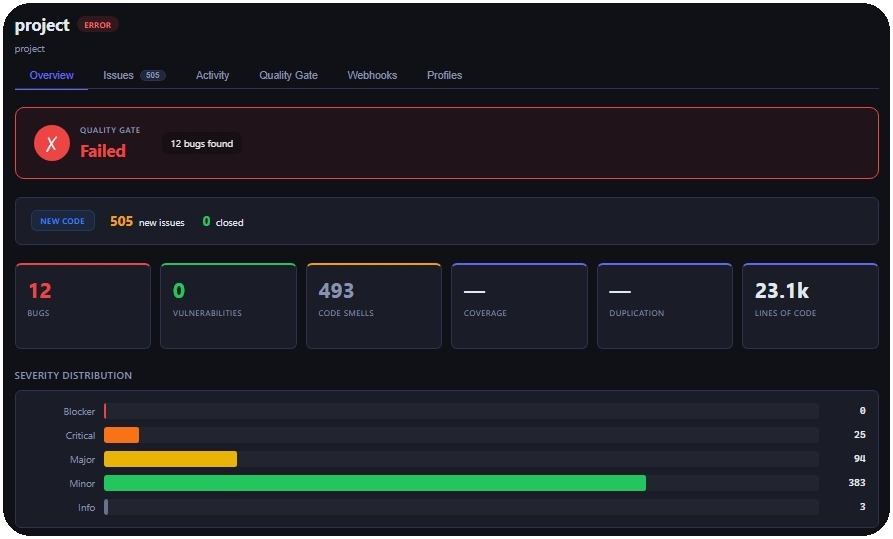
Ollanta is a multi-language static analysis platform written in Go. It scans source code, reports bugs, code smells and vulnerabilities, computes metrics, and evaluates configurable quality gates. You can use Ollanta in two ways:
- Scanner: a local CLI that scans a project and writes JSON/SARIF reports. It can also open an embedded local UI on port
7777. - Server: a centralized API that receives scan reports, stores history, tracks issues across scans, evaluates quality gates, exposes dashboards, and runs background workers.
For the full first-project flow, see docs/how-to-use.md.
| Language | Parser | Bundled rules |
|---|---|---|
| Go | Native go/ast |
8 |
| JavaScript | Tree-sitter | 4 |
| TypeScript | Tree-sitter | Parser support; no bundled rules yet |
| Python | Tree-sitter | 5 |
| Rust | Tree-sitter | Parser support; no bundled rules yet |
For the scanner and local development:
- Go
1.21+ - CGO enabled
- A C compiler for Tree-sitter
- Linux/macOS: install
gccorclangwith your package manager - Windows: install MSYS2, then run
pacman -S mingw-w64-x86_64-gcc
- Linux/macOS: install
- Docker and Docker Compose, optional but recommended for the server stack
For frontend changes in the scanner UI, Node.js is also required under ollantascanner/server/static.
On Windows, the Makefile prepends C:\msys64\mingw64\bin to PATH for its own targets. If MSYS2 is installed somewhere else, add your MinGW bin directory to PATH before running Go commands.
This section is the shortest happy path. The full journey is in docs/how-to-use.md.
make upOpen http://localhost:8080 — login admin / admin.
make run         # scan + local UI at http://localhost:7777
make run-bg      # same, but in background (terminal stays free)
make push        # scan + push results to the server
make run blocks the terminal while serving. Use make run-bg for background mode and make stop to kill it. All commands auto-build the scanner binary on first run.
Override defaults:
make run   PROJECT_DIR=D:\projects\myapp PROJECT_KEY=my-app
make push PROJECT_DIR=D:\projects\myapp PROJECT_KEY=my-app SERVER=http://prod:8080go run github.com/scovl/ollanta/ollantascanner/cmd/ollanta \
-project-dir . -project-key my-project -format sarifReports are written to .ollanta/report.json and .ollanta/report.sarif.
docker compose --profile server up -d                     # server stack
docker compose --profile push run --build --rm push # push scanollantaworker,ollantaindexer, andollantawebhookworker
The local Docker stack works without extra variables. It uses admin / admin for the seeded development login and ollanta-dev-scanner-token for scanner pushes. Override PG_PASSWORD, OLLANTA_JWT_SECRET, and OLLANTA_SCANNER_TOKEN in a local .env file for any shared or long-lived environment.
go run github.com/scovl/ollanta/ollantascanner/cmd/ollanta \
  -project-dir . \
  -project-key my-project \
  -format all \
  -server http://localhost:8080 \
  -server-token ollanta-dev-scanner-token \
`make push` waits for server-side processing to complete before returning. If the Quality Gate fails, the scanner exits with code 3 — treat that as a gate failure, not an ingestion error.

## Configuration

Ollanta can read settings from [config.toml.example](config.toml.example). The example is intentionally small: scanner defaults, optional server push settings, and local server connectivity. Use [docs/how-to-use.md](docs/how-to-use.md) for the recommended scanner/server configuration split.

```sh
cp config.toml.example config.toml
Use CLI flags for one-off runs and config.toml when the same project or CI job should be repeatable. Advanced test, coverage, and mutation evidence settings are documented in docs/test-signals.md. Configuration precedence:
| Runtime | Precedence |
|---|---|
| Scanner | defaults, then config.toml, then CLI flags |
| Server | defaults, then config.toml, then OLLANTA_* environment variables |
Important environment variables for Docker/server use:
| Variable | Default in local compose | Purpose |
|---|---|---|
PROJECT_DIR |
. |
Host project directory mounted into the scanner container |
PROJECT_KEY |
project |
Project identifier used in reports and server history |
OLLANTA_SERVER |
http://ollantaweb:8080 |
Server URL used by Docker push mode |
OLLANTA_TOKEN |
ollanta-dev-scanner-token |
Scanner token sent by Docker push mode |
OLLANTA_SCANNER_TOKEN |
ollanta-dev-scanner-token |
Token accepted by ollantaweb for scan push |
PG_PASSWORD |
ollanta_dev |
PostgreSQL password for the compose stack |
ZINC_USER |
admin |
ZincSearch user |
ZINC_PASSWORD |
ollanta_dev |
ZincSearch password |
| Flag | Purpose |
|---|---|
-project-dir |
Root directory to scan |
-project-key |
Stable project identifier |
-sources |
Comma-separated source patterns; default is ./... |
-exclusions |
Comma-separated glob exclusions |
-format |
summary, json, sarif, or all |
-local-ui |
Start the embedded local UI |
-bind |
Bind address for the local UI |
-port |
Port for the local UI; default is 7777 |
-server |
ollantaweb URL for pushing results |
-server-token |
Bearer token used when pushing results |
-server-wait |
Wait for server-side processing to complete |
-profile-source |
Quality profile source: auto, local, server, or builtin |
-profile-file |
JSON or YAML profile-as-code file for local scans |
-profile-strict |
Fail when the requested profile source cannot be loaded |
-profile-fetch-timeout |
Timeout for fetching effective profiles from the server |
-config |
Explicit path to a TOML config file |
Branch and pull request metadata can be provided with -branch, -commit-sha, -pull-request-key, -pull-request-branch, and -pull-request-base.
Test and mutation evidence collection is optional. See docs/test-signals.md for collect, run, and doctor modes.
Quality Profiles decide which rules run. Quality Gates decide whether the finished scan passes based on metrics such as bugs, coverage, or mutation score. In server mode, Ollanta resolves the project profile per language and the scanner enforces that policy before analysis. In local mode, you can use profile-as-code without a server:
version: 1
profiles:
  - language: go
    name: Strict Go
    rules:
      - key: go:no-large-functions
        severity: critical
        params:
          max_lines: "30"
      - key: go:todo-comment
        active: false
Run it with:
go run github.com/scovl/ollanta/ollantascanner/cmd/ollanta \
  -project-dir . \
  -project-key my-project \
  -profile-source local \
  -profile-file profiles.yaml \
  -format all
Reports include quality_profiles snapshots with active rule counts and stable rule hashes. The server stores those snapshots during ingest and marks older reports without this field as profile metadata unavailable.
Custom Rule Packs add declarative team rules without rebuilding Ollanta. Local scans load packs from .ollanta/rules/*.yaml, .ollanta/rules/*.yml, and .ollanta/rules/*.json; server users can create, validate, publish, and activate rules through Rule Studio. AI-assisted drafts are available through server-side provider configuration, but generated rules still require validation, publication, and Quality Profile activation.
See docs/rules.md for pack schema, examples, AI provider setup, and the full custom-rule smoke flow.
make build
make test
make smoke-local
The Makefile covers the scanner-side CGO modules. For the full contributor workflow, including module-specific tests and linting, see CONTRIBUTIONS.md and docs/contributing.md.
- Architecture: docs/architecture.md and docs/arquitetura.md
- API: docs/api.md
- Authentication: docs/authentication.md
- Background tasks: docs/background-tasks.md
- Database: docs/database.md
- Issue tracking: docs/issue-tracking.md
- Observability: docs/observability.md
- Operations runbooks: docs/operations-runbooks.md
- Quality gates: docs/quality-gates.md
- Rules: docs/rules.md
- Test and mutation evidence: docs/test-signals.md
- Webhooks: docs/webhooks.md
Apache-2.0. See LICENSE.