
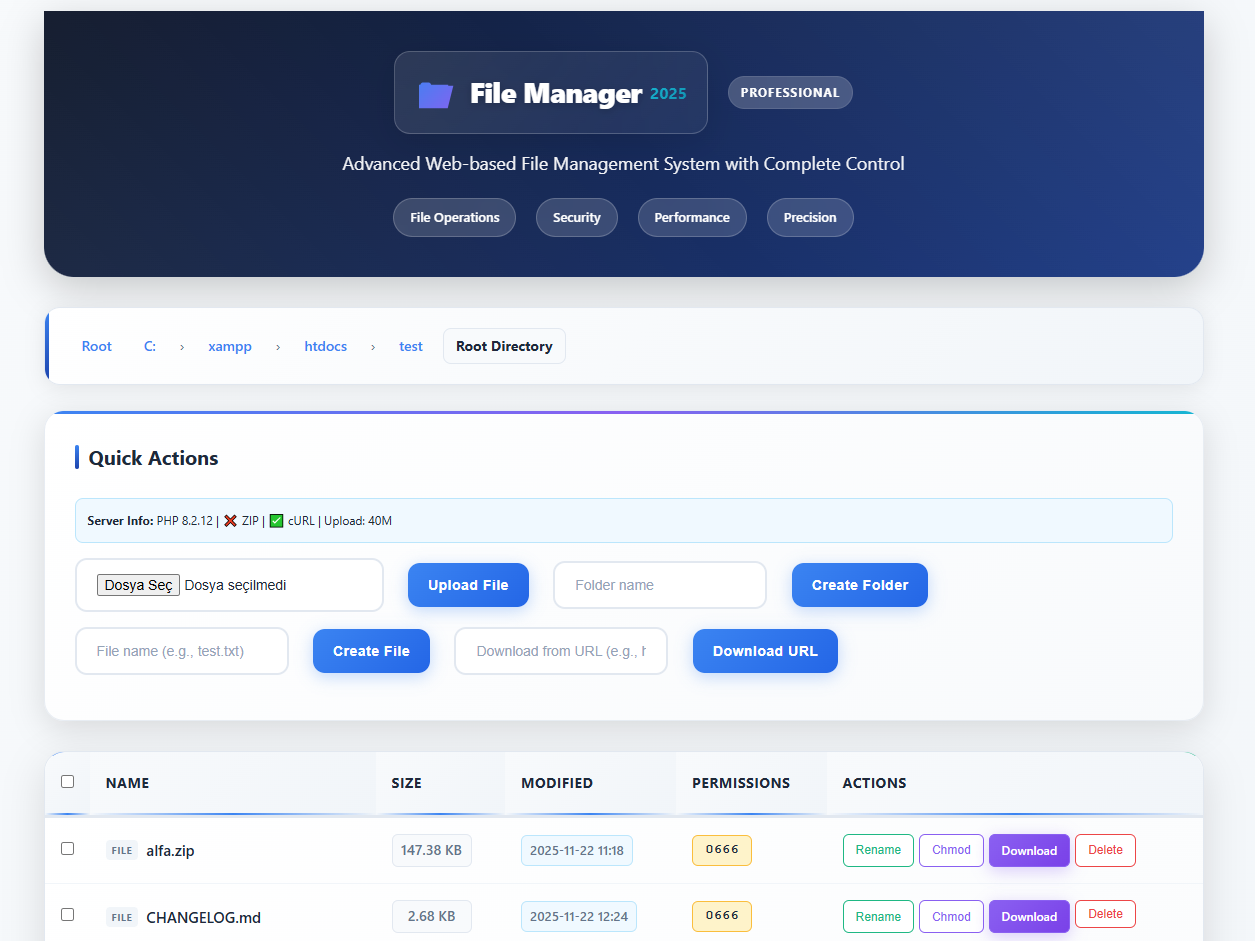
📁 Professional Web-based File Management System
# Direct download
curl -O https://raw.githubusercontent.com/yourusername/file-manager-2025/main/file-manager.php

# Or download via browser
# Visit: https://github.com/yourusername/file-manager-2025
# Click: file-manager.php → Download# Upload to your web server
# Place file-manager.php in desired directory
# Set permissions: chmod 644 file-manager.phphttp://yourdomain.com/file-manager.php
- Upload Files - Drag & drop or traditional upload
- Create Files - Quick file creation
- Create Folders - Directory management
- Rename Files/Folders - Easy renaming with extension preservation
- Delete Files/Folders - Safe deletion with confirmation
- Change Permissions - CHMOD support for Unix/Linux servers
- Create ZIP Archives - Batch file compression
- Extract ZIP Files - Optional extraction with custom paths
- Multiple Formats - ZIP, tar.gz, and simple archive fallbacks
- Download from URL - Remote file downloading
- Multiple Methods - cURL, file_get_contents with fallbacks
- Breadcrumb Navigation - Clickable path navigation
- Directory Links - Quick folder access
- Security Checks - Path traversal protection
- Modern Design - Professional gradient UI
- Responsive Layout - Mobile-friendly design
- Glassmorphism Effects - Modern visual effects
- Hover Animations - Smooth micro-interactions
- Modal Dialogs - User-friendly confirmations
- PHP 5.4+ (with compatibility layers)
- File Uploads enabled
- Basic file functions (file_put_contents, mkdir, etc.)
- ZIP Extension - For ZIP operations (fallbacks available)
- cURL - For URL downloads (fallbacks available)
- JSON Support - For modern features
- Compression: ZIP → tar.gz → Simple copy
- Downloads: cURL → file_get_contents → Error message
- Paths: Windows ↔ Unix/Linux compatibility
- cPanel Hosting (95%+)
- Plesk Hosting (95%+)
- VPS/Dedicated (100%)
- Cloud Platforms (100%)
- Shared Hosting (90%)
- Free Hosting (70%)
- Path Traversal Protection - Prevents directory access attacks
- File Extension Validation - Safe file handling
- XSS Protection - Cross-site scripting prevention
- CSRF Protection - Form submission security
- Permission Checks - File access validation
- Security Headers - Modern security headers
- Chrome 60+
- Firefox 55+
- Safari 12+
- Edge 79+
- Mobile Browsers - iOS Safari, Chrome Mobile
- Learning PHP - File system operations
- Web Development - Modern UI practices
- Security Examples - Safe file handling
- File Management - Internal file sharing
- Remote Access - Web-based file access
- Quick Operations - Fast file manipulations
- Testing - File upload testing
- Debugging - File system debugging
- Prototyping - Rapid file operations
/* Add custom CSS at the top of the file */
.header { background: linear-gradient(135deg, #your-color, #your-color); }
.btn-create { background: linear-gradient(135deg, #your-color, #your-color); }// Change base directory (line ~20)
$base_dir = '/path/to/your/directory';
// Modify file size limits (add at top)
ini_set('upload_max_filesize', '50M');
ini_set('post_max_size', '50M');# Enable ZIP extension
php.ini → extension=zip
# Restart server
sudo service apache2 restart# Enable file uploads
php.ini → file_uploads = On# Set proper permissions
chmod 755 /path/to/directory
chown www-data:www-data /path/to/directory# Check PHP errors
php -l file-manager.php
# Enable error display temporarily
ini_set('display_errors', 1);
error_reporting(E_ALL);file-manager.php # Complete application (single file)
├── PHP Backend (~400 lines)
├── HTML Structure (~200 lines)
├── CSS Styles (~150 lines)
├── JavaScript (~100 lines)
└── Documentation (inline)
- Zero Dependencies - No external files needed
- Easy Deployment - Just upload one file
- Portable - Works anywhere PHP runs
- Self-Contained - All code in one place
- Fast Setup - No configuration required
- Secure - No external dependencies to exploit
- Quick Deployments - Rapid file management setup
- Educational Purposes - Learn from complete code
- Testing Environments - Quick file operations
- Emergency Access - Backup file management
- Portable Tools - Carry on USB/Cloud
MIT License - Free to use, modify, and distribute
- Fork the repository
- Edit the single file
- Test thoroughly
- Submit pull request
- Open an issue on GitHub
- Include server information
- Provide error logs
- Describe steps to reproduce
- Open an issue with "Feature Request" label
- Describe the use case
- Suggest implementation approach
📁 File Manager 2025 - Single File Solution
Universal Compatibility • Modern Design • Zero Dependencies
One File • Complete Solution • Ready to Deploy
Universal Compatibility • Modern Design • Zero Dependencies
One File • Complete Solution • Ready to Deploy
file-manager-2025/
├── file-manager.php          # Main single-file application
├── README_SINGLE.md          # This documentation
├── LICENSE                   # MIT License
└── CHANGELOG.md              # Version history
# Clone repository
git clone https://github.com/yourusername/file-manager-2025.git

# Use immediately
cd file-manager-2025
# Upload file-manager.php to your serverhttps://raw.githubusercontent.com/yourusername/file-manager-2025/main/file-manager.php
🎯 Ready to use in 30 seconds!