Setting up a locally hosted blockchain
One of the ways we will be testing the write operations of our dashboard is by setting up a locally-hosted blockchain. We accomplish this with Truffle and Ganache, using the tokens in centre-tokens. Although truffle/ganache are both documented thoroughly, this article serves as a quick reference to setting it up for the specific needs of our project.
These are the minimum prerequisites that must be completed before setting up the local blockchain:
-
Install
ganache-cli, our test RPC client.$ npm i -g ganache-cli -
Install
truffle, our development environment for creating our blockchain.$ npm i -g truffle -
Clone the
centre-tokensrepository to any location on your machine. This is where the truffle config is defined.$ git clone https://github.com/centrehq/centre-tokens.git -
Install dependencies in the
centre-tokensdirectory.centre-tokens$ npm install
-
Compile the defined truffle configurations.
centre-tokens$ truffle compileFor context, this compiles
truffle-config.js,contracts/**, andmigrations/**. -
Start the block-chain locally.
centre-tokens$ npm run ganache -- -p 8545 -h localhostThe output should look EXACTLY the same as
Available Accounts
==================
(0) 0x90F8bf6A479f320ead074411a4B0e7944Ea8c9C1 (1000000 ETH)
(1) 0xFFcf8FDEE72ac11b5c542428B35EEF5769C409f0 (1000000 ETH)
(2) 0x22d491Bde2303f2f43325b2108D26f1eAbA1e32b (1000000 ETH)
(3) 0xE11BA2b4D45Eaed5996Cd0823791E0C93114882d (1000000 ETH)
(4) 0xd03ea8624C8C5987235048901fB614fDcA89b117 (1000000 ETH)
(5) 0x95cED938F7991cd0dFcb48F0a06a40FA1aF46EBC (1000000 ETH)
(6) 0x3E5e9111Ae8eB78Fe1CC3bb8915d5D461F3Ef9A9 (1000000 ETH)
(7) 0x28a8746e75304c0780E011BEd21C72cD78cd535E (1000000 ETH)
(8) 0xACa94ef8bD5ffEE41947b4585a84BdA5a3d3DA6E (1000000 ETH)
(9) 0x1dF62f291b2E969fB0849d99D9Ce41e2F137006e (1000000 ETH)
(10) 0x610Bb1573d1046FCb8A70Bbbd395754cD57C2b60 (1000000 ETH)
(11) 0x855FA758c77D68a04990E992aA4dcdeF899F654A (1000000 ETH)
(12) 0xfA2435Eacf10Ca62ae6787ba2fB044f8733Ee843 (1000000 ETH)
(13) 0x64E078A8Aa15A41B85890265648e965De686bAE6 (1000000 ETH)
(14) 0x2F560290FEF1B3Ada194b6aA9c40aa71f8e95598 (1000000 ETH)

Private Keys
==================
(0) 0x4f3edf983ac636a65a842ce7c78d9aa706d3b113bce9c46f30d7d21715b23b1d
(1) 0x6cbed15c793ce57650b9877cf6fa156fbef513c4e6134f022a85b1ffdd59b2a1
(2) 0x6370fd033278c143179d81c5526140625662b8daa446c22ee2d73db3707e620c
(3) 0x646f1ce2fdad0e6deeeb5c7e8e5543bdde65e86029e2fd9fc169899c440a7913
(4) 0xadd53f9a7e588d003326d1cbf9e4a43c061aadd9bc938c843a79e7b4fd2ad743
(5) 0x395df67f0c2d2d9fe1ad08d1bc8b6627011959b79c53d7dd6a3536a33ab8a4fd
(6) 0xe485d098507f54e7733a205420dfddbe58db035fa577fc294ebd14db90767a52
(7) 0xa453611d9419d0e56f499079478fd72c37b251a94bfde4d19872c44cf65386e3
(8) 0x829e924fdf021ba3dbbc4225edfece9aca04b929d6e75613329ca6f1d31c0bb4
(9) 0xb0057716d5917badaf911b193b12b910811c1497b5bada8d7711f758981c3773
(10) 0x77c5495fbb039eed474fc940f29955ed0531693cc9212911efd35dff0373153f
(11) 0xd99b5b29e6da2528bf458b26237a6cf8655a3e3276c1cdc0de1f98cefee81c01
(12) 0x9b9c613a36396172eab2d34d72331c8ca83a358781883a535d2941f66db07b24
(13) 0x0874049f95d55fb76916262dc70571701b5c4cc5900c0691af75f1a8a52c8268
(14) 0x21d7212f3b4e5332fd465877b64926e3532653e2798a11255a46f533852dfe46

HD Wallet
==================
Mnemonic:      myth like bonus scare over problem client lizard pioneer submit female collect
Base HD Path:  m/44'/60'/0'/0/{account_index}

Gas Price
==================
20000000000

Gas Limit
==================
6721975

Call Gas Limit
==================
9007199254740991

Listening on localhost:8545
Tip: save the 15 account addresses and private keys to somewhere else since the ganache server produces a lot of output and you might lose the addresses when testing locally.
-
Deploy contracts to the block-chain.
IMPORTANT: now open a new terminal tab to keep your block-chain server running!
centre-tokens$ npm run migrateThe output should look something like
Compiling your contracts...
===========================
> Everything is up to date, there is nothing to compile.

Starting migrations...
======================
> Network name:    'development'
> Network id:      1605989681002
> Block gas limit: 6721975 (0x6691b7)

1_initial_migration.js
======================

   Deploying 'Migrations'
   ----------------------
   ...

2_deploy_v1.js
==============
Proxy Admin:   0x2F560290FEF1B3Ada194b6aA9c40aa71f8e95598
Owner:         0xE11BA2b4D45Eaed5996Cd0823791E0C93114882d
Master Minter: 0x3E5e9111Ae8eB78Fe1CC3bb8915d5D461F3Ef9A9
Pauser:        0xACa94ef8bD5ffEE41947b4585a84BdA5a3d3DA6E
Blacklister:   0xd03ea8624C8C5987235048901fB614fDcA89b117
Deploying implementation contract...

   Deploying 'FiatTokenV1'
   -----------------------
   ...

   Deploying 'FiatTokenProxy'
   --------------------------
   > transaction hash:    0xfa9ad043a309b6047000c8d2a3b57435115b3c608b7eef2818c1d38ee861bda2
   > Blocks: 0            Seconds: 0
   > contract address:    0xC89Ce4735882C9F0f0FE26686c53074E09B0D550
   > block number:        5
   > block timestamp:     1605989824
   > account:             0x90F8bf6A479f320ead074411a4B0e7944Ea8c9C1
   > balance:             999999.92802742
   > gas used:            486261 (0x76b75)
   > gas price:           20 gwei
   > value sent:          0 ETH
   > total cost:          0.00972522 ETH
   ...

3_deploy_v2.js
==============
FiatTokenProxy:  0xC89Ce4735882C9F0f0FE26686c53074E09B0D550
Deploying FiatTokenV2 implementation contract...

   Deploying 'FiatTokenV2'
   -----------------------
   ...

4_deploy_v2_upgrader.js
=======================
   ...


Summary
=======
...
The account roles that it produces should exactly match:
Owner:         0xE11BA2b4D45Eaed5996Cd0823791E0C93114882d
Master Minter: 0x3E5e9111Ae8eB78Fe1CC3bb8915d5D461F3Ef9A9
Pauser:        0xACa94ef8bD5ffEE41947b4585a84BdA5a3d3DA6E
Blacklister:   0xd03ea8624C8C5987235048901fB614fDcA89b117
The private keys for these accounts should have been provided for you in the step above.
However, the
FiatTokenProxyaddress should be different every time you run this. For now, copy this proxy address (FiatTokenProxycontract address) into your clipboard. -
Go to metamask in your browser and switch your Network to
Localhost 8545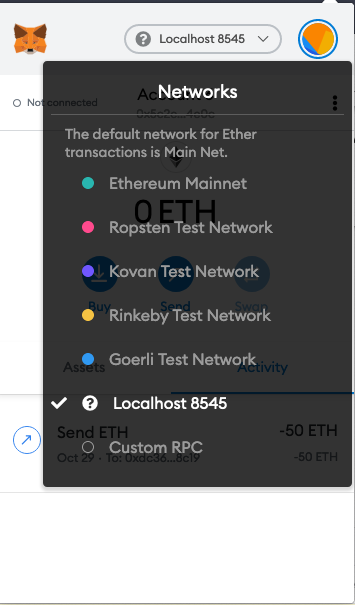
-
Set up the contract address on the app locally.
Copy and paste the
FiatTokenProxycontract address from step 3 into your.envfile:USDC_CONTRACT_ADDRESS = '{{PASTE_FIAT_TOKEN_PROXY_CONTRACT_ADDRESS}}'
NOTE: this address is different every time you run your blockchain server.
-
Open up
localhost:3000and run the app. You might notice that there are no transactions displayed. This is because there is no transaction history on your new blockchain. To create transactions, you can either:-
Import accounts into metamask and create transactions. You get your account's private keys from the terminal from step 2. You can check if the transaction went through with the
/transactionspage. -
Use the
/transferspage.
-