React components for audio waveform visualization and live recording.
- Full TypeScript - Complete type safety with detailed type definitions
- Easy to Use - Simple API with sensible defaults, works out of the box
- Mobile Compatible - WASM fallback decoder for reliable mobile browser support
- Headless Hooks - Full control with raw audio data for custom implementations
- SSR Safe - Compatible with Next.js and other SSR frameworks
npm install react-audio-wavekit
# or
pnpm add react-audio-wavekit
# or
bun add react-audio-wavekit
Requirements: React 18+, Web Audio API, MediaRecorder API
Visualize existing audio files (mp3, wav, etc.) with playhead and seek support.

Static waveform visualization with playhead and drag-to-seek.
<AudioWaveform
  // Also accepts classnames, compatible with tailwind.
  className=""
  blob={audioBlob}
  currentTime={currentTime}
  duration={duration}
  onSeekStart={() => audio.pause()}
  onSeekDrag={(time) => setCurrentTime(time)}
  onSeekEnd={(time) => {
    audio.currentTime = time;
    audio.play();
  }}
  style={{
    // Or use classNames with Tailwind
    width: '400px',
    height: '100px',
  }}
/>| Prop | Type | Default | Description |
|---|---|---|---|
blob |
Blob | null |
- | Audio blob to visualize |
peaks |
number[] |
- | Pre-computed peaks (0-1 range, skips decoding) |
currentTime |
number |
- | Current playback time in seconds |
duration |
number |
- | Total audio duration in seconds |
onSeek |
(time: number) => void |
- | Callback for simple click-to-seek |
onSeekStart |
() => void |
- | Callback when drag starts (pause playback) |
onSeekDrag |
(time: number) => void |
- | Callback during drag (real-time updates) |
onSeekEnd |
(time: number) => void |
- | Callback when drag ends (resume playback) |
suspense |
boolean |
false |
Enable React Suspense mode |
appearance |
AudioWaveformAppearance |
- | See Appearance Options |
SSR note: When suspense is true, decoding only starts on the client after mount. On the server (and during the first client render), the waveform renders without peaks, so wrap the component in a Suspense boundary to show a fallback during hydration.
Real-time waveform visualization during recording using MediaRecorder API.
Headless hook to manage recording state. Use with recorder components below.
Config:
| Option | Type | Default | Description |
|---|---|---|---|
mimeType |
string | (() => string) |
auto | MIME type for recording |
audioConstraints |
MediaTrackConstraints | boolean |
true |
Audio constraints for getUserMedia |
onRecordingComplete |
(blob: Blob) => void |
- | Callback when recording is complete |
Returns:
| Property | Type | Description |
|---|---|---|
startRecording |
() => Promise<void> |
Start recording from microphone |
stopRecording |
() => void |
Stop recording and generate blob |
pauseRecording |
() => void |
Pause current recording |
resumeRecording |
() => void |
Resume paused recording |
clearRecording |
() => void |
Clear recording and reset state |
mediaRecorder |
MediaRecorder | null |
MediaRecorder instance |
recordingBlob |
Blob | null |
Recorded audio blob |
recordingTime |
number |
Recording duration in seconds |
isRecording |
boolean |
Whether currently recording |
isPaused |
boolean |
Whether recording is paused |
error |
Error | null |
Any error that occurred |
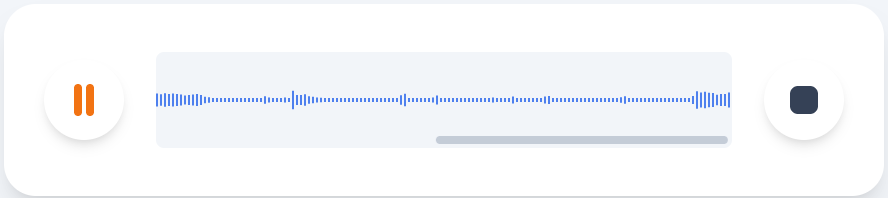
This is an example image. The component includes only the waveform.
Scrolling timeline waveform (Voice Memos style). Canvas grows horizontally as recording continues.
<LiveStreamingRecorder.Root
  mediaRecorder={mediaRecorder}
  className="h-12 w-80 rounded bg-slate-100"
  appearance={{ scrollbar: { thumbColor: "#94a3b8" } }}
>
  <LiveStreamingRecorder.Canvas appearance={{ barColor: "#3b82f6", barWidth: 2, barGap: 1 }} />
</LiveStreamingRecorder.Root>
Root Props:
| Prop | Type | Default | Description |
|---|---|---|---|
mediaRecorder |
MediaRecorder | null |
- | MediaRecorder instance (required) |
fftSize |
number |
2048 |
FFT size for frequency analysis |
smoothingTimeConstant |
number |
0.8 |
Smoothing constant (0-1) |
sampleInterval |
number |
50 |
Sample interval in ms |
amplitudeScale |
number |
1.5 |
Amplitude multiplier (lower = quieter waveform) |
appearance |
LiveStreamingRecorderAppearance |
- | See Appearance Options |
Canvas Props:
| Prop | Type | Default | Description |
|---|---|---|---|
appearance |
WaveformAppearance |
- | See Appearance Options |
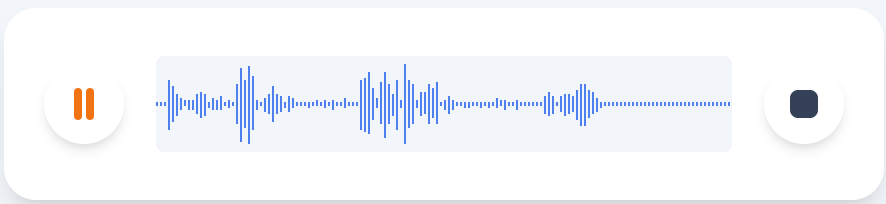
This is an example image. The component includes only the waveform.
Fixed-width waveform where bars compress as recording grows.
<LiveStreamingStackRecorder
  mediaRecorder={mediaRecorder}
  className="h-12 w-80 rounded bg-slate-100"
  appearance={{ barColor: "#3b82f6", barWidth: 2, barGap: 1 }}
/>| Prop | Type | Default | Description |
|---|---|---|---|
mediaRecorder |
MediaRecorder | null |
- | MediaRecorder instance (required) |
fftSize |
number |
2048 |
FFT size for frequency analysis |
smoothingTimeConstant |
number |
0.8 |
Smoothing constant (0-1) |
sampleInterval |
number |
50 |
Sample interval in ms |
amplitudeScale |
number |
1.5 |
Amplitude multiplier (lower = quieter waveform) |
appearance |
WaveformAppearance |
- | See Appearance Options |
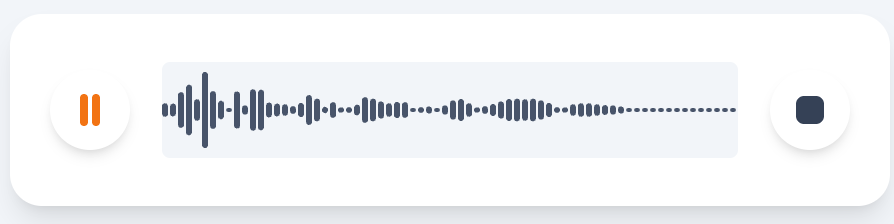
This is an example image. The component includes only the waveform.
Real-time frequency bars visualization.
<LiveRecorder mediaRecorder={mediaRecorder} />| Prop | Type | Default | Description |
|---|---|---|---|
mediaRecorder |
MediaRecorder | null |
- | MediaRecorder instance (required) |
fftSize |
number |
2048 |
FFT size for frequency analysis |
smoothingTimeConstant |
number |
0.8 |
Smoothing constant (0-1) |
showIdleState |
boolean |
true |
Show minimal bars when not recording |
amplitudeScale |
number |
1.5 |
Amplitude multiplier (lower = quieter waveform) |
appearance |
WaveformAppearance |
- | See Appearance Options |
Common appearance options for all waveform components.
| Property | Type | Default | Description |
|---|---|---|---|
barColor |
string |
"#3b82f6" |
Color of waveform bars |
barWidth |
number |
1 |
Width of each bar in pixels |
barGap |
number |
1 |
Gap between bars in pixels |
barRadius |
number |
0 |
Border radius of bars |
barHeightScale |
number |
0.95 |
Scale factor for bar height (0-1) |
Extends WaveformAppearance with playhead options.
| Property | Type | Default | Description |
|---|---|---|---|
playheadColor |
string |
"#ef4444" |
Color of the playhead line |
playheadWidth |
number |
2 |
Width of the playhead line |
Options for scrollbar in LiveStreamingRecorder.
| Property | Type | Default | Description |
|---|---|---|---|
thumbColor |
string |
"rgba(148, 163, 184, 0.5)" |
Scrollbar thumb color |
hidden |
boolean |
false |
Hide scrollbar completely |
Components accept className, style, and all standard canvas HTML attributes.
<AudioWaveform
  blob={blob}
  className="h-32 w-full rounded-lg bg-slate-900 p-4"
  // or style prop
  style={{
    width: "100%",
    height: "100%",
  }}
  appearance={{
    barColor: "#3b82f6",
    barWidth: 2,
    barGap: 1,
    barRadius: 1,
    playheadColor: "#ef4444",
    playheadWidth: 2,
  }}
/>CC0 1.0 - Public Domain