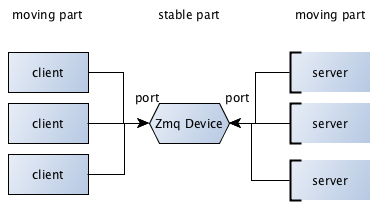
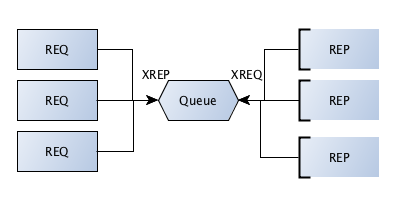
repo introduction -> server client application with ZMQ This lib contains two programs. One is on the client side and the other is on the server side. Well, let's do a short review on this lib. server.py in the first step runs a device. more info for the device : The device is the interface between the client and the socket nodes. It listens the frontend and is connected to the backend (socket nodes) device can listen to a specific address and After load balancing, it sends the request to one of the nodes.
I implemented this method ->
For more information you can read this Article After receiving the Json request: Returns the answer as Jason The server understand two types of commands: expression & system commands. exp:
'{"command_type": "os", "command_name": "echo", "parameters": "HelloWorld"}'
'{"command_type": "compute", "expression": "(40 + 60) * 2"}'
This program sends your requests to the server through a socket connection. mode os : you can send system commands to the server.mode compute : you can perform your mathematical calculations on the server side.Finally, you can recive the Json response. You can run the client side program in two ways. 1 -> you can create an instance of the Client class and send the input in the form of send_request method. from client import Client
import json
dict_request = {'command_type': 'os', 'command_name': 'echo', 'parameters': 'HelloWorld'}
json_request = json.dumps(dict_request)
client = Client()
print(client.send_request(json_request))
2 -> You can also send arguments in the $hell-> exp 1: python .\client.py --mode='os' --command='ping 127.0.0.1' --arg='-n 6'
exp 2: python .\client.py --mode='compute' --expression='5*5'
Enter this command in the terminal to see how to do this $hell-> For Test the server, you can enter the command in the $hell-> python server_unittest.py
Installion of libraries : pip install -r requirements.txt