

Whisper is a general-purpose speech recognition model. It is trained on a large dataset of diverse audio and is also a multitasking model that can perform multilingual speech recognition, speech translation, and language identification.
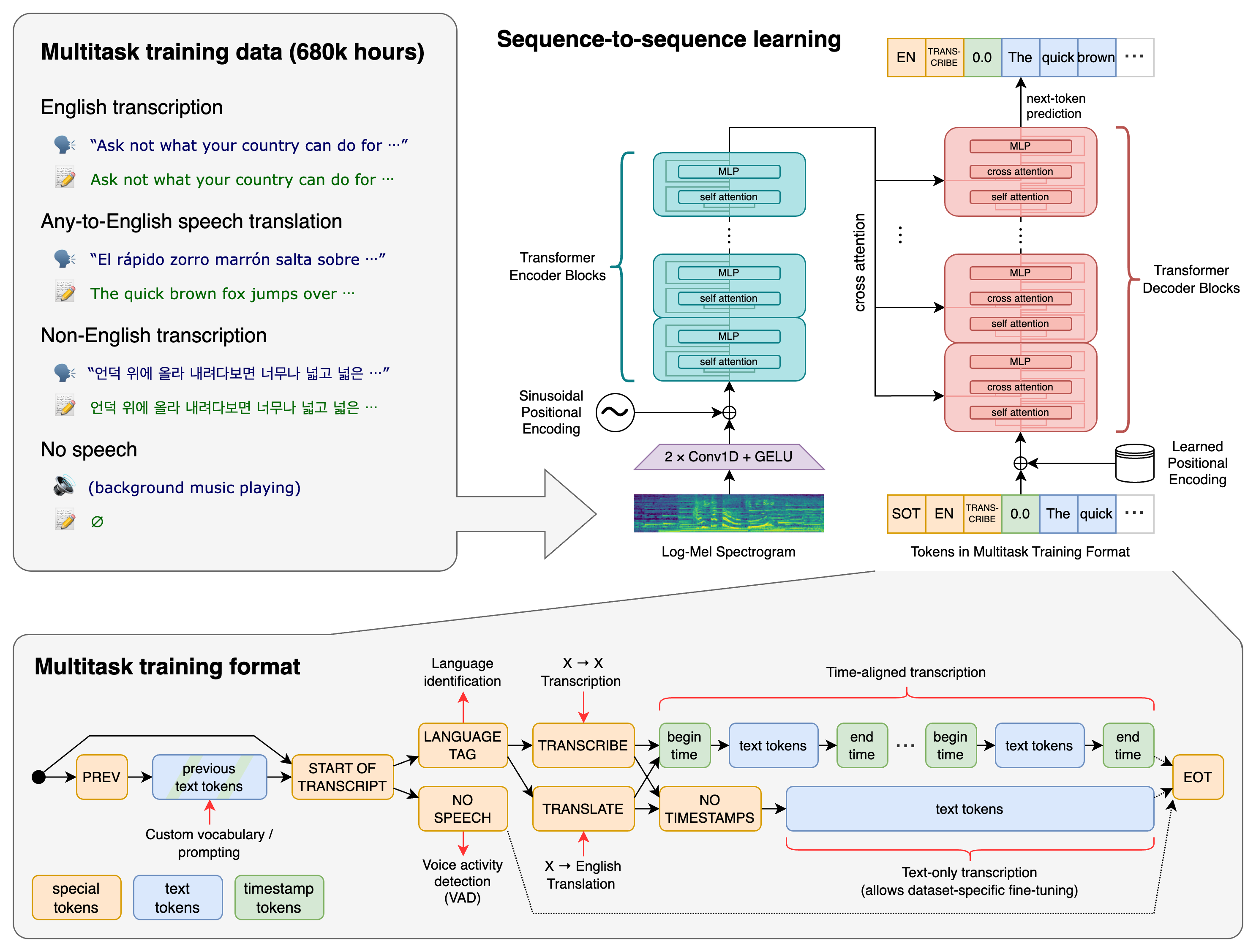
A Transformer sequence-to-sequence model is trained on various speech processing tasks, including multilingual speech recognition, speech translation, spoken language identification, and voice activity detection. These tasks are jointly represented as a sequence of tokens to be predicted by the decoder, allowing a single model to replace many stages of a traditional speech-processing pipeline. The multitask training format uses a set of special tokens that serve as task specifiers or classification targets.
We used python 3.9 and PyTorch version 1.10.1 to train and test the models. The codebase should work with versions 3.8-3.11 of python as well. Please follow the installation steps below in order to get your environment setup correctly.
pip install -U openai-whisper
Alternatively, the following command will pull and install the latest commit from this repository, along with its Python dependencies:
pip install git+https://github.com/openai/whisper.git
To update the package to the latest version of this repository, please run:
pip install --upgrade --no-deps --force-reinstall git+https://github.com/openai/whisper.git
It also requires the command-line tool ffmpeg to be installed on your system, which is available from most package managers:
# on Ubuntu or Debian
sudo apt update && sudo apt install ffmpeg

# on Arch Linux
sudo pacman -S ffmpeg

# on MacOS using Homebrew (https://brew.sh/)
brew install ffmpeg

# on Windows using Chocolatey (https://chocolatey.org/)
choco install ffmpeg

# on Windows using Scoop (https://scoop.sh/)
scoop install ffmpeg
There is a chance you will need to install rust as well.
pip install setuptools-rustTranscription can also be performed within Python:
import whisper

model = whisper.load_model("base")
result = model.transcribe("audio.mp3")
print(result["text"])
Internally, the transcribe() method reads the entire file and processes the audio with a sliding 30-second window, performing autoregressive sequence-to-sequence predictions on each window.
Below is an example usage of whisper.detect_language() and whisper.decode() which provide lower-level access to the model.
import whisper

model = whisper.load_model("base")

# load audio and pad/trim it to fit 30 seconds
audio = whisper.load_audio("audio.mp3")
audio = whisper.pad_or_trim(audio)

# make log-Mel spectrogram and move to the same device as the model
mel = whisper.log_mel_spectrogram(audio).to(model.device)

# detect the spoken language
_, probs = model.detect_language(mel)
print(f"Detected language: {max(probs, key=probs.get)}")

# decode the audio
options = whisper.DecodingOptions()
result = whisper.decode(model, mel, options)

# print the recognized text
print(result.text)Whisper's code and model weights are released under the MIT License. See LICENSE for further details.