


BBDecoder is a Python package designed to provide essential tools for visually analyzing various aspects of the training and testing processes of deep learning models. It offers functionalities to help researchers and developers gain insights into their model's performance and behavior through visualizations and metrics.
First you need to install graphviz and torchview
pip install graphviz
pip install torchview
Then, continue with installing BBDecoder using pip
pip install BBDecoder
Start by wrapping the entire model. Each layer in the model is assigned a name and a unique layer ID.
from BBDecoder import Master_analyzer

model = resnet50().to(device)
wrapped_model = Master_analyzer(model, save_path, input_size)
model is the model to be analyzed. save_path is the main path where all the analysis data will be saved. input_size = [1, 3, 32, 32] this shape is used to create the architecture graph using torchview.
wrapped_model.backward_propagation() can be used to get gradients of each layer and also the L1 and L2 norms of the gradient for each itteration.
for data in tqdm(train_loader):
    inputs, labels = data
    inputs, labels = inputs.to(device), labels.to(device)

    outputs = wrapped_model.forward_propagation(inputs)
    loss = F.cross_entropy(outputs, labels)

    optimizer.zero_grad()
    wrapped_model.backward_propagation(loss, collect_grads = True, layer_inds = [0, 1, 2, 3, 4, 5, 6])
    optimizer.step()
    losses.append(loss.item())

print('Epoch: ', epoch)
print('Average Loss: ', sum(losses)/len(losses))
wrapped_model.save_collected_grads(ep = epoch, save_folder)
The graphs will be saved directly in the save_folder path, by default save_folder = None if a new path is not specified then the graphs will be saved on a separate folder in the path specified during Master_analyzer initialization.
collect_grads = True is grads need to be collected other wise False. layer_inds is the list of layers that need to be analyzed. Setting collect_grads = True needs to be accompanied by wrapped_model.save_collected_grads() to actually save the collected data.

Mean and Max gradients through layers accross the entire dataset.
L1 and L2 norms of each selected layer in the model can highlight the stability of the training process.
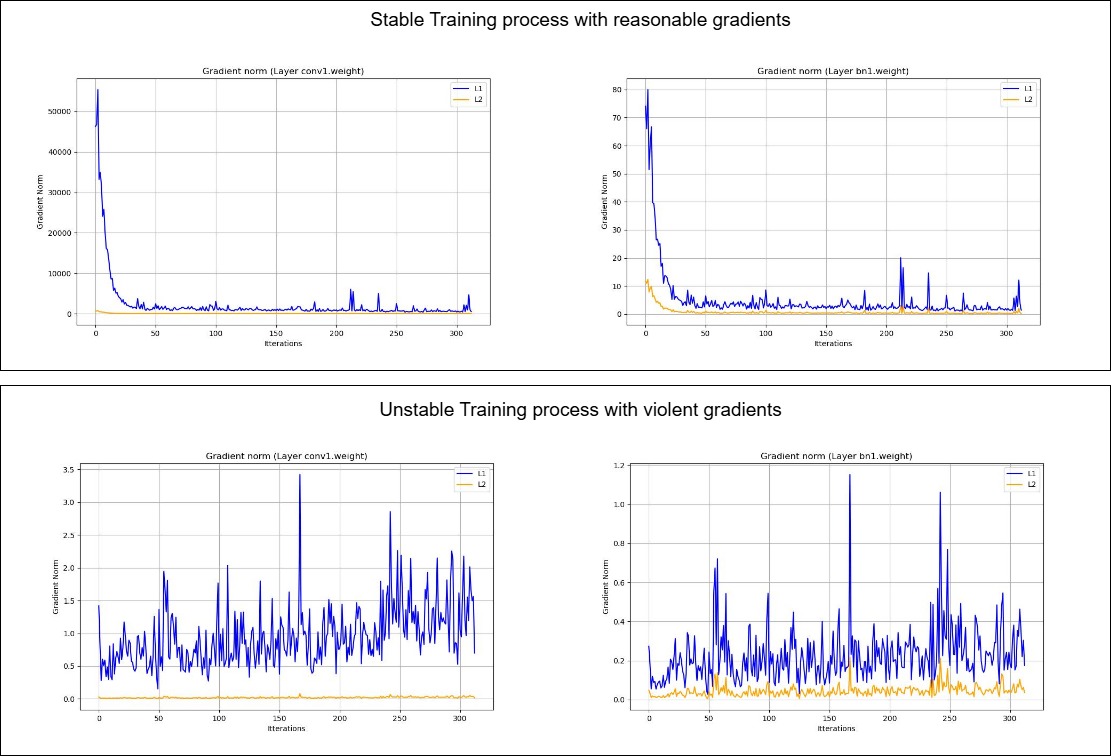
L1 and L2 norms differentiating between stable and unstable training process.
wrapped_model.visualize_weight_hist(layer_inds, save_folder) can be used to save weight histograms for layers with unique ID specified in layer_inds. save_folder = None by default, results will be saved in the path specified during initialization if no path specified.
Weight histograms can be used to identify saturation, divergence and clustering in layer weights. Weights clustering at extreme ends can saturate activation functions. Clustering of weights around certain values in convolution operation can point towards kernels with similar values, this would prevent the network to distinguish between subtle features.
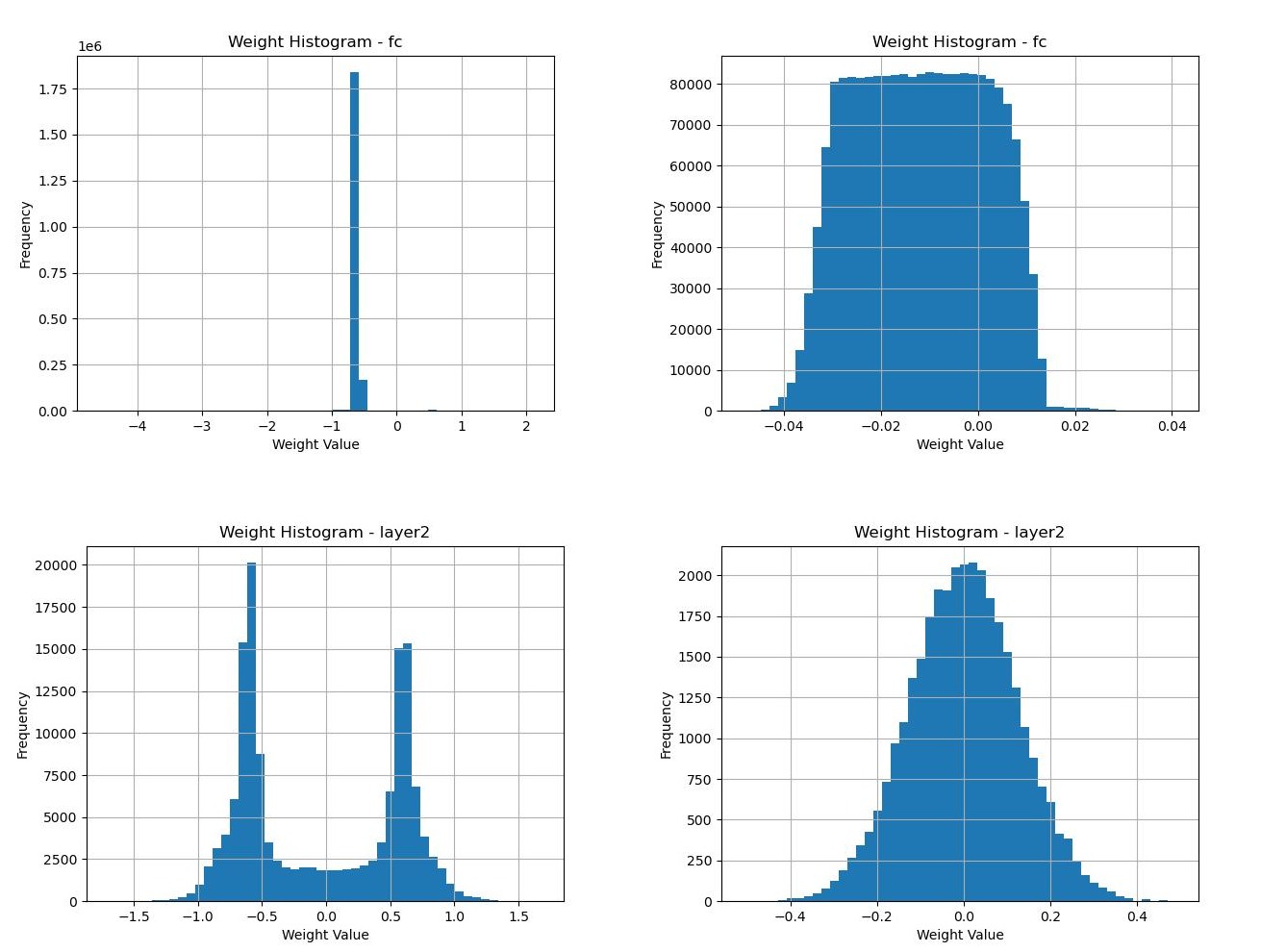
Weight histograms of multi-layer perceptrons and convolutional layers.
get_sim(x, layer_inds, dim) function can be used to calculate how similar the features are accross a certain dimension, this can be used to perform studies similar to vision transformers with patch diversificattion.
forward propagation on the input x will generate features, the features similarity accross dimension dim will be calculated on the intermediate features of layer_inds.
wrapped_model.get_sim(torch.unsqueeze(inputs.cuda()[0, :, :, :], dim=0), layer_inds = [0, 1, 2, 3, 4, 5, 6], dim = 1)
You can easily record intermediate features from each layer in the model through get_inter_features(test_input, layer, path, post_proc = None, dim = None). test_input is the input you want to use to extract the features, the output features of layer will be stored at path path. post_proc represents the function that will e applied on the output features of layer before being saved. If dim is not noen then only the specified dimension will be saved.
For example if you want to check the intermediate features of a certain layer after a training loop you can do so as follows
for epoch in EPOCHS:
    for data in tqdm(train_loader):
                .
                .
            training logic
                .
                .

    sample = torch.tensor(test_sample)
    sample = sample.unsqueeze(0).to(device).float()
    wrapped_model.get_inter_features(sample, layer = 9, './saves', post_proc_function)
You can also generate a small video on how your intermediate features evolved throughout the entire training process. By using the compile_feature_evaluation(layer, fps) function. This function compiles all of the previously stored features of a certain specified layer.
for epoch in EPOCHS:
    for data in tqdm(train_loader):
                .
                .
            training logic
                .
                .

    sample = torch.tensor(test_sample)
    sample = sample.unsqueeze(0).to(device).float()
    wrapped_model.get_inter_features(sample, layer = 9, './saves', post_proc_function)


# Compiles all of the previously stored features of layer with index 9 after each epoch.
wrapped_model.compile_feature_evolution(layer = 9, fps = 5)