Repository navigation
Galaxy Project 的 Sphinx 文档部署 #46
shenweiyan
announced in
3.1-Galaxy

Replies: 0 comments
Sign up for free
to join this conversation on GitHub.
Already have an account?
Sign in to comment

Uh oh!
There was an error while loading. Please reload this page.
Uh oh!
There was an error while loading. Please reload this page.
https://docs.galaxyproject.org/ 是 Galaxy Project 官方的文档地址链接,这是一个基于 Sphinx + Read the Docs 的文档站点。如果我们也想要创建一个这样一模一样的 Galaxy 文档需要怎么操作呢?
虽然 Galaxy 官方文档 也给出了关于构建该文档的一些说明,但没有太多细节。
下面我们来详细分解一下
make docs这个命令具体执行的构建步骤。首先,在 Galaxy 根目录的执行
make docs,主要是执行了该目录下 Makefile 中的这几句命令:$(MAKE)就是预设的make这个命令的名称(或者路径)。-C:到指定目录下读取 Makefile 文件并执行(给出指定的目录的路径)。第二步,读取
doc目录下的 Makefile 文件,并执行make html。结合其中的一些参数,其实最终就是执行了下面这个命令完成最终的构建。
sphinx-build -b html -d build/doctrees source build/html-b:BUILDER,builder to use (default: html)了解了以上几个步骤后,我们就可以把 Galaxy 根目录的 doc 目录单独拎出来,通过 Sphinx 的命令实现独立构建部署。
1. 安装必须依赖
主要包括三个依赖。
2. 修改配置
由于
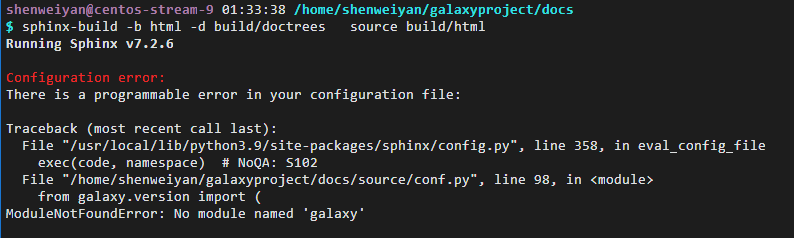
sphinx-build会读取source/conf.py并执行,但这个文件调用了galaxy.version模块:所以,如果我们想要把
galaxy/doc和 Galaxy 独立开来进行部署,就需要修改一下source/conf.py:3. 执行构建
最后生成的静态文件都保存在了
build/html目录,我们可以借助 NGINX 或者其他 Pages 就可以直接看到一个一模一样对应当前 Repo 版本的 Galaxy Project 文档了。All reactions