


PasteShield intercepts every paste (Ctrl+V / Cmd+V) in the editor and scans the clipboard content for dangerous patterns — API keys, hardcoded passwords, unsafe JavaScript, prototype pollution, and more — before the text ever reaches your file.
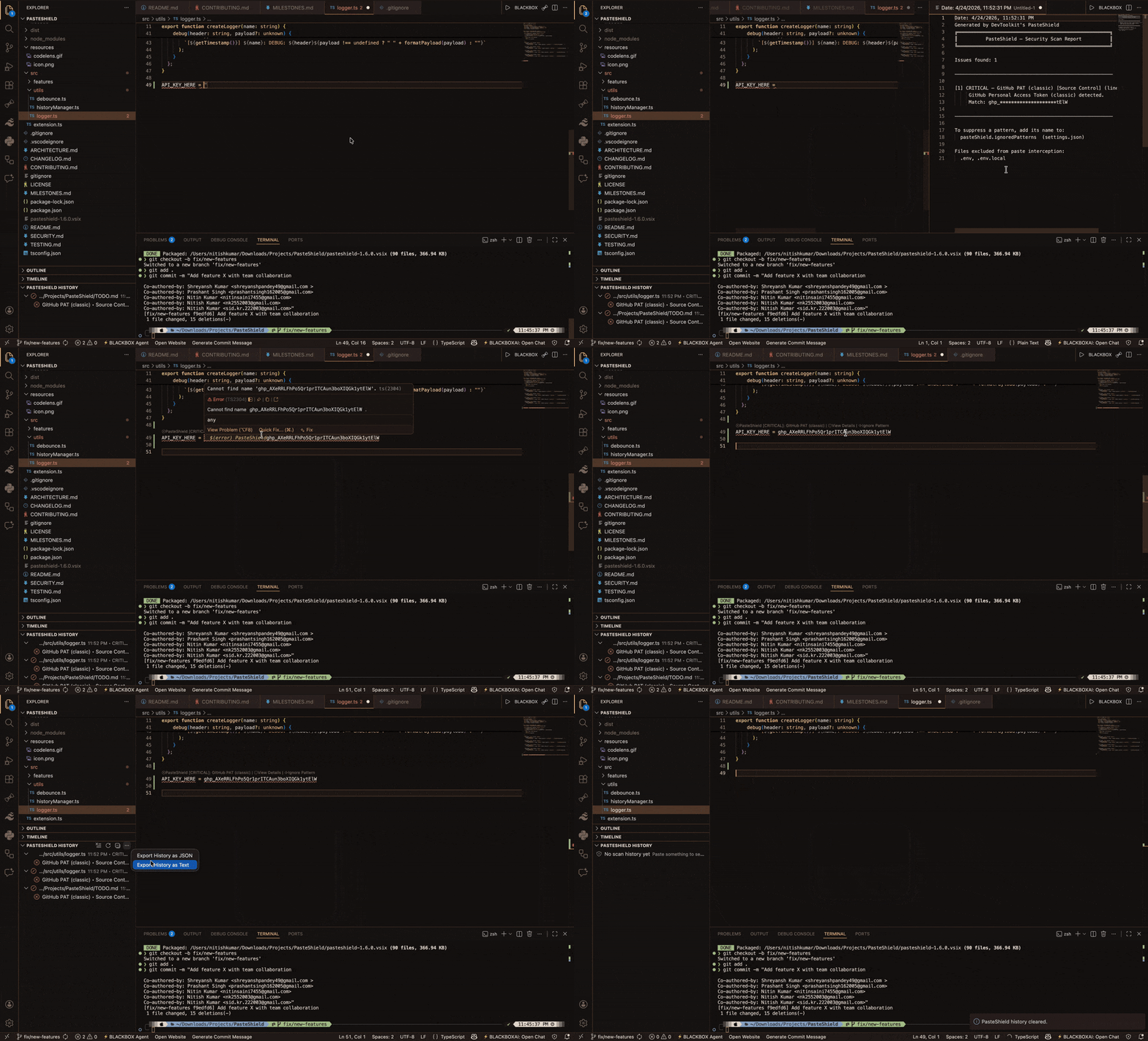
It works entirely offline, using a high-performance regex engine that evaluates ~200 pre-compiled patterns across 25+ categories in under 50 ms. Detected threats are surfaced through inline warnings, CodeLens annotations, a persistent history sidebar, and an ASCII statistics dashboard.
Gitleaks catches what's in your repo. PasteShield catches what never should have been.
These tools are complementary, not competing:
- Gitleaks: Scans existing git repositories for leaked secrets (post-commit detection)
- PasteShield: Intercepts secrets at paste time, before they ever touch your filesystem (pre-commit prevention)
Use both for defense-in-depth: PasteShield as your first line of defense during development, Gitleaks as your safety net in CI/CD pipelines.
For a deep dive into how each module works, see ARCHITECTURE.md. For manual testing guidance, see TESTING.md.
Every Ctrl+V / Cmd+V is scanned instantly. If a risk is detected you get a clear warning with severity, pattern name, and the option to proceed or cancel — all without ever leaving the editor.
Enable silent mode in settings to log detections to the sidebar without blocking paste. Perfect for new users who want visibility without interruption, or teams that prefer audit trails over hard blocks.
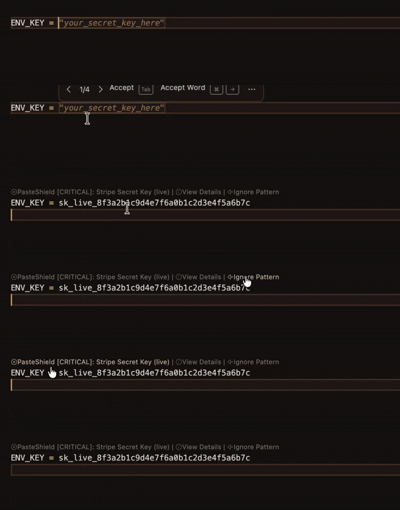
PasteShield also scans already-open files and surfaces CodeLens annotations directly above risky lines. Each lens shows the severity and provides one-click actions: view details, ignore the pattern, or open settings.
Filter noise by choosing the minimum severity that triggers a warning:
| Level | What it catches |
|---|---|
| Critical | API keys, private keys, database credentials |
| High | JWTs, hardcoded passwords, prototype pollution |
| Medium (default) | eval(), innerHTML, document.write |
| Low | setTimeout/setInterval with string arguments |
Run PasteShield: Show Last Scan Report from the command palette to review a full breakdown of everything detected in the last paste — pattern names, severities, and matched content.
All scans are stored in VS Code's global state across sessions. View them in the PasteShield History sidebar, export as JSON or plain text, and clear them anytime.
Run PasteShield: Show Statistics to open an ASCII dashboard with total scans, threats blocked, severity breakdowns, top detected types, 7-day trends, and a risk score (0–100).
Define your own regex patterns via PasteShield: Manage Custom Patterns. Add, edit, toggle, remove, import, and export custom rules with full severity and category support.
Store detected secrets securely in HashiCorp Vault, AWS Secrets Manager, Azure Key Vault, or Google Secret Manager. Rotate, list, and delete secrets without leaving VS Code.
Enable team-wide security policies with .pasteshield-policy.json. Block critical patterns, enforce audit logging, generate compliance reports, and apply strict/moderate/permissive policy templates.
Distribute a .pasteshield-policy.json via a URL (e.g. hosted on GitHub). One config update propagates to all team members automatically. This makes the enterprise tier genuinely sticky — centralize policy management across your entire organization.
Ignore patterns at the user level (settings), workspace level (.pasteshieldignore file), or automatically from .gitignore entries related to secrets.
Run PasteShield: Show Rotation Reminders to see secrets that haven't been rotated in the configured number of days (default 90).
Export a JSON audit trail of all scans, detections, and actions taken for compliance reporting.
- Ignore specific patterns by name
- Disable scanning for chosen languages (e.g.
markdown,plaintext) - Exclude specific files from CodeLens scanning
.envand.env.localfiles are always excluded from paste interception
- Paste interception — PasteShield overrides the default paste keybinding and reads the clipboard before any text enters the document.
- Pattern scanning — The clipboard is matched against ~200 pre-compiled regexes grouped into 25+ categories (AI providers, cloud platforms, CI/CD, databases, PII, unsafe code, mobile/IoT, infrastructure, and more).
- Severity filtering — Results are filtered by your configured
minimumSeverity. - User decision — If threats are found, a non-blocking warning offers: Paste Anyway, Show Details, or Cancel.
- Post-paste actions — On paste, optional inline decorations mark the insertion point. CodeLens scans the file to surface existing secrets. A history entry is recorded.
- Background analysis — History feeds the statistics dashboard, rotation reminders, and audit logs.
From the VS Code Marketplace:
- Open VS Code
- Press
Ctrl+Shift+X(Extensions) - Search for PasteShield
- Click Install
From a .vsix file:
code --install-extension pasteshield-1.7.0.vsixOr drag-and-drop the .vsix into the Extensions panel.
PasteShield activates automatically on startup — no configuration needed.
| Action | How |
|---|---|
| Paste with scan | Ctrl+V / Cmd+V (automatic) |
| Toggle on/off | Command Palette → PasteShield: Toggle On/Off |
| View last scan report | Command Palette → PasteShield: Show Last Scan Report |
| Toggle via right-click | Editor context menu → PasteShield group |
| View scan history | Sidebar → PasteShield History |
| Show statistics | Command Palette → PasteShield: Show Statistics |
| Manage custom patterns | Command Palette → PasteShield: Manage Custom Patterns |
| Configure secret manager | Command Palette → PasteShield: Configure Secret Manager |
| Show enterprise policy | Command Palette → PasteShield: Show Enterprise Policy |
| Secret rotation reminders | Command Palette → PasteShield: Show Rotation Reminders |
| Export audit log | Command Palette → PasteShield: Export Audit Log |
| Add to workspace ignore | Command Palette → PasteShield: Add to Workspace Ignore |
All settings are available under Settings → PasteShield or in your settings.json.
{
// Enable persistent scan history
"pasteShield.enableHistory": true,
// Auto-refresh the history sidebar on new scans
"pasteShield.autoRefreshHistory": true
}{
// User-defined regex patterns (managed via UI)
"pasteShield.customPatterns": [
{
"name": "My Company API Key",
"regex": "MYCOMPANY_[a-zA-Z0-9]{32}",
"severity": "critical",
"description": "Detects internal company API keys",
"category": "Company-Specific",
"enabled": true
}
]
}PasteShield stores detected secrets using VS Code's built-in SecretStorage API (OS-level keychain: Windows Credential Manager, macOS Keychain, or Linux libsecret). No custom encryption is used — secrets are handled by the operating system's native security primitives.
For external providers (Vault, AWS, Azure, GCP), credentials are collected securely via password prompts and stored in SecretStorage. They never appear in settings.json.
{
// Provider: "none" | "vault" | "aws" | "azure" | "gcp"
"pasteShield.secretManagerProvider": "none",
// Non-sensitive provider config (stored in settings)
"pasteShield.vaultUrl": "http://localhost:8200",
"pasteShield.awsRegion": "us-east-1",
"pasteShield.azureVaultUrl": "",
"pasteShield.gcpProjectId": ""
}{
// Enable enterprise policy enforcement
"pasteShield.enterpriseMode": false,
// Team members for access control
"pasteShield.teamMembers": []
}{
// Enable audit logging for compliance
"pasteShield.enableAuditLogging": true,
// Days before a secret triggers a rotation reminder
"pasteShield.secretRotationReminderDays": 90
}All commands are available via the Command Palette (Ctrl+Shift+P / Cmd+Shift+P):
| Command | Description |
|---|---|
PasteShield: Paste (with scan) |
Intercepted paste command (bound to Ctrl+V / Cmd+V) |
PasteShield: Toggle On/Off |
Enable or disable PasteShield globally |
PasteShield: Show Last Scan Report |
View the full report from the last paste scan |
| Command | Description |
|---|---|
PasteShield: Show History |
Focus the PasteShield History sidebar |
PasteShield: Clear History |
Clear all scan history (with confirmation) |
PasteShield: Export History as JSON |
Save history to a JSON file |
PasteShield: Export History as Text |
Save history to a plain text file |
PasteShield: Refresh History |
Refresh the history tree view |
| Command | Description |
|---|---|
PasteShield: Show Statistics |
Open the statistics dashboard in a side panel |
PasteShield: Export Audit Log |
Export a JSON audit log for compliance |
PasteShield: Show Rotation Reminders |
List secrets older than the rotation threshold |
| Command | Description |
|---|---|
PasteShield: Manage Custom Patterns |
Add, edit, toggle, remove, import, or export custom regex patterns |
PasteShield: Add to Workspace Ignore |
Add a pattern name to .pasteshieldignore |
| Command | Description |
|---|---|
PasteShield: Configure Secret Manager |
Select and configure Vault, AWS, Azure, or GCP |
PasteShield: List Stored Secrets |
View, rotate, or delete secrets in the configured manager |
| Command | Description |
|---|---|
PasteShield: Show Enterprise Policy |
Display the active policy and compliance summary |
PasteShield: Export Compliance Report |
Save the compliance report as JSON |
PasteShield detects patterns across the following categories:
| Category | Examples |
|---|---|
| AI Providers | OpenAI, Anthropic, Gemini, Mistral, Cohere, Hugging Face, Groq, Perplexity, ElevenLabs |
| AWS | Access Key ID, Secret Key, Session Token, S3 pre-signed URLs |
| Google Cloud | Service Account JSON, OAuth secrets, Firebase credentials |
| Azure | Client Secret, Storage Key, SAS Token, Connection String |
| Source Control | GitHub PAT, GitLab tokens, Bitbucket App Password |
| CI/CD | CircleCI, Travis CI, Vercel, Netlify, Render, Railway |
| Communication | Slack, Discord, Telegram, Twilio, SendGrid, Mailgun |
| Payments | Stripe, PayPal, Razorpay, Braintree, Square, Adyen |
| Databases | MongoDB, PostgreSQL, MySQL, Redis, Supabase, PlanetScale, Neon |
| Monitoring | Datadog, Sentry, New Relic, Grafana |
| Auth & Identity | Auth0, Clerk, Okta, JWT, NextAuth, Better Auth |
| Crypto / Web3 | Ethereum private key, BIP39 mnemonic, Alchemy, Infura |
| Infrastructure | Cloudflare, DigitalOcean, Terraform Cloud, Vault, Pulumi |
| Package Registries | npm, PyPI, RubyGems tokens |
| Social APIs | Twitter/X, Facebook, Instagram, Shopify, Figma, Notion |
| Keys & Certs | PEM private keys, SSH keys, PGP keys |
| Generic Secrets | Hardcoded passwords, API keys, Basic Auth URLs, .env contents |
| Unsafe Code | eval(), innerHTML, prototype pollution, SQL injection, SSRF |
| PII | US SSN, credit cards, IBAN, Aadhaar, PAN, UK NINO, passport numbers |
| Mobile / IoT | Apple Push Notifications, Firebase FCM, Expo, MQTT, AWS IoT |
| Search & Data | Algolia, Typesense, Elastic, Meilisearch, Segment, Mixpanel, PostHog |
| Storage & CDN | Cloudinary, Bunny.net, Uploadthing, ImageKit, Backblaze B2, Wasabi |
| Maps & Geo | Mapbox, Google Maps, HERE, TomTom |
PasteShield runs entirely offline. Clipboard content is never sent to any server, logged remotely, or stored beyond the current VS Code session unless you explicitly enable history tracking.
- Scanning — All regex matching happens locally in the extension host
- History — Stored in VS Code's
globalState(persists across restarts, cleared on uninstall) - Secrets — Stored via VS Code's built-in
SecretStorageAPI (OS-level keychain: Windows Credential Manager, macOS Keychain, Linux libsecret). Enterprise-credible: no custom encryption, no plaintext credentials in settings. - Audit logs — Exported manually as JSON; no automatic remote transmission
.envfiles — Excluded from paste interception by design (secrets are intentional there), but CodeLens still scans them
Contributions are welcome! Please read CONTRIBUTING.md before submitting a pull request.
# Clone the repo
git clone https://github.com/sidkr222003/pasteshield.git
cd pasteshield
# Install dev dependencies
npm install
# Compile in watch mode
npm run watch
# Press F5 in VS Code to launch the Extension Development Host| Document | Description |
|---|---|
| ARCHITECTURE.md | Deep dive into every module, class, function, command, and setting |
| TESTING.md | Manual testing checklist, configuration tests, edge cases, and performance benchmarks |
| MILESTONES.md | Release roadmap and completed features |
| CONTRIBUTING.md | Contribution guidelines |
| SECURITY.md | Security policy and reporting |
MIT © 2026 Sid Kr. (NK2552003 - Nitish)
{
  // Enable or disable all clipboard scanning
  "pasteShield.enabled": true,

  // Minimum severity that triggers a warning
  // Options: "critical" | "high" | "medium" | "low"
  "pasteShield.minimumSeverity": "medium",

  // Show a gutter decoration at the paste point (auto-clears after 10s)
  "pasteShield.showInlineDecorations": true,

  // Show CodeLens warnings above risky lines in open files
  "pasteShield.showCodeLens": true,

  // Patterns to skip by name (get names from the scan report)
  "pasteShield.ignoredPatterns": [],

  // Language IDs where paste scanning is disabled
  "pasteShield.ignoredLanguages": [],

  // Extra file basenames to exclude from CodeLens scanning
  "pasteShield.codeLensExcludedFiles": []
}