[Windows 10][v5.4.1] Signal.exe causes Windows 10 to crash and reboot #5338

Description

- I have searched open and closed issues for duplicates
Bug Description
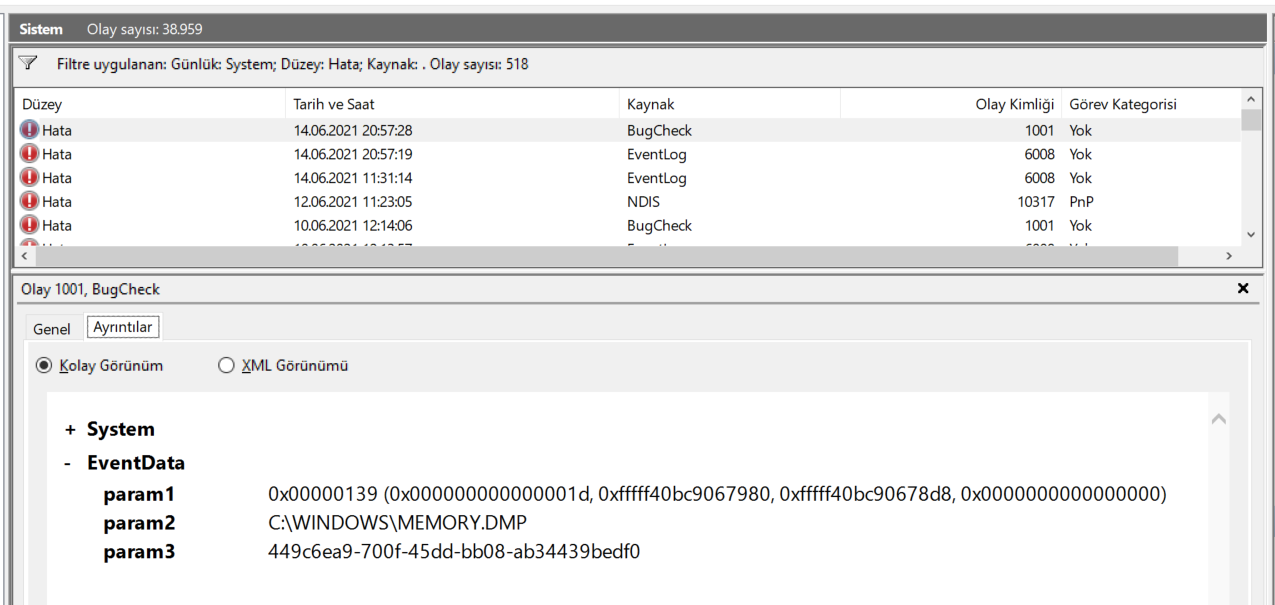
Signal.exe causes Windows 10 to crash with a BSOD (with a KERNEL_SECURITY_CHECK reason) and reboot. This happens when PC is unattended for some time but I also had random crashes while typing in Signal.exe. Windows Event Viewer shows a BugCheck event which indicates a stack buffer overrun in Signal.exe.
Steps to Reproduce
- Launch Signal Desktop
- Leave PC unattended (or just type in any chat)
- PC reboots with a BugCheck event in Windows Event Viewer pointing to Signal.exe stack buffer overrun.
Actual Result: Sudden crash with BSOD and reboot.
Expected Result: No crashes.
Screenshots
Platform Info
Signal Version: 5.4.1
Operating System: Windows 10 Home 64Bit 20H2 Build 19042.1052
Linked Device Version: N/A (This is related to Signal Desktop on Windows 10)
Link to Debug Log
Windows 10 Event Viever displays a kernel security check error with stack buffer overrun: 0x00000139 (0x000000000000001d, 0xffffb5088aa67980, 0xffffb5088aa678d8, 0x0000000000000000).
Memory dump analysis yields:
PROCESS_NAME: Signal.exe
ERROR_CODE: (NTSTATUS) 0xc0000409 - The system detected an overrun of a stack-based buffer in this application. This overrun could potentially allow a malicious user to gain control of this application.
EXCEPTION_CODE_STR: c0000409
EXCEPTION_PARAMETER1: 000000000000001d
DPC_STACK_BASE: FFFFB5088AA67FB0
EXCEPTION_STR: 0xc0000409
STACK_TEXT:
ffffb5088aa67658 fffff80306208b69 : 0000000000000139 000000000000001d ffffb5088aa67980 ffffb5088aa678d8 : nt!KeBugCheckEx
ffffb5088aa67660 fffff80306208f90 : 0000000000000010 0000000000000000 ffffb5088aa677d0 ffffb5088aa677c8 : nt!KiBugCheckDispatch+0x69
ffffb5088aa677a0 fffff80306207323 : 0000000000000000 0000000000000000 0000000000000000 0000000000000000 : nt!KiFastFailDispatch+0xd0
ffffb5088aa67980 fffff80306281279 : fffff80306a31e20 fffff803060eb5bf fffff80306a124e0 0000000000000000 : nt!KiRaiseSecurityCheckFailure+0x323
ffffb5088aa67b10 fffff803060eb5bf : fffff80306a124e0 0000000000000000 fffff80306aebfc0 0000000000001388 : nt!RtlRbInsertNodeEx+0x16c409
ffffb5088aa67b20 fffff8030631b7fa : 0000000000000002 000000000000000f ffffb5088aa67e70 0000000000000608 : nt!KiSetClockInterval+0xa3
ffffb5088aa67b50 fffff8030631b884 : ffff9500a6e43240 ffffb5088aa67cb0 ffff9500a6e40180 0000000000000000 : nt!KiSetVirtualHeteroClockIntervalRequest+0xc6
ffffb5088aa67b80 fffff803061230ce : ffff9500a6e43240 ffffcd0fc9d60000 0000000000000000 ffffcd0f00000002 : nt!KiSetVirtualHeteroClockIntervalRequestDpcRoutine+0x14
ffffb5088aa67bb0 fffff803061223b4 : ffff9500a6e40180 0000000000000000 0000000000000008 000000000002bc79 : nt!KiExecuteAllDpcs+0x30e
ffffb5088aa67d20 fffff803061fdc65 : 0000000000000000 ffff9500a6e40180 0000000000000000 00006930000166c8 : nt!KiRetireDpcList+0x1f4
ffffb5088aa67fb0 fffff803061fda50 : 0000000000000000 0000000000000000 0000000000000000 0000000000000000 : nt!KxRetireDpcList+0x5
ffffb5089028f410 fffff803061fd11e : ffffcd0fdcc94080 ffffcd0fdcb3e860 0000000000000000 0000000000000000 : nt!KiDispatchInterruptContinue
ffffb5089028f440 00007ff64b64248d : 0000000000000000 0000000000000000 0000000000000000 0000000000000000 : nt!KiDpcInterrupt+0x2ee
000000cf9edff150 0000000000000000 : 0000000000000000 0000000000000000 0000000000000000 0000000000000000 : 0x00007ff6`4b64248d
SYMBOL_NAME: nt!KiFastFailDispatch+d0
MODULE_NAME: nt
IMAGE_NAME: ntkrnlmp.exe
STACK_COMMAND: .thread ; .cxr ; kb
BUCKET_ID_FUNC_OFFSET: d0
FAILURE_BUCKET_ID: 0x139_1d_INVALID_BALANCED_TREE_nt!KiFastFailDispatch
OS_VERSION: 10.0.19041.1
BUILDLAB_STR: vb_release
OSPLATFORM_TYPE: x64
OSNAME: Windows 10
FAILURE_ID_HASH: {67ec97ad-ad0b-071e-ab87-6dc661e22d1b}