Junjie Li · Congyang Ou · Haokui Zhang · Guoting Wei · Shengqin Jiang · Ying Li





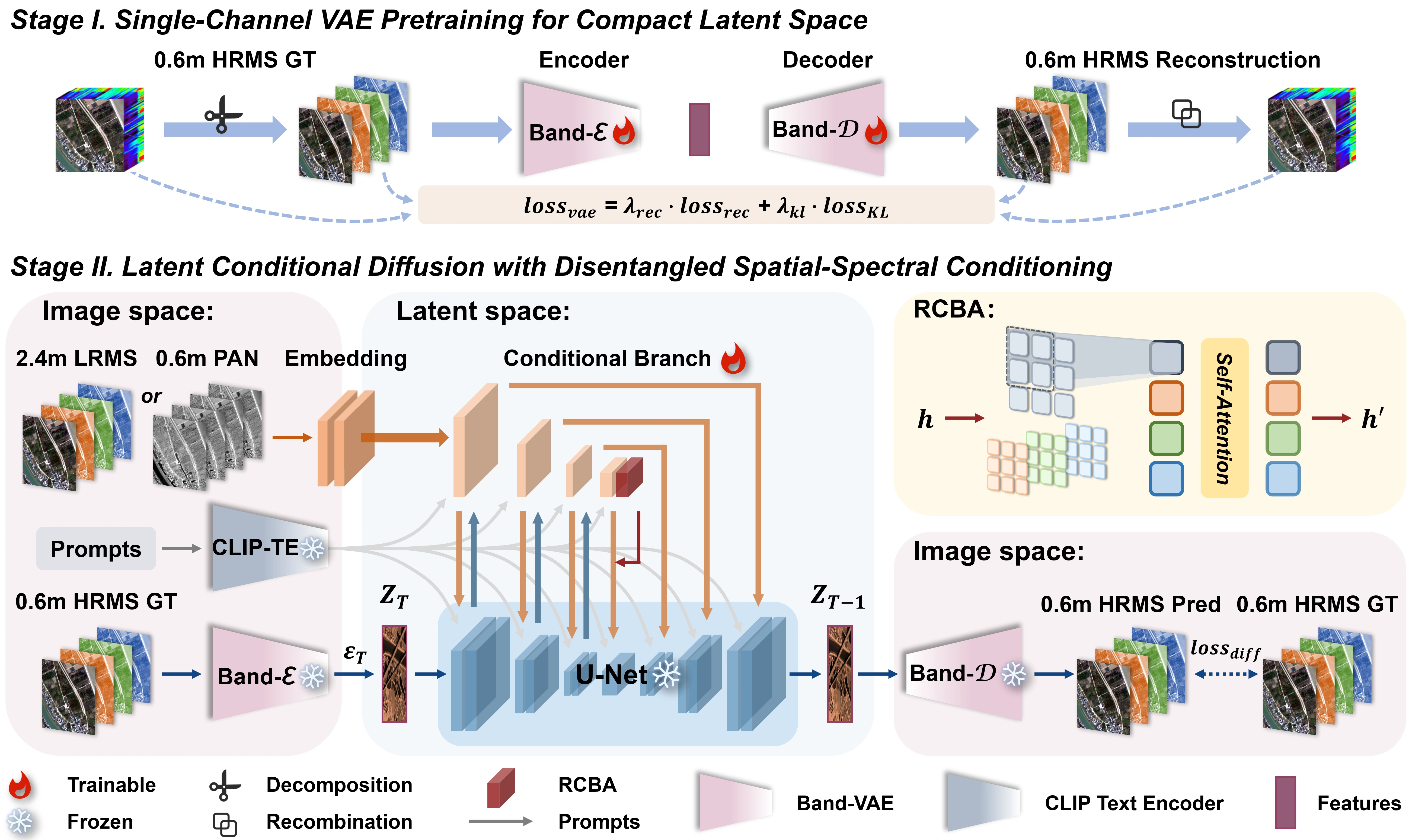
Given a PAN–LRMS image pair, CC-Pan fine-tunes a pre-trained diffusion model to generate a HRMS image.
CC-Pan is a diffusion-based pan-sharpening framework that compresses multispectral channels into a compact latent space and reconstructs high-resolution multispectral imagery with a lightweight dual-branch adapter. This repository includes the training pipeline, offline inference entry points, checkpoint layout, and the Gradio demo used to reproduce the paper workflow.
- [02/01/2026] Code will be released soon!
- Task: pan-sharpening from a PAN image and a low-resolution multispectral image.
- Training stages: a 1-channel Band-VAE pretraining stage followed by latent diffusion + adapter tuning.
- Main entry points:
train_vae.py,train_diffusion.py,inference.py, andapp.py. - Local assets: the repository expects local base-model files, checkpoints, and H5 datasets under the documented directory layout.
- At a Glance
- Quick Start
- Setup
- Usage
- Demo
- Repository Layout
- Results
- Reproducibility
- FAQ
- Contributing
- Maintenance
- License
- Citation
- Shoutouts
- Clone the repository and install the editable local
diffuserspackage. - Download the Stable Diffusion base model together with the CC-Pan VAE and adapter checkpoints.
- Prepare PanCollection-style H5 datasets and point your YAML configs to those local paths.
- Launch Stage-I VAE training, then Stage-II diffusion training, and finally run
inference.pyfor evaluation.
Before installation, make sure you have:
- Git access for cloning the repository.
- A Conda environment with Python 3.10 available locally.
- A CUDA-capable PyTorch runtime that matches your GPU driver.
- Enough local disk space for the Stable Diffusion base model, training checkpoints, and H5 datasets.
git clone https://github.com/JJLibra/CC-Pan.git
cd CC-Pan

conda create -n ccpan python=3.10 -y
conda activate ccpan

# This project depends on a modified local version of `diffusers` under `./diffusers`.
cd diffusers
pip install -e .

cd ..
pip install -r requirements.txt
If you plan to train or evaluate on GPU, installing an xformers build compatible with your local PyTorch/CUDA stack is recommended for better memory efficiency.
Initialize an 🤗 Accelerate environment with:
accelerate configOr use a default Accelerate configuration without answering environment questions:
accelerate config defaultFor single-GPU runs, review configs/accelerate.yaml and adjust fields such as gpu_ids, num_processes, and mixed_precision to match your machine.
We provide two-stage checkpoints:
-
Stage I (Band-VAE):
checkpoints/vae.safetensorsDownload: Hugging Face -
Stage II (Latent Diffusion): runs on top of Stable Diffusion in the Band-VAE latent space.
- Stable Diffusion base: download from Hugging Face (e.g., Stable Diffusion v1-5)
- Adapters:
checkpoints/adapters.pthDownload: Hugging Face
Expected local layout after downloading:
base/
  stable-diffusion-v1-5/
checkpoints/
  vae.safetensors
  adapters.pth
Dataset preparation details are documented in data/README.md. The training and evaluation pipeline expects PanCollection-style H5 files for sensors such as GF2, QB, and WV3, plus the merged data/vae/train_gt_1ch_all.h5 file used by Stage-I VAE training.
train_vae.py: Stage-I Band-VAE training entry point.train_diffusion.py: Stage-II diffusion + adapter training entry point.inference.py: offline inference and evaluation script for H5 datasets.app.py: Gradio demo for interactive experimentation.configs/: training and inference YAML configurations.core/: project model components and diffusion pipeline implementation.utils/: data prep and metric utilities.scripts/: convenience shell launchers.data/: dataset root and expected structure notes.checkpoints/: local checkpoint storage.base/stable-diffusion-v1-5/: local SD v1.5 base model files.
Before launching experiments, double-check that your YAML files point to the correct base model directory, checkpoint files, dataset H5 files, and output directory.
All main scripts also accept repeated -o key=value overrides, which is useful for changing a few paths or runtime options without duplicating full YAML files.
We train the model in two stages.
Pass your dataset- and path-specific YAML file through --config for both stages.
- Stage I (VAE pretraining)
accelerate launch --config_file configs/accelerate.yaml train_vae.py --config <path/to/train_vae.yaml>- Stage II (Diffusion + Adapter training)
accelerate launch --config_file configs/accelerate.yaml train_diffusion.py --config <path/to/train_diffusion.yaml>If you prefer shell wrappers, scripts/train_vae.sh and scripts/train_diffusion.sh mirror the same two-stage workflow.
Note: Training usually takes
40k–50ksteps, which is about1–2days on eight RTX 4090 GPUs in fp16. Reducebatch_sizeif your GPU memory is limited.
In practice, Stage-I validation is often organized around GF2/QB/WV3 splits, while Stage-II can consume multiple training and validation H5 files through list-style YAML entries.
Once training is finished, run inference:
python inference.py --config <path/to/inference.yaml>Common inference fields to review are input_h5_paths, input_h5_names, inference_count, save_pred_h5, save_visual_rgb, and save_metrics_jsonl.
For custom experiments or notebook-style integration, the core pipeline can also be loaded directly in Python:
import torch
from diffusers import AutoencoderKL, DDPMScheduler, UNet2DConditionModel, UniPCMultistepScheduler
from transformers import AutoTokenizer, CLIPTextModel
from core.components.cc_pan import DualBranchXSAdapter, UNetDualBranchXSModel
from core.pipelines.cc_pan import StableDiffusionDualBranchXSPipeline

device = "cuda"
dtype = torch.float16

base_model = "base/stable-diffusion-v1-5"
vae_path = "output/vae_c1_gf2_qb_wv3"
adapter_weights = "output/diffusion_model/dual_branch_xs_adapter.pt"

tokenizer = AutoTokenizer.from_pretrained(base_model, subfolder="tokenizer", use_fast=False, local_files_only=True)
text_encoder = CLIPTextModel.from_pretrained(base_model, subfolder="text_encoder", local_files_only=True)
vae = AutoencoderKL.from_pretrained(vae_path, local_files_only=True)
base_unet = UNet2DConditionModel.from_pretrained(base_model, subfolder="unet", local_files_only=True)

adapter = DualBranchXSAdapter.from_unet(base_unet, size_ratio=0.25, conditioning_channels=5, conditioning_channel_order="rgb")
unet = UNetDualBranchXSModel.from_unet(base_unet, adapter=adapter)
unet.load_state_dict(torch.load(adapter_weights, map_location="cpu"), strict=False)

scheduler = UniPCMultistepScheduler.from_config(
    DDPMScheduler.from_pretrained(base_model, subfolder="scheduler", local_files_only=True).config
)

pipe = StableDiffusionDualBranchXSPipeline(
    vae=vae,
    text_encoder=text_encoder,
    tokenizer=tokenizer,
    unet=unet,
    adapter=None,
    scheduler=scheduler,
    safety_checker=None,
    feature_extractor=None,
    requires_safety_checker=False,
).to(device)

prompt = ["GaoFen-2 satellite Band Red 630-690nm"]
conditioning = torch.randn(1, 5, 128, 128, device=device, dtype=dtype)  # replace with real [LR*4, PAN]

image = pipe(
    prompt=prompt,
    image=conditioning,
    num_inference_steps=20,
    guidance_scale=1.0,
    conditioning_scale_spa=1.0,
    conditioning_scale_spe=1.0,
    output_type="pil",
).images[0]

image.save("cc_pan_demo.png")
In real use, replace the random conditioning tensor with the aligned LRMS/PAN input pair and adapt the text prompt to the target sensor or band description used by your config.
Installing xformers is highly recommended for better GPU efficiency and speed.
To enable it, set enable_xformers_memory_efficient_attention=True.
Depending on your inference config, inference.py can save predicted H5 files, RGB previews, and per-sample metric logs, which makes it suitable for both benchmarking and qualitative inspection.
To launch the interactive Gradio demo locally:
python app.pyMake sure the demo points to valid local checkpoints and dataset paths before opening it in a browser.
🚨 We strongly recommend visiting our project website for a better reading experience.
The tables below summarize reduced-resolution benchmarks across WV3, QB, and GF2, while the figures highlight both reduced- and full-resolution visual comparisons.
Table 1. Quantitative results on the WorldView-3 (WV3) dataset. Best results are in bold.
| Models | Pub/Year | Q8 ↑ | SAM ↓ | ERGAS ↓ | SCC ↑ | Dλ ↓ | Ds ↓ | HQNR ↑ |
|---|---|---|---|---|---|---|---|---|
| PaNNet | ICCV’17 | 0.891±0.045 | 3.613±0.787 | 2.664±0.347 | 0.943±0.018 | 0.017±0.008 | 0.047±0.014 | 0.937±0.015 |
| FusionNet | TGRS’20 | 0.904±0.092 | 3.324±0.411 | 2.465±0.603 | 0.958±0.023 | 0.024±0.011 | 0.036±0.016 | 0.940±0.019 |
| LAGConv | AAAI’22 | 0.910±0.114 | 3.104±1.119 | 2.300±0.911 | 0.980±0.043 | 0.036±0.009 | 0.032±0.016 | 0.934±0.011 |
| BiMPAN | ACMM’23 | 0.915±0.087 | 2.984±0.601 | 2.257±0.552 | 0.984±0.005 | 0.017±0.019 | 0.035±0.015 | 0.949±0.026 |
| ARConv | CVPR’25 | 0.916±0.083 | 2.858±0.590 | 2.117±0.528 | 0.989±0.014 | 0.014±0.006 | 0.030±0.007 | 0.958±0.010 |
| WFANET | AAAI’25 | 0.917±0.088 | 2.855±0.618 | 2.095±0.422 | 0.989±0.011 | 0.012±0.007 | 0.031±0.009 | 0.957±0.010 |
| PanDiff | TGRS’23 | 0.898±0.090 | 3.297±0.235 | 2.467±0.166 | 0.980±0.019 | 0.027±0.108 | 0.054±0.047 | 0.920±0.077 |
| SSDiff | NeurIPS’24 | 0.915±0.086 | 2.843±0.529 | 2.106±0.416 | 0.986±0.004 | 0.013±0.005 | 0.031±0.003 | 0.956±0.016 |
| SGDiff | CVPR’25 | 0.921±0.082 | 2.771±0.511 | 2.044±0.449 | 0.987±0.009 | 0.012±0.005 | 0.027±0.003 | 0.960±0.006 |
| CC‑Pan | Ours | 0.924±0.064 | 2.689±0.135 | 1.839±0.211 | 0.989±0.007 | 0.010±0.008 | 0.021±0.004 | 0.965±0.007 |
Table 2. Quantitative results on the QuickBird (QB) dataset. Best results are in bold.
| Models | Pub/Year | Q4 ↑ | SAM ↓ | ERGAS ↓ | SCC ↑ | Dλ ↓ | Ds ↓ | HQNR ↑ |
|---|---|---|---|---|---|---|---|---|
| PaNNet | ICCV’17 | 0.885±0.118 | 5.791±0.995 | 5.863±0.413 | 0.948±0.021 | 0.059±0.017 | 0.061±0.010 | 0.883±0.025 |
| FusionNet | TGRS’20 | 0.925±0.087 | 4.923±0.812 | 4.159±0.351 | 0.956±0.018 | 0.059±0.019 | 0.052±0.009 | 0.892±0.022 |
| LAGConv | AAAI’22 | 0.916±0.130 | 4.370±0.720 | 3.740±0.290 | 0.959±0.047 | 0.085±0.024 | 0.068±0.014 | 0.853±0.018 |
| BiMPAN | ACMM’23 | 0.931±0.091 | 4.586±0.821 | 3.840±0.319 | 0.980±0.008 | 0.026±0.020 | 0.040±0.013 | 0.935±0.030 |
| ARConv | CVPR’25 | 0.936±0.088 | 4.453±0.499 | 3.649±0.401 | 0.987±0.009 | 0.019±0.014 | 0.034±0.017 | 0.948±0.042 |
| WFANET | AAAI’25 | 0.935±0.092 | 4.490±0.582 | 3.604±0.337 | 0.986±0.008 | 0.019±0.016 | 0.033±0.019 | 0.948±0.037 |
| PanDiff | TGRS’23 | 0.934±0.095 | 4.575±0.255 | 3.742±0.353 | 0.980±0.007 | 0.058±0.015 | 0.064±0.020 | 0.881±0.075 |
| SSDiff | NeurIPS’24 | 0.934±0.094 | 4.464±0.747 | 3.632±0.275 | 0.982±0.008 | 0.031±0.011 | 0.036±0.013 | 0.934±0.021 |
| SGDiff | CVPR’25 | 0.938±0.087 | 4.353±0.741 | 3.578±0.290 | 0.983±0.007 | 0.023±0.013 | 0.043±0.012 | 0.934±0.011 |
| CC‑Pan | Ours | 0.939±0.088 | 4.198±0.526 | 3.251±0.288 | 0.984±0.009 | 0.017±0.011 | 0.026±0.009 | 0.957±0.010 |
Table 3. Quantitative results on the GaoFen-2 (GF2) dataset. Best results are in bold.
| Models | Pub/Year | Q4 ↑ | SAM ↓ | ERGAS ↓ | SCC ↑ | Dλ ↓ | Ds ↓ | HQNR ↑ |
|---|---|---|---|---|---|---|---|---|
| PaNNet | ICCV’17 | 0.967±0.013 | 0.997±0.022 | 0.919±0.039 | 0.973±0.011 | 0.017±0.012 | 0.047±0.012 | 0.937±0.023 |
| FusionNet | TGRS’20 | 0.964±0.014 | 0.974±0.035 | 0.988±0.072 | 0.971±0.012 | 0.040±0.013 | 0.101±0.014 | 0.863±0.018 |
| LAGConv | AAAI’22 | 0.970±0.011 | 1.080±0.023 | 0.910±0.045 | 0.977±0.006 | 0.033±0.013 | 0.079±0.013 | 0.891±0.021 |
| BiMPAN | ACMM’23 | 0.965±0.020 | 0.902±0.066 | 0.881±0.058 | 0.972±0.018 | 0.032±0.015 | 0.051±0.014 | 0.918±0.019 |
| ARConv | CVPR’25 | 0.982±0.013 | 0.710±0.149 | 0.645±0.127 | 0.994±0.005 | 0.007±0.005 | 0.029±0.019 | 0.963±0.018 |
| WFANET | AAAI’25 | 0.981±0.007 | 0.751±0.082 | 0.657±0.074 | 0.994±0.002 | 0.003±0.003 | 0.032±0.021 | 0.964±0.020 |
| PanDiff | TGRS’23 | 0.979±0.011 | 0.888±0.037 | 0.746±0.031 | 0.988±0.003 | 0.027±0.011 | 0.073±0.013 | 0.903±0.025 |
| SSDiff | NeurIPS’24 | 0.983±0.007 | 0.670±0.124 | 0.604±0.108 | 0.991±0.006 | 0.016±0.009 | 0.027±0.027 | 0.957±0.010 |
| SGDiff | CVPR’25 | 0.980±0.011 | 0.708±0.119 | 0.668±0.094 | 0.989±0.005 | 0.020±0.013 | 0.024±0.022 | 0.959±0.011 |
| CC‑Pan | Ours | 0.982±0.010 | 0.667±0.051 | 0.592±0.088 | 0.991±0.003 | 0.005±0.002 | 0.022±0.014 | 0.973±0.010 |
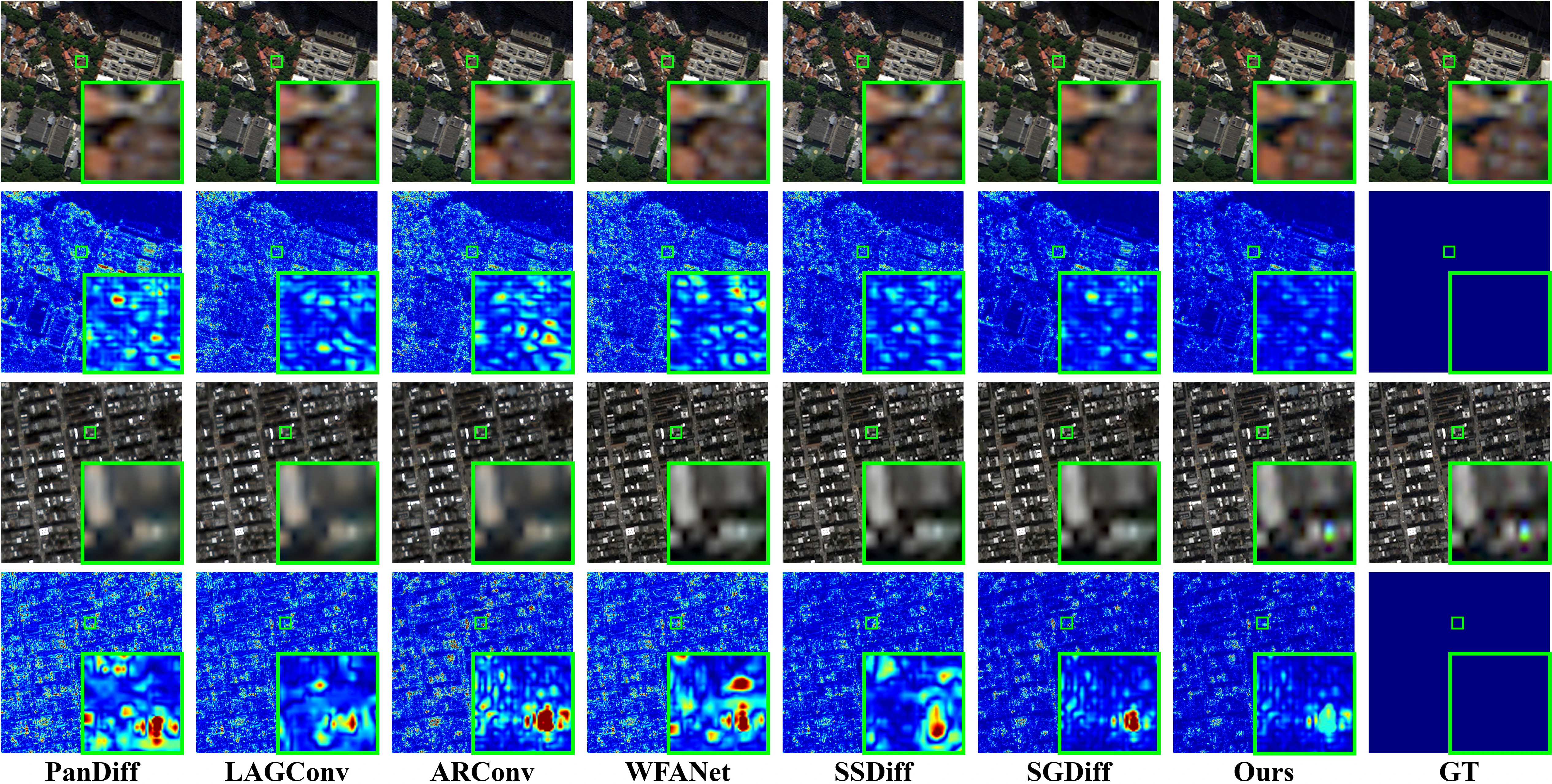
Visual comparison on the WorldView-3 (WV3) and QuickBird (QB) datasets at reduced resolution.
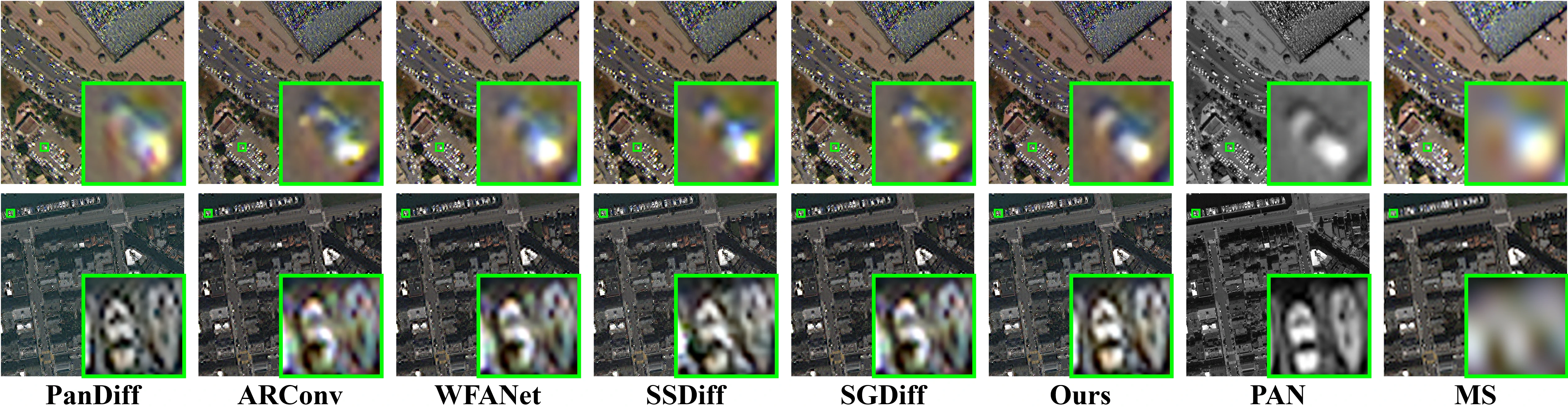
Visual comparison on the WorldView-3 (WV3) and QuickBird (QB) datasets at full resolution.
| Diffusion-based Methods | SAM ↓ | ERGAS ↓ | NFE | Latency (s) ↓ |
|---|---|---|---|---|
| PanDiff | 4.575±0.255 | 3.742±0.353 | 1000 | 356.63±1.98 |
| SSDiff | 4.464±0.747 | 3.632±0.275 | 10 | 10.10±0.21 |
| SGDiff | 4.353±0.741 | 3.578±0.290 | 50 | 6.64±0.09 |
| CC-Pan | 4.198±0.526 | 3.251±0.288 | 20 | 3.36±0.07 |
Latency is reported as mean ± std over 10 runs (warmup = 3), with batch size = 1, evaluated on the QB dataset under the reduced-resolution (RR) protocol on an RTX 4090 GPU. NFE denotes the number of function evaluations during sampling, so lower values generally correspond to faster diffusion inference.
For reproducible experiments, record the exact YAML used for each stage, the accelerate launcher settings, the selected checkpoint files, and the git commit hash associated with each run.
Do I need local Stable Diffusion weights?
Yes. The training and inference code expects a local base model directory under base/.
Why do the training commands use <path/to/...>.yaml placeholders?
Because the exact dataset paths, checkpoint locations, and output directories depend on your local setup.
What input format does offline evaluation expect?
PanCollection-style H5 files with gt, lms, and pan keys are expected by the default pipeline.
Documentation fixes, setup clarifications, and reproducibility improvements are welcome. When preparing changes, keep paths explicit, describe any dataset assumptions, and mention whether your notes target training, inference, or the demo workflow.
When updating the project, keep the README in sync with checkpoint filenames, expected directory names, and any CLI arguments exposed by train_vae.py, train_diffusion.py, inference.py, or app.py.
This project is released under the MIT License. See LICENSE for the full text.
If you find our work useful, please cite:
@article{li2026ccpan,
  title={CC-Pan: Channel-wise Compression based Diffusion for Efficient Pan-Sharpening},
  author={Junjie Li and Congyang Ou and Haokui Zhang and Guoting Wei and Shengqin Jiang and Ying Li},
  journal={arXiv preprint arXiv:2602.04473},
  year={2026}
}- Built with 🤗 Diffusers. Thanks for open-sourcing!
- The interactive demo is powered by 🤗 Gradio. Thanks for open-sourcing!