For your Public Contributions chart on GitHub.
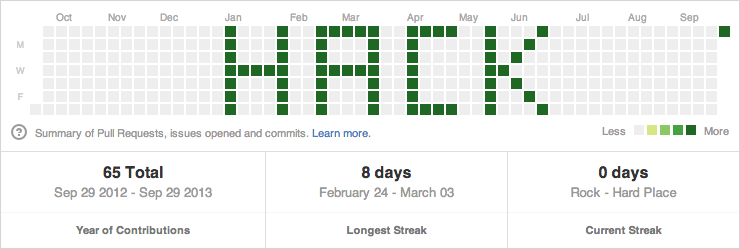

- Create a new GitHub user (Ex:
example-user). (I did this in a Chrome Ingognito browser so I didn't have to log out of my real user.) - Create a repo for that user (Ex:
example-repo). - Create an empty folder on your computer.
- Add dates.txt to that folder and modify with the dates you want to "draw" to your Public Contributions chart.
- Add dates.sh to that folder and change
--author="public-contributions"(Ex:--author="example-user"). - Open a terminal window and
cdto your folder (which now hasdates.txtanddates.shin it). - Run
git initto initialize the Git repo. - Run
./dates.sh. (You may need to runchmod +x dates.shfirst depending on how you created the file.) - Add the remote git origin. (Ex:
git remote add origin git@github.com:example-user/example-repo.git.) - Run
git push. - Visit your user page to see the chart. (Ex:
http://github.com/example-user.)
Made by Adam Schwartz