This repository provides some scripts for running a compatible subset of the Renaissance benchmarks as Graal native images and compares the performance of OpenJDK's HotSpot JVM with various GraalVM and GraalVM Native Image configurations.
The results for JDK 25 look as follows (click on the image for a larger version):
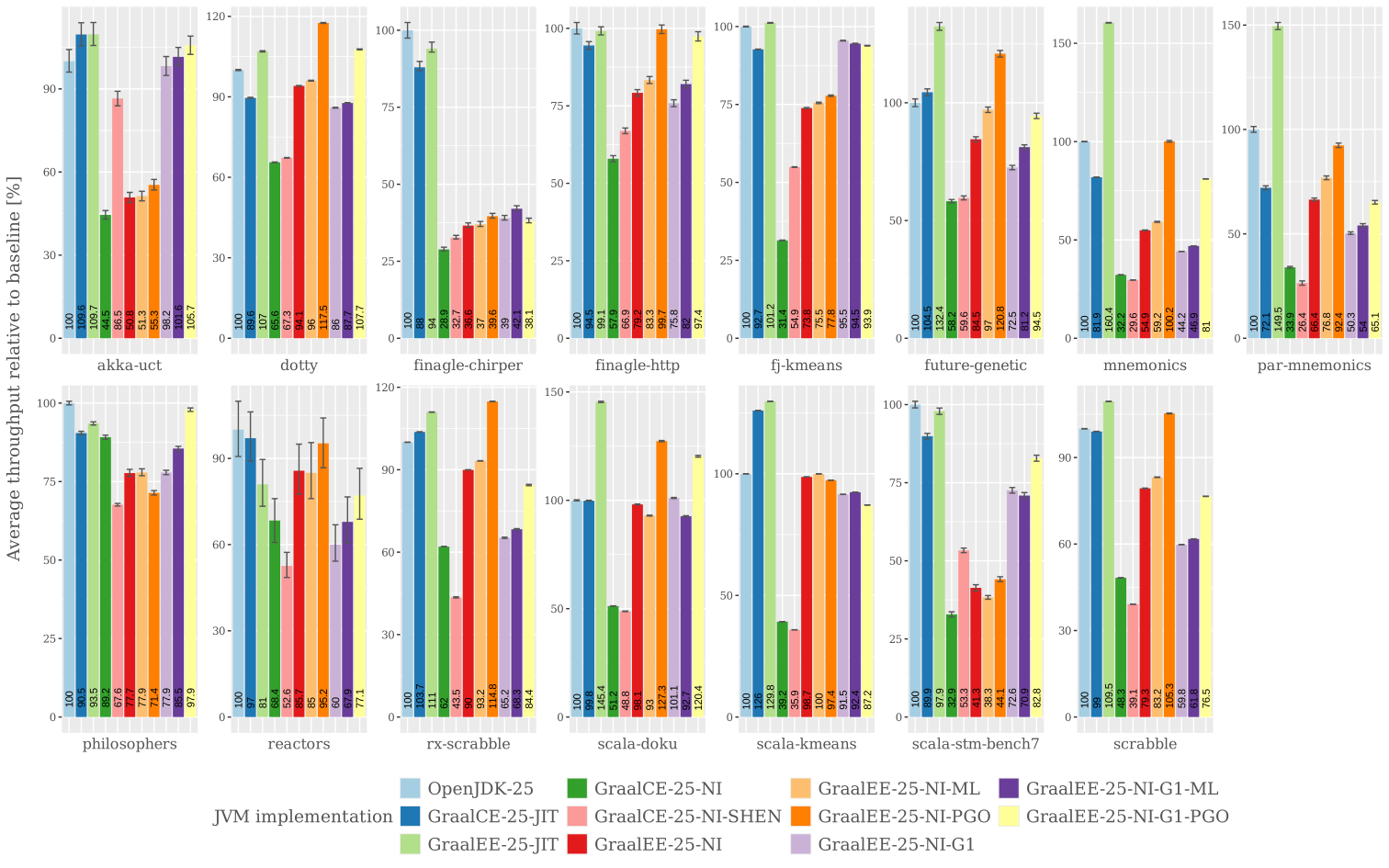
In this graph, the labels for the JVM implementation have the following meaning:
- OpenJDK-25: plain OpenJDK 25 running with the default C2/G1 configuration
- GraalCE-25-JIT: GraalVM 25 Community edition with the Graal JIT (i.e. "libgraal") running as high tier JIT and the default G1 collector.
- GraalEE-25-JIT: Oracle GraalVM 25 (formerly known as "Enterprise Edition) with the Graal JIT (i.e. "libgraal") running as high tier JIT and the default G1 collector.
- GraalCE-25-NI: Native image produced by the GraalVM 25 Community edition (running with the default Serial GC).
- GraalCE-25-NI-SHEN: Native image produced by the GraalVM 25 Community edition (running with a development version of Shenandoah GC in "passive" (i.e. "Stop-The-World" mode)).
- GraalEE-25-NI: Native image produced by Oracle GraalVM 25 (running with the default Serial GC and without automatic, ML-powered, profile guided optimizations (PGO), i.e.
-H:-MLProfileInference). - GraalEE-25-NI-ML: Native image produced by Oracle GraalVM 25 (running with the default Serial GC and automatic, Machine Learning powered, profile guided optimizations (PGO)).
- GraalEE-25-NI-PGO: Native image produced by Oracle GraalVM 25 (running with the default Serial GC and explicit, profile guided optimizations (PGO), i.e. training run).
- GraalEE-25-NI-G1: Native image produced by Oracle GraalVM 25 (running with G1 GC and without automatic, ML-powered, profile guided optimizations (PGO), i.e.
-H:-MLProfileInference). - GraalEE-25-NI-G1-ML: Native image produced by Oracle GraalVM 25 (running with G1 GC and automatic, Machine Learning powered, profile guided optimizations (PGO)).
- GraalEE-25-NI-G1-PGO: Native image produced by Oracle GraalVM 25 (running with the G1 GC and explicit, profile guided optimizations (PGO), i.e. training run).
The above numbers were collected on a c5.metal bare metal instance with 96 Intel Xeon vCPUs and 192gb RAM using Renaissance 0.16.1. All benchmarks were run with -Xms12g -Xmx12g for 10 minutes and in the graph the results within the first three minutes were discarded to accommodate for warmup. The native images were compiled with -O3.
The first three columns in each subgraph represent HotSot executions with C2, Graal CE and Graal EE JIT respectively (all using G2 GC by default). The results are quite similar to those which are published on the original Renaissance website for JDK 23. On average, the Graal CE JIT is slightly slower than C2 and the Graal EE JIT slightly faster.
For the following 8 columns, which all represent Native Image runs, the outcomes are a little bit more nuanced. finagle-chirper is not representative. All native image executions are more than 50% slower than the corresponding JIT runs. One of the reason might be that the native images are silently failing to load the native libzstd-jni-1.5.6-7.so library. The reactors results show a quite high variance (although it is about the same for all JVM version). Both benchmarks require further investigations.
Apart from that, Oracle Graal NI with PGO and either Serial of G1 GC (depending on the GC characteristics of the benchmark) performs really well and is on par or faster compared to the HotSpot C2/G1. However, Graal Community Edition NI (which currently only supports Serial GC and no PGO) performs really bad and only reaches ~50% of the HotSpot performance on average. The Graal CE NI with Shenandoah runs show first promising results for some benchmarks although it is still in early development and only runs in Stop-the-World mode for now.
But the biggest gap between Oracle GraalVM and GraalVM CE clearly seems to be the superior compiler inlining and optimization phases together with PGO in the Oracle version which are both missing from the Community Edition. This makes it currently almost impossible to replace HotSpot in production for any longer running, throughput oriented applications with Graal CE Native Images and only leaves the niche of short-running, startup sensitive applications for the Community Edition (read e.g. my comparison of "Leyden vs. Graal Native Image" to see where even Graal CE NI still shines compared to HotSpot).
Graal actually has built-in (i.e. into mx) support for running the Renaissance benchmarks and only excludes "chi-square", "gauss-mix", "page-rank" and "movie-lens" from the full benchmark set. There's also special support for building native images versions of the benchmarks in mx_substratevm_benchmark.py. Unfortunately, this support seems to be broken for a few more benchmarks. According to current information (i.e. Feb. 12, 2026) from the Graal Native Image Slack channel the following Renaissance benchmarks are known to currently work with Native Image: akka-uct, dotty, finagle-chirper, finagle-http, fj-kmeans, future-genetic, mnemonics, par-mnemonics, philosophers, reactors, rx-scrabble, scala-doku, scala-kmeans, scala-stm-bench7, scrabble. These are the benchmarks further considered here.
Renaissance 0.14 introduced the so called "standalone mode" which executes a benchmark without the help of the launcher in the main Renaissance bundle. The benchmark harness is still used, but both the harness and benchmark code are loaded using a single class loader. The benchmark bundle (i.e. renaissance-gpl-0.16.1.jar) needs to be manually extracted. In addition to directories containing the benchmark and dependency jars, it also contains metadata-only jars (one for each benchmark) in a directory called single/. These jars can be used to execute the corresponding benchmark in standalone mode simply by running java -jar single/<benchmakr>.jar or to create a native image for them with native-image -o <benchmark>.exe -cp single/<benchmakr>.jar org.renaissance.harness.RenaissanceSuite which can then be executed as <benchmark>.exe <benchmark>,
The script ./scripts/renaissanceNI.sh handles this automatically. For HotSpot execution it just runs the benchmarks as described above. For the native image case it first runs each benchmark on HotSpot with the native image agent in order to collect the required reachability metadata and then created the native image version of each benchmarks. For the profile guided optimizations modes (PGO) it adds another intermediate step to first create an instrumented native image and run it in order to collect the PGO data which is then used in the final build step of the actual native image.
The script can be configured with environment variables, many of which are mandatory and will let the script fail if not defined:
| Name | Mandatory | Default | Description |
|---|---|---|---|
OPENJDK_HOME |
✓ | ✗ | Directory where to find a plain OpenJDK distribution |
GRAALCE_HOME |
✓ | ✗ | Directory where to find a plain Graal CE distribution |
GRAALCE_SHEN_HOME |
✓ | ✗ | Directory where to find a plain Graal CE distribution with Shenandoah support |
SHENANDOAH_HOME |
✓ | ✗ | Directory where to find libshenandoahgc-ur.so |
GRAALEE_HOME |
✓ | ✗ | Directory where to find an Oracle Graal distribution |
RENAISSANCE_SINGLE |
✓ | ✗ | The single/ subdirectory of an unpacked Renaissaince benchmark .jar file |
OUTPUT |
✗ | RenaissanceNI/output |
Directory where to place the artifacts produced by the script. All the benchmarks results (i.e. .json files) of a single script run are placed under ${OUTPUT}/results/`date +%Y-%m-%d-%H-%M-%S`/<benchmark>. The generated artifacts (i.e. native images and PGO files) are placed under ${OUTPUT}/<benchmark> and the reachability metadata under ${OUTPUT}/<benchmark>/conf. Non existing directories will be created. |
REBUILD_CONF |
✗ | unset | If set, the reachability metadata will be re-computed at each run, even if it already exists for a benchmark. |
REBUILD_NI |
✗ | unset | If set, the native images and PGO data will be re-build at each run, even if it already exists for a benchmark. |
JAVA_ARGS |
✗ | -Xms12g -Xmx12g |
Can be used to pass command line arguments to all benchmark runs (HotSpot and Native Image) |
BENCH_TIME |
✗ | 600 |
The benchmark execution time in seconds. Will be passed with -t to each benchmark execution. |
BENCHMARKS |
✗ | all benchmarks | A comma-separated list of benchmarks to execute. By default all benchmarks which are known to work as Native Image (i.e. akka-uct, dotty, finagle-chirper, finagle-http, fj-kmeans, future-genetic, mnemonics, par-mnemonics, philosophers, reactors, rx-scrabble, scala-doku, scala-kmeans, scala-stm-bench7, scrabble) will be executed. |
FINAGLE_CHIRPER_MAX_CPUS |
✗ | unset | finagle-chirpher becomes unstable and can throw exceptions if it is running on a machine with too many cores. With this option, the numbers of cores used for the benchmark can be restricted. |
If dotty is run as native image, it needs this special command line arguments -Djava.home and -Djava.class.path which will be set automatically by the script.
For creating the graph with the benchmarks results I used my own, slightly adapted version of the original Renaissance utilities-r scripts. Before we can use these scripts, we first have to pre-process the generated .json files a little bit. Because we need some extra command line arguments for certain benchmarks, the utilities-r scripts will treat those executions as if they were run with a different JVM and create a new column for them in the generated graph. In order to fix this problem without bigger changes in the R scripts themselves, we simply strip those extra argument from the result files with:
$ ./scripts/strip_results.sh ./output/results/ json ', "-Djava.home=.*-Djava.class.path=.*"' ""
$ ./scripts/strip_results.sh ./output/results/ json ', "-XX:ActiveProcessorCount=48"' ""
The second invocation is only required if you have use FINAGLE_CHIRPER_MAX_CPUS and the pattern should be adapted accordingly.
Once we have prepared the results, we can clone my version of utilities-r
and use them as follows:
$ git clone https://github.com/simonis/utilities-r
$ cd utilities-r
$ git checkout RenaissanceNI
$ R
# Build and install the rren package
> pak::pak('.')
...
? Do you want to continue (Y/n)
✔ Got rren 0.1.2 (source) (4.10 kB)
ℹ Packaging rren 0.1.2
✔ Packaged rren 0.1.2 (948ms)
ℹ Building rren 0.1.2
✔ Built rren 0.1.2 (4s)
✔ Installed rren 0.1.2 (local) (1s)
✔ 1 pkg + 47 deps: kept 46, upd 1, dld 1 (NA B) [31.3s]
# Load the results into a dataset
> renaissance <- rren::load_path_json("./output/results")
# Create default labels from the dataset
> labels <- rren::plot_default_labels(renaissance)
# Write the labels into a CSV file and edit them accordingly (e.g. set 'vm_label' and 'vm_jdk')
> readr::write_csv(labels, "./output/results/labels_all.csv")
# Create the graph. Discard all measurements in the first 'warmup' seconds
# This will create a file 'stripe-jdk-<vm_jdk>.svg' in the current directory.
> rren::plot_website_stripes(renaissance, warmup=180, labels="./output/results/labels_all.csv", palette='Paired')