Skip to content

Feature/viewer controller refactor#124

Merged
toloudis merged 8 commits intomasterfrom
feature/viewer-controller-refactor
May 14, 2021
Merged

Feature/viewer controller refactor#124
toloudis merged 8 commits intomasterfrom
feature/viewer-controller-refactor

Conversation

@toloudis
Copy link
Copy Markdown
Contributor

Problem

Update usage of SimulariumController in simularium-viewer 2.8.0

Solution

Update viewer version and modify calls to changeFile

Type of change

  • New feature (non-breaking change which adds functionality)

Change summary:

Some reformatting happened due to format-on-save in my editor. If you view the side by side diff, you'll see the only changes are to the simularium-viewer version and the calls to changeFile

Steps to Verify:

run website and verify that trajectories load, drag and drop works, and state isn't corrupted when the trajectory is changed.

@toloudis toloudis requested review from a user, blairlyons, meganrm and schoinh May 10, 2021 18:31
Copy link
Copy Markdown
Contributor

@schoinh schoinh left a comment

Choose a reason for hiding this comment

The reason will be displayed to describe this comment to others. Learn more.

I'm not sure why, but when I pulled this branch, then ran npm i then npm start, drag and drop didn't work. I tried both v1 and v2 files and in both cases I just got an error message on the top right saying "Simularium files need 'spatialData' array".

@toloudis
Copy link
Copy Markdown
Contributor Author

I'm not sure why, but when I pulled this branch, then ran npm i then npm start, drag and drop didn't work. I tried both v1 and v2 files and in both cases I just got an error message on the top right saying "Simularium files need 'spatialData' array".

Anything good in the console? Are you connecting to dev server or staging server?

@schoinh
Copy link
Copy Markdown
Contributor

schoinh commented May 11, 2021

Anything good in the console? Are you connecting to dev server or staging server?

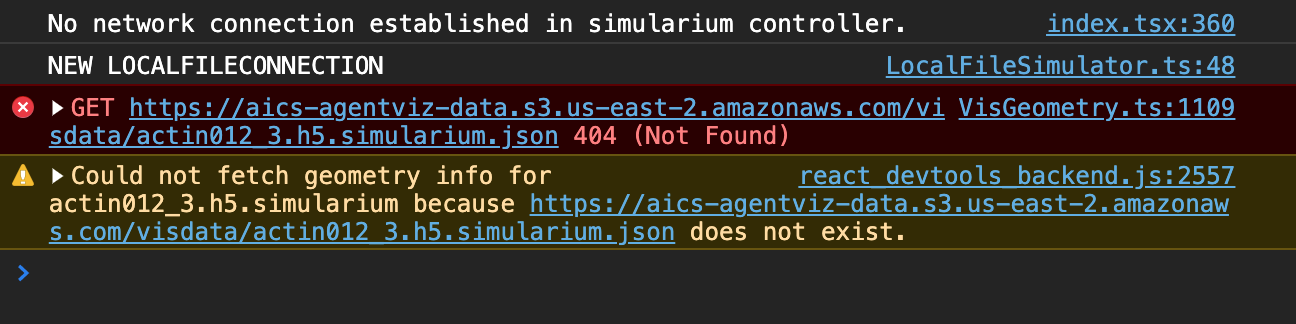
Oh why do I always forget to look in the console... In this case actin012_3.h5.simularium is the name of the file I drag and dropped.
image

I'm able to connect to staging server and load simulations from there. (not working with dev server but I expected that)

@toloudis
Copy link
Copy Markdown
Contributor Author

I'm not sure why, but when I pulled this branch, then ran npm i then npm start, drag and drop didn't work. I tried both v1 and v2 files and in both cases I just got an error message on the top right saying "Simularium files need 'spatialData' array".

Fixed! sorry about that

Copy link
Copy Markdown

@ghost ghost left a comment

Choose a reason for hiding this comment

The reason will be displayed to describe this comment to others. Learn more.

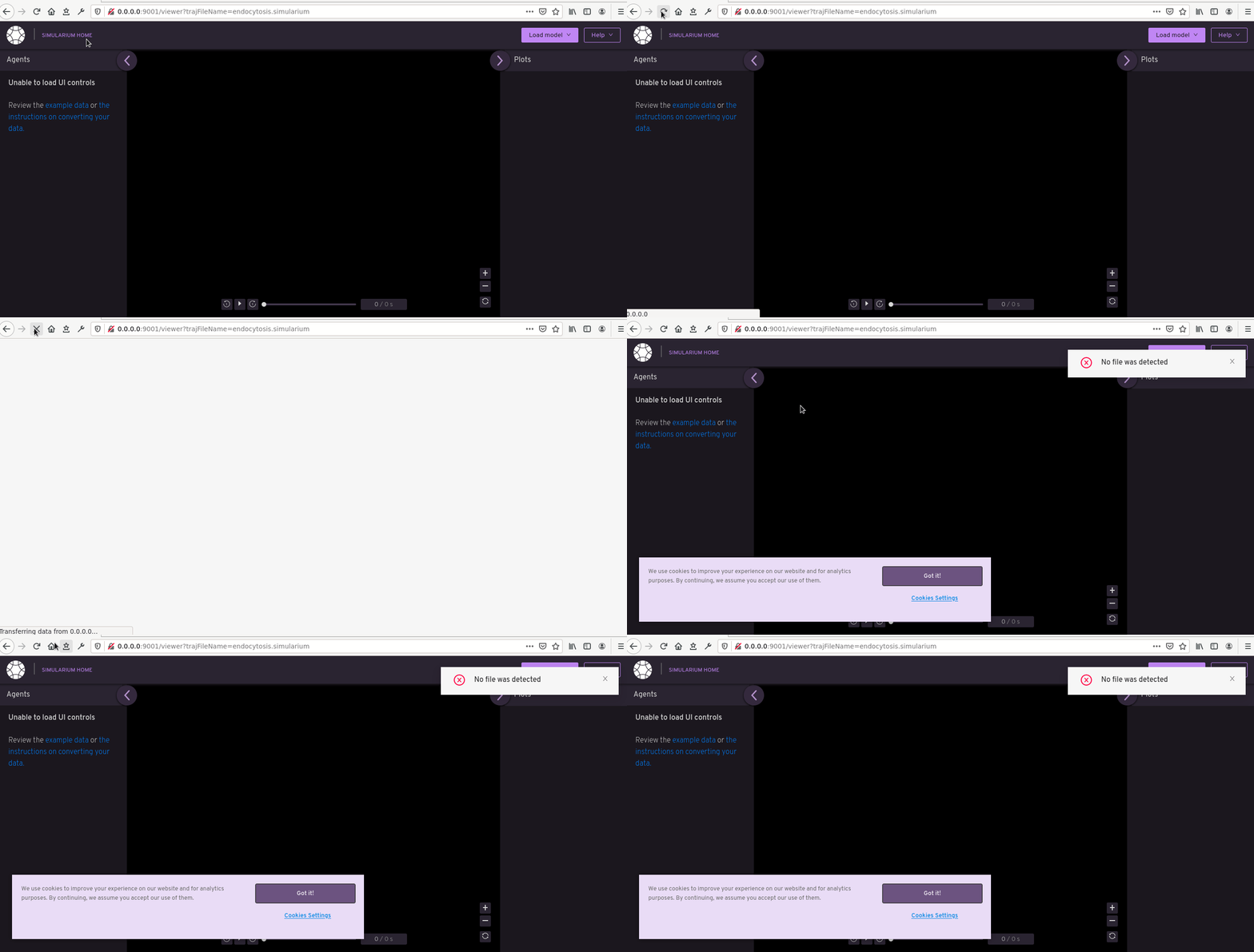
Attempting to load endocytosis using this branch is resulting in a pop-up "no file was detected" and no messages to the console. I'm connecting to the staging back-end. The same file loads correctly on master.

@toloudis
Copy link
Copy Markdown
Contributor Author

Attempting to load endocytosis using this branch is resulting in a pop-up "no file was detected" and no messages to the console. I'm connecting to the staging back-end. The same file loads correctly on master.

I can't repro. Can you describe your steps?

@ghost
Copy link
Copy Markdown

ghost commented May 13, 2021

Attempting to load endocytosis using this branch is resulting in a pop-up "no file was detected" and no messages to the console. I'm connecting to the staging back-end. The same file loads correctly on master.

I can't repro. Can you describe your steps?

  1. In webpack/plugins.js I changed the BACKEND_SERVER_IP for the DEV environment to point to the staging back-end staging-node1-agentviz-backend.cellexplore.net (since dev is still down afaik)
  2. npm start
  3. navigate to http://0.0.0.0:9001/viewer?trajFileName=endocytosis.simularium

@ghost
Copy link
Copy Markdown

ghost commented May 13, 2021

no-file-detected

@schoinh
Copy link
Copy Markdown
Contributor

schoinh commented May 13, 2021

  1. In webpack/plugins.js I changed the BACKEND_SERVER_IP for the DEV environment to point to the staging back-end staging-node1-agentviz-backend.cellexplore.net (since dev is still down afaik)
  2. npm start
  3. navigate to http://0.0.0.0:9001/viewer?trajFileName=endocytosis.simularium

@EricJIsaac Did you npm i?

@toloudis
Copy link
Copy Markdown
Contributor Author

  1. In webpack/plugins.js I changed the BACKEND_SERVER_IP for the DEV environment to point to the staging back-end staging-node1-agentviz-backend.cellexplore.net (since dev is still down afaik)
  2. npm start
  3. navigate to http://0.0.0.0:9001/viewer?trajFileName=endocytosis.simularium

@EricJIsaac Did you npm i?

Yeah I was thinking possible dependency conflicts too. First thing I'd try is removing node_modules (but keep package_lock.json) and npm install.

@ghost
Copy link
Copy Markdown

ghost commented May 14, 2021

I did run npm i, but I'll try it again to verify that I didn't miss an error

@ghost
Copy link
Copy Markdown

ghost commented May 14, 2021

Removing the node_modules folder and re-running npm i cleared it up; my mistake

@toloudis
Copy link
Copy Markdown
Contributor Author

thank you both for pulling the code and testing it. much appreciated!

@toloudis toloudis merged commit afb06b4 into master May 14, 2021
@toloudis toloudis deleted the feature/viewer-controller-refactor branch May 14, 2021 16:53
Sign up for free to join this conversation on GitHub. Already have an account? Sign in to comment

Labels

None yet

Projects

None yet

Development

Successfully merging this pull request may close these issues.

2 participants