
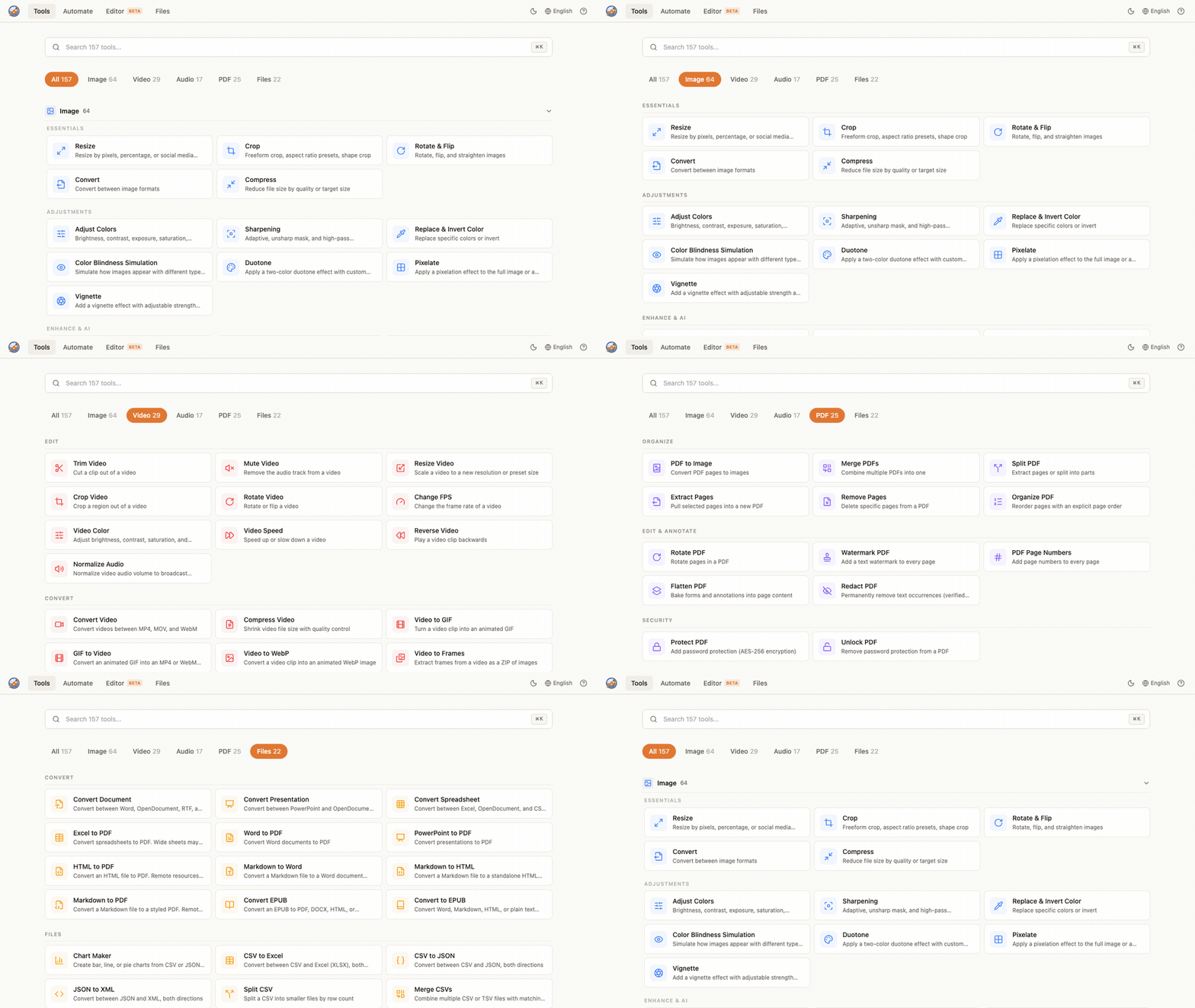
SnapOtter 2.0 turns the image toolkit into a full file-manipulation suite: 200+ tools across five modalities (Image, Video, Audio, PDF, and Files) plus a layer-based image editor, all still self-hosted with no external SaaS. Under the hood the whole platform was rebuilt on Postgres 17 and a Redis-backed job queue, so long-running work (video transcodes, AI upscales, OCR) now runs as durable background jobs with live progress instead of blocking a request. And you can start the entire stack with a single docker run.
Tip
New here? Start in one command. An embedded Postgres 17 and Redis 8 boot inside the container, so there's nothing else to wire up.
docker run -d -p 1349:1349 -v snapotter-data:/data snapotter/snapotter:2.0.0Open http://localhost:1349 and sign in with admin / admin.
This is a major release. If you're on 1.x, read the Breaking Changes section below before upgrading: your data migrates automatically, but the container stack changed.
New Features
- Four new tool modalities: Video, Audio, PDF, and Files join Image, taking the catalog from a focused image toolkit to 200+ tools. Trim and transcode video, convert and normalize audio, split/merge/compress/sign PDFs, and run file utilities, all in the same self-hosted app.
- Durable background jobs: A Redis-backed queue (BullMQ) runs every tool as a tracked job. Fast tools still return instantly; long ones stream live progress over SSE and survive a page reload or a brief network drop.
- All-in-one single-container mode:
docker run -p 1349:1349 -v snapotter-data:/data snapotter/snapotter:2.0.0now boots a complete instance with an embedded Postgres and Redis. No Compose file required for a quick start. Compose remains the recommended production path. - On-demand AI bundles: Background removal, OCR, transcription, upscaling, face detection/enhancement, object eraser and colorize, and photo restoration install on demand from the UI into your data volume, so the base image stays lean and installed models survive container recreation. GPU acceleration is detected per framework.
- Sign PDF: Draw, type, or upload a signature and place it anywhere on a PDF, right in the browser.
- Automate (visual pipeline builder): Chain tools into reusable pipelines where each step's output feeds the next, across all modalities, with nine prebuilt templates to start from.
- 83 one-click conversion presets: Dedicated JPG-to-PNG, MP4-to-GIF, and similar converters with fuzzy search, so common conversions are a single click.
- Layer-based image editor: A Konva-powered editor at
/editorwith brushes, shapes, adjustments, filters, and curves. - Files library: Save any result to a persistent library and reuse it as input to another tool without downloading and re-uploading.
- Pinned tools: Pin the tools you use most to the top of the dashboard.
- In-canvas zoom and pan: Zoom and pan directly inside the object eraser and split tools instead of relying on browser zoom.
- Enterprise capabilities: OIDC/SSO, SAML, SCIM provisioning, S3-compatible storage, per-tool permissions, audit export, and OpenTelemetry distributed tracing, all offline-validated and gated behind a license.
- 21 languages: Full UI translations across 21 locales.
- Analytics with a real opt-out: Product analytics and error reporting are on by default with an instance-wide admin toggle in Settings that genuinely stops all egress.
Improvements
- Cancel a running process: You can now cancel work in progress instead of waiting for it to finish. (#137)
- Full-resolution RAW decoding: RAW files (including DNG) decode through LibRaw first, so they process at full resolution instead of failing. (#289)
- Non-root and foreign-UID deployments: Storage is writable under arbitrary UIDs, and the app sets a writable HOME, so TrueNAS, Unraid, OpenShift, and PUID/PGID setups work correctly. (#230, #127)
- Accurate AI install detection: Tools that are already installed no longer prompt you to download them again, and the install flow is hardened against partial-download states. (#214, #352)
- Privacy hardening: Removed automatic third-party egress of user data. Map tiles, API-reference fonts, and editor fonts are self-hosted, and an optional strict-offline mode (
SNAPOTTER_ALLOW_MODEL_DOWNLOAD=0) disables even AI model self-heal downloads. - Always-on feedback button: The feedback button stays visible even with analytics off, handing off to GitHub issues or email instead of going dark.
Bug Fixes
- RATE_LIMIT_PER_MIN=0 now disables rate limiting for tool routes: Setting the limit to
0correctly means unlimited on/api/v1/tools/*again. (#271) - AI venv paths in Docker: Repaired copied AI virtualenv paths so bundles resolve correctly inside the container. (#390)
- sharp 0.35.2+ compatibility: Adopted the newer sharp
FormatEnumtyping so the image pipeline builds cleanly on current sharp. (#362) - Image editor layout: Fixed rulers rendering as black bars, incorrect Paint Bucket/Fill behavior, a clipped right sidebar, and a canvas that used only part of the viewport. (#258, #259)
- Italian translations: Completed and corrected the Italian UI, feedback, and loading-message strings. (#231, #206, #425)
- Audio sample rate: Normalize/loudnorm now preserves the source sample rate instead of resampling.
- SSRF hardening: Numeric CIDR matching for IPv6 allow/deny lists and a broadened URL pre-scan (srcset, poster, formaction,
@import) close server-side request forgery vectors. - PDF metadata: Generated PDFs are stamped honestly with SnapOtter as the Producer.
- mediapipe on Python 3.13 / Debian 13: Loosened the mediapipe pin and made requirement paths resolve relative to the source file, so AI bundles install on newer base images.
Breaking Changes
Warning
2.0 replaces the embedded SQLite database with Postgres 17 and adds Redis 8 for the job queue. Your 1.x data migrates automatically, but the container stack changed, so you can't just pull the new image onto an old single-container setup.
1. Back up your whole data volume first. 1.x runs SQLite in WAL mode, so the committed data usually lives in snapotter.db-wal, not snapotter.db alone. Back up the entire /data volume, not just the .db file.
2. Pick a stack.
- Single container (simplest):
docker run -p 1349:1349 -v /path/to/your/data:/data snapotter/snapotter:2.0.0. Postgres and Redis run embedded. This requires running as root; arbitrary-UID runtimes should use Compose. - Compose (recommended for production): use the updated
docker-compose.yml, which now brings up the app plus Postgres 17 and Redis 8 (a three-container stack).
3. First boot migrates automatically. On startup, SnapOtter detects a 1.x SQLite database on the mounted volume and imports it. To run it by hand, use pnpm --filter @snapotter/api migrate:sqlite -- <path> [--dry-run|--verify], or set SQLITE_MIGRATE_PATH to point at the file.
Full step-by-step instructions are in MIGRATING.md and the upgrade guide.
Acknowledgements
This release leaned on a lot of community help. Thank you to everyone who filed bugs, requested features, contributed code and translations, joined the discussions, and disclosed security issues.
Code and translations:
- @mvanhorn ❤️: Adopted sharp 0.35.2+ by centralizing the
FormatEnumkey type. (#362) - @EnanoFurtivo ❤️: Reported and fixed rate limiting not honoring
RATE_LIMIT_PER_MIN=0on tool routes. (#271, #272) - @SyntaxSawdust ❤️: Fixed the copied AI virtualenv paths in the Docker image. (#390)
- @albanobattistella ❤️: Ongoing Italian translation contributions across the UI and feedback strings. (#231, #206, #425, #414)
Bug reports:
- @feelugly ❤️: RAW (DNG) decoding failing with a ufraw-batch error. (#289)
- @shrisha108 ❤️: Image editor ruler rendering and layout issues. (#258, #259)
- @spaganini ❤️: "Workspace folder is not writable" on TrueNAS. (#230)
- @mptpro ❤️: Remove Background prompting to download a model that was already installed. (#214)
- @wiltwong ❤️: AI tools not compatible with PUID/PGID environment variables. (#127)
- @Aloe-recite ❤️: AI background removal download failing. (#352)
Feature requests and discussions:
- @LECOQQ ❤️: Requested the ability to cancel a running process. (#137)
- @d-air1 ❤️: Requested a way to zoom in and out of an image without using browser zoom, shipped as in-canvas zoom and pan. (#223)
- @JamDaBam ❤️: Raised reusing a result across tools without re-uploading, which shaped the Files library workflow. (#357, #389)
Security disclosures:
- @tonghuaroot ❤️: Responsibly disclosed two server-side request forgery reports that led to hardened IPv6 CIDR matching and a broadened URL pre-scan. (#287)
- MickLesk ❤️ (Proxmox VE community-scripts): Reported the mediapipe pin failing to install on Python 3.13 / Debian 13. (community-scripts/ProxmoxVE#14720)
Upgrade
docker compose pull && docker compose up -dOr pull the app image directly:
docker pull snapotter/snapotter:2.0.0Docs · Live demo · Website · Discord
Full Changelog: v1.17.2...v2.0.0


