

Python script with playwright, all packaged into a docker container with port 8080 open for requests.
Able to cache images for faster retrieval as well as specify screenshot size, full page screenshots and delays.
Can protect the script with username/password and/or secret key.
Supports API calls. Also has a UI for calling API with parameters.
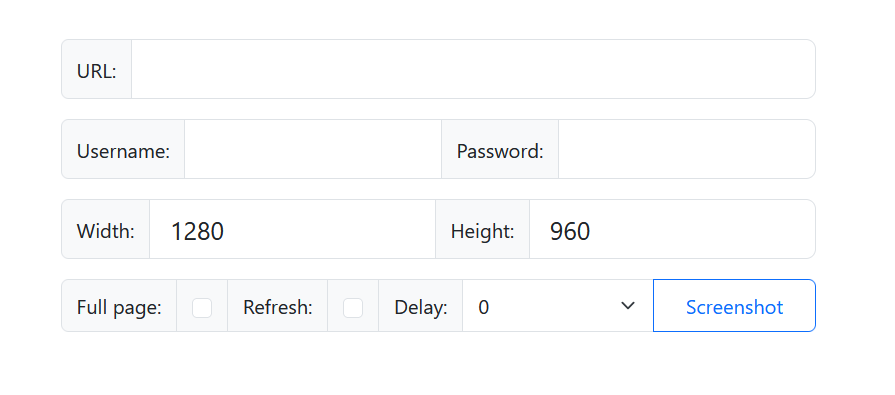
Pull and deploy the image on your localhost's port 80 with the following docker-compose.yaml example:
volumes:
  pyweb_capture_data:
    name: pyweb_capture_data

services:
  pyweb-capture:
    restart: always
    container_name: pyweb-capture
    image: somik123/pyweb-capture:latest
    volumes:
      - pyweb_capture_data:/app/data
    environment:
      PYCAPTURE_SECRET: d6aQCNhhtcQz3CURzFyRmj4dsw8zvz4s #<-- Change this to your prefered secret key
      PYCAPTURE_USER: somik123         #<-- Change this to your prefered username
      PYCAPTURE_PASS: 88ZdhFwziMHn2f86 #<-- Change this to your prefered password
      PYCAPTURE_CACHE: yes
      PYCAPTURE_DATA: /app/data
    ports:
      - 80:8080
| Query | Detailed info |
|---|---|
| secret | Required to provide if you set it in the env variable for the container. |
| url | The url to the website you want to screenshot |
| full | Set it if you want to capture the full page screeenshot |
| refresh | Set it if you want to refresh this specific screenshot |
| width | Set the page width. Screenshot image width will follow this as well. Min 100, max 4096, default 1280. |
| height | Set the page height. Screenshot image height will follow this as well. Min 100, max 4096, default 960. |
| delay | Delay from when the page is fully loaded before taking a screenshot. Min 0, max 10s, default 0. |
Capture full screen screenshot of a website:
http://10.0.0.10/?secret=d6aQCNhhtcQz3CURzFyRmj4dsw8zvz4s&full&url=https://github.com/somik123/python-web-capture
Capture simple screenshot of a website:
http://10.0.0.10/?secret=d6aQCNhhtcQz3CURzFyRmj4dsw8zvz4s&url=https://github.com/somik123/python-web-capture
Refresh screenshot of a website (instead of loading it from cache again):
http://10.0.0.10/?secret=d6aQCNhhtcQz3CURzFyRmj4dsw8zvz4s&refresh&url=https://github.com/somik123/python-web-capture
Capture screenshot with a specific page size of 1920x1080:
http://10.0.0.10/?secret=d6aQCNhhtcQz3CURzFyRmj4dsw8zvz4s&width=1920&height=1080&refresh&url=https://github.com/somik123/python-web-capture
Capture screenshot but wait 2 seconds for the ajax to load the contents: Capture simple screenshot of a website:
http://10.0.0.10/?secret=d6aQCNhhtcQz3CURzFyRmj4dsw8zvz4s&delay=2&url=https://github.com/somik123/python-web-capture
Note:
Hered6aQCNhhtcQz3CURzFyRmj4dsw8zvz4sis the secret key that we set in out docker-compose file. Do change it to something uncommon.
Replace10.0.0.10with the IP address or host of your machine.
If you are running it on a different port (then port 80) do add it to the request.