"Your Resume. The Harsh Reality."
Watch the Full Video Walkthrough
FAB is an AI-powered agent that acts like a strict technical interviewer. It reads your resume, scans your GitHub repositories, and exposes the truth about your skills.
- ✅ Verifies Claims: Checks if you actually have code to back up "Expert React" on your resume.
- 🔎 Detects Gaps: Finds skills you list but haven't used in public projects.
- 🧠 ** AI Interrogator**: Generates specific, project-based interview questions to test your knowledge.
- 📈 Project Roadmap: Gives you a concrete plan to build projects and fill your skill gaps.
You don't need to be an expert to run this. Follow these simple steps.
- Node.js (Version 18 or higher) - Download Here
- Git - Download Here
- (Optional) Ollama - If you want to run the AI locally on your PC.
Open your terminal (Command Prompt or PowerShell) and run:
git clone https://github.com/YOUR_USERNAME/FAB.git
cd FABThis command installs all the necessary code libraries for both the frontend (website) and backend (server).
npm run install:all(This looks for a scripts folder or runs npm install in both folders. If that command doesn't exist, run npm install inside backend/ and frontend/ separately).
- Duplicate the
.env.examplefile and rename it to.env. - Open
.envin a text editor (Notepad, VS Code). - Fill in your GitHub Client ID and Secret. (See Setup Guide for how to get these for free).
Start the system with one simple command:
npm run devThis will start:
- Frontend at:
http://localhost:5173 - Backend at:
http://localhost:3000
Click the link in your terminal to open the app in your browser!
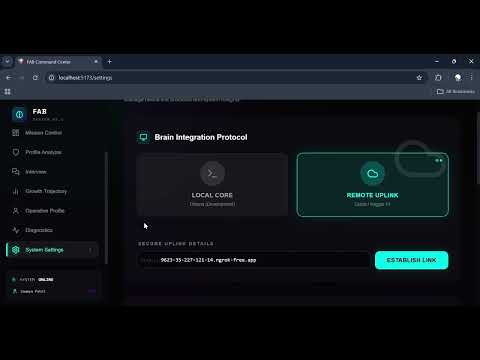
FAB needs an AI to think. You have two options:
- Download Ollama.
- Run
ollama run gemma2:2bin a separate terminal. - In FAB Settings, select "Local Core".
- We provide a free Google Colab script to run a powerful AI on Google's GPUs.
- Open the Setup Guide to learn how to deploy it in 2 minutes.
- In FAB Settings, select "Remote Uplink" and paste your URL.
| Dashboard | Analysis |
|---|---|
- Frontend: React, TailwindCSS, Framer Motion (for those smooth animations)
- Backend: Node.js, Express, TypeScript
- AI: Ollama, Transformers (HuggingFace), LangChain ideas
- Database: SQLite (Simple, file-based)
Found a bug? Want to add a feature?
- Fork the repo.
- Create a new branch (
git checkout -b feature/amazing-feature). - Commit your changes.
- Push to the branch.
- Open a Pull Request.
I am currently looking for immediate job opportunities. If you have an open role or know someone who is hiring, please contact me:
📧 Email: saumyavishwam@gmail.com
License: MIT. Use this tool to improve yourself, not to fake it! 💪