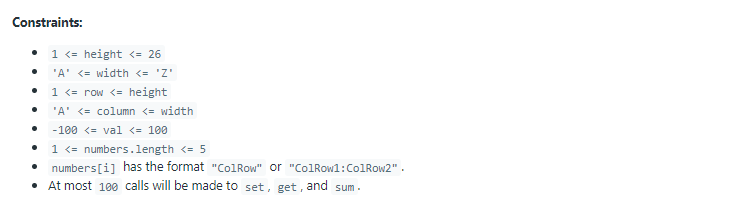
631. Design Excel Sum Formula #242

Description

https://leetcode.com/problems/design-excel-sum-formula/
Varsayılan kod:
class Excel {

    public Excel(int height, char width) {

    }

    public void set(int row, char column, int val) {

    }

    public int get(int row, char column) {

    }

    public int sum(int row, char column, String[] numbers) {

    }
}

/**
 * Your Excel object will be instantiated and called as such:
 * Excel obj = new Excel(height, width);
 * obj.set(row,column,val);
 * int param_2 = obj.get(row,column);
 * int param_3 = obj.sum(row,column,numbers);
 */

Example 1:

Input
["Excel", "set", "sum", "set", "get"]
[[3, "C"], [1, "A", 2], [3, "C", ["A1", "A1:B2"]], [2, "B", 2], [3, "C"]]
Output
[null, null, 4, null, 6]

Explanation
Excel excel = new Excel(3, "C");
 // construct a 3*3 2D array with all zero.
 //   A B C
 // 1 0 0 0
 // 2 0 0 0
 // 3 0 0 0
excel.set(1, "A", 2);
 // set mat[2]["B"] to be 2.
 //   A B C
 // 1 2 0 0
 // 2 0 0 0
 // 3 0 0 0
excel.sum(3, "C", ["A1", "A1:B2"]); // return 4
 // set mat[3]["C"] to be the sum of value at mat[1]["A"] and the values sum of the rectangle range whose top-left cell is mat[1]["A"] and bottom-right cell is mat[2]["B"].
 //   A B C
 // 1 2 0 0
 // 2 0 0 0
 // 3 0 0 4
excel.set(2, "B", 2);
 // set mat[2]["B"] to be 2. Note mat[3]["C"] should also be changed.
 //   A B C
 // 1 2 0 0
 // 2 0 2 0
 // 3 0 0 6
excel.get(3, "C"); // return 6