Repository navigation


RockWheel 2.1 lets you build and save equalizer presets on the iPod itself. It also fixes crashes and freezes reported after 2.0, including a crash when opening an artist’s songs from Now Playing. RockWheel README
Highlights
- You can set up the equalizer by ear while a song plays, or load an AutoEq preset made for your headphones.
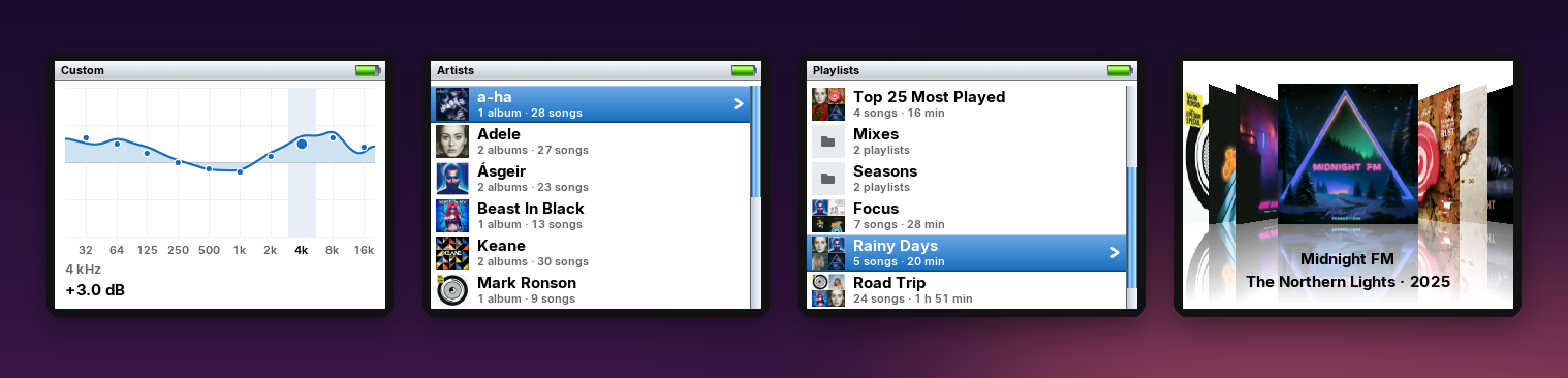
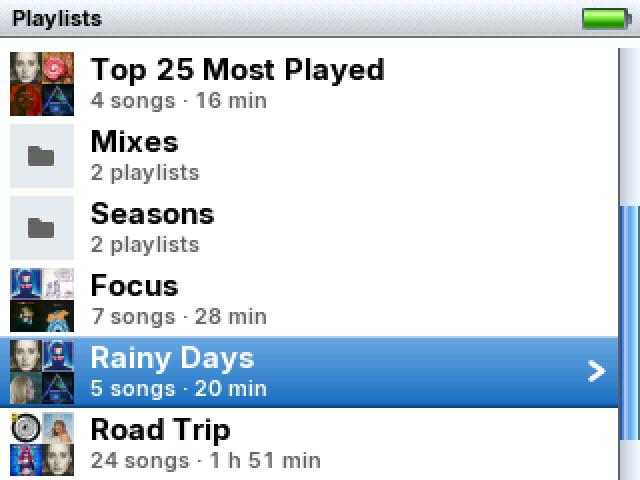
- You can see an album cover beside each artist. Each playlist has a collage of its albums, with the song count and playing time underneath its name.
- From Now Playing, press Select and Play together to open the current album in Cover Flow. Press Menu to return to the song.
- Sound Check can now adjust the volume for a whole album, preserving the difference between its quiet and loud tracks.
- If RockWheel detects a freeze, the iPod tells you how to restart it and saves a log to help diagnose the problem.
Before you update
- Choose Update in the RockWheel app or run the install command again. Your settings, play counts, ratings and playback positions carry over. Both installers also update the games, since games built for 2.0 won’t run on 2.1. The desktop app from 2.0.1 (version 1.0.1) works with this release.
- The first startup takes longer. The iPod checks its free space, and Updating Library rebuilds several lists, Cover Flow’s albums among them. It also remakes the artwork in list views and some of Cover Flow’s covers.
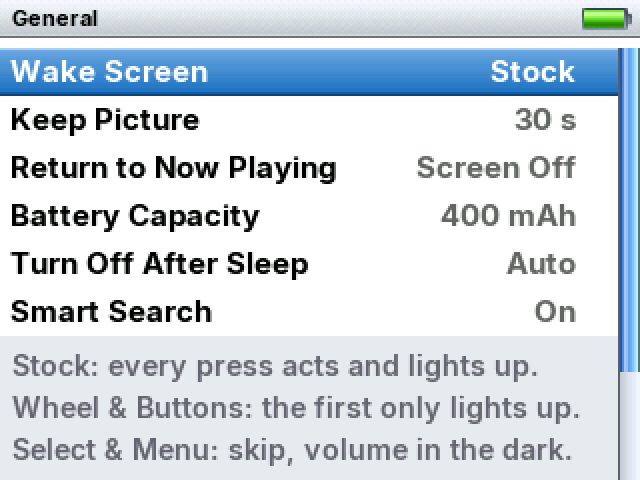
- Wake Screen now defaults to Stock. With the backlight off, one press of Next skips the song and lights the screen. If you prefer the first press to wake the screen only, choose Wheel & Buttons. If you had already chosen Wheel & Buttons, it stays. The old default was Select & Menu. If you had it, you now get Stock, and you can choose Select & Menu again.
- Holding Menu still takes you to the main menu from anywhere. The longer hold that switched between your last two screens has been removed.
- The first sync restores playlist names that were cut short in 2.0. If you were listening to one of those playlists, you’ll need to open it again to resume playback.
- If you’re updating from 1.4.1, also read Before you update in the 2.0 release notes.
What’s new
Equalizer
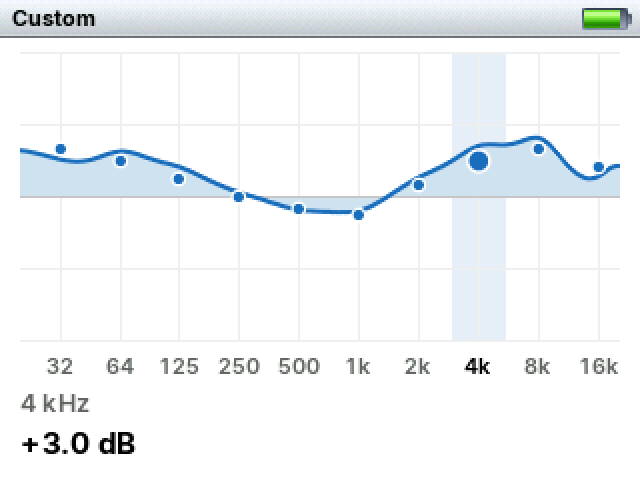
Open Settings › Sound › EQ and choose Custom under My Presets. You can also reach the equalizer from Now Playing. The curve updates as you adjust the ten bands. While a song plays, hold Play to bypass the equalizer at the same loudness. Release it to hear your settings again.
- Each band has its own frequency, gain, Q and filter type. The wheel adjusts gain in 0.5 dB steps from −12 to +12 dB.
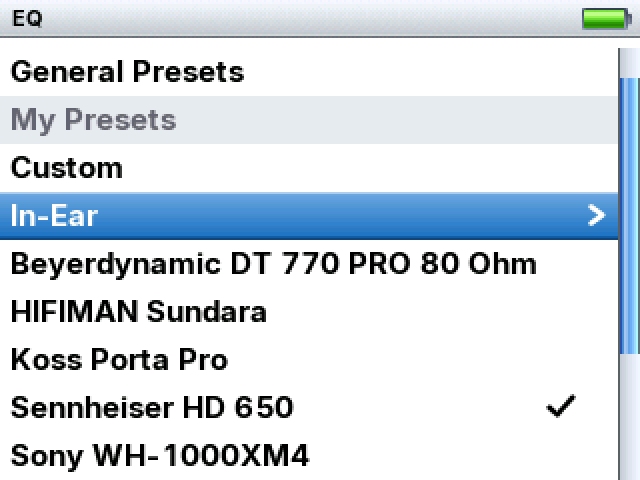
- Hold Select in the editor to save a named preset, use another preset as a starting point or reset the curve to flat. Hold Select on a saved preset to edit, rename or delete it.
- My Presets lists files in
.rockbox/eqson the iPod, with folders first. It accepts RockWheel presets, older Rockbox presets andParametricEQ.txtfiles from AutoEq or Equalizer APO. - Choose a preset to hear it immediately. A check mark shows the active preset, and the list stays open so you can compare it with the next one. The equalizer menu also offers Off, General Presets and Headphones.
Music and library
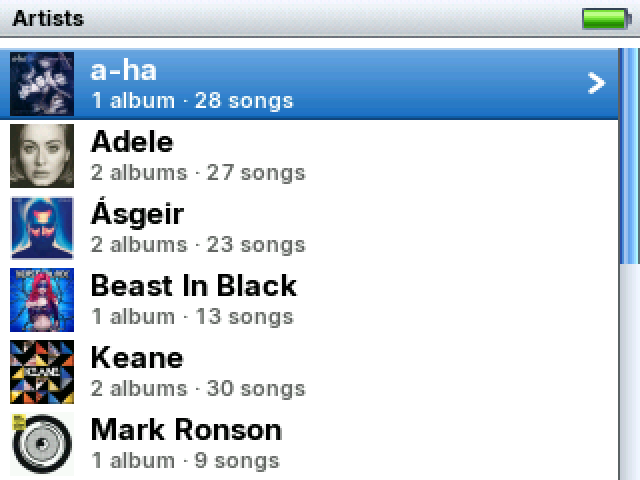
- Each artist in Music › Artists appears with artwork from their earliest album that has a cover, plus album and song counts. You can sort an artist’s albums by year or name.
- Each playlist shows a collage from its first four distinct albums with artwork. Open it to see the collage, track count and total playing time above the songs. Playlist folders show how many playlists they contain. Albums now show their total playing time above the track list too.
- You can turn off Artist Covers and Playlist Covers independently in Settings › Appearance › Lists.
- If you manually delete a song file that Finder synced, the next library update removes its entry.
- If there isn’t enough memory to add new songs, the iPod tells you and retries them at the next sync. Your removals, play counts and ratings still go through. In emulator tests, a 32 MB iPod Video could index about 58,000 songs on the first import and about 54,000 during a later sync.
Playback
- Sound Check › Albums uses the album gain stored in the files to apply the same volume adjustment to every track on the album. When you shuffle individual songs, Sound Check uses track gain. You can switch between Off, On and Albums from Now Playing.
- Choosing Play Next, Play Last or Shuffle near the end of a song no longer restarts it. With Crossfade on, the song fades out and the fade can start up to two seconds early.
- If part of a FLAC file is damaged, playback can continue past it. Opus files now play to the end, and AIFF and AIFC files saved by Core Audio now play on the iPod.
- RockWheel now recognizes the numeric ID3 genres for audiobooks and podcasts in files you copy yourself, so those files appear under Audiobooks or Podcasts. Files that were already on the iPod stay where they were. To move them, delete them, unplug the iPod and let it update the library, then copy them back.
Cover Flow
Open an album and the cover now flips right edge first to reveal the tracks. The turn is shorter and plays in reverse when you close the album.
Podcasts
You can sort shows alphabetically or by newest episode. For episodes you copied to the iPod yourself, hold Select and choose Delete, or use the show’s menu to delete its played episodes in one go. Episodes synced with Finder are still managed on the computer.
Interface and settings
- Wake Screen now explains what each of its three options does. Choose Select & Menu to skip songs and adjust the volume without lighting the screen.
- On iPod Video, Settings › General › Keep Picture keeps the image visible for 30 seconds after the backlight goes out. The other choices are Off, 10 seconds, one minute, five minutes and Always.
- Turn off Settings › Appearance › Volume Number to hide the percentage in Now Playing. The volume bar stays visible.
- Classic adds Hot Pink beside Pink. In Dieter, the clock and battery icon now line up with the menu text. Playlist names that start with stars now line up with the rest of the list.
- RockWheel usually detects a freeze after 10–20 seconds and then shows restart instructions in your language. Hold Menu and Select to restart, then send the
.rockbox/crash.logfile named on screen. The log records where RockWheel stopped. The backlight turns off after about a minute, and any button lights it again.

Sync and storage
- About › Available now agrees with Finder or iTunes even if the computer left an incorrect free-space count on the iPod. RockWheel checks the count after each USB session and the first time a new firmware version starts. The check took about three seconds on each test iPod.
- On macOS 26, Spotlight no longer writes an index to the iPod during sync. Any existing index stays on the drive.
- After a sync, every step that follows the import now shows Updating Library. None of them keeps the iPod busy for more than about 0.15 seconds at a time, so the iPod still answers the power button and USB while it works. On the test iPod Video, one step used to keep it busy for 1.45 seconds.
- Cover Flow needs fewer reads from storage to prepare album covers, especially on iPods with large libraries.
iPod Photo
- Menu labels, hints and confirmation prompts that were cut off on the 220-pixel screen now fit across all four themes. These fixes cover 44 languages.
- If a small thumbnail is blank, Cover Flow now looks for a larger copy of the artwork. It rebuilds affected covers on the first startup.
- Gradients in Classic now look as smooth as they do on the Video. Opening an empty photo library shows “No Photos” over the main menu without leaving fragments of the previous screen.
Fixes
Crashes and hangs
- Fixed the “Stkov main” crash when opening Now Playing › Go to Artist › All Songs, and other deeply nested menus now have more room.
- Fixed crashes and freezes caused by damaged artwork, APE tags and voice files, as well as corrupt MP4, FLAC, Opus, Ogg, Musepack and RealMedia files.
- If the music database is damaged, the main menu still opens. Open Music to rebuild the library.
- If a file crashes Updating Library, RockWheel skips it at the next startup so the iPod can finish booting.
- Fixed startup crashes caused by damaged fonts, skins or settings files.
Library and sync
- RockWheel now keeps ratings and play counts recorded while it’s saving the database.
- Long playlist names now survive a sync, and songs with long file paths appear in the library. The old length limit was especially noticeable with Cyrillic, Chinese, Japanese and Korean names.
- Synced playlists now stay out of Playlists › Unsynced. During import, RockWheel leaves folders it didn’t create in place.
- Fixed a problem that could leave the main menu blank after repeated syncs. Updating Library now closes files as it finishes with them.
Buttons and screen
- Button presses now register even when a song is changing.
- The screen goes dark again if the iPod has to postpone shutdown, for example while it saves the database.
- Touching the wheel as you engage Hold no longer makes the list jump when you release Hold.
USB
- The iPod now recovers if the computer resets a USB transfer midway. Previously, the connection could stay stuck until the USB port was reset.
- RockWheel now reports a failed write to the computer even if it had already acknowledged the transfer.
Known limitations
- Car stereos that control an iPod over USB still don’t recognize RockWheel. If your stereo has an AUX input, you can use the iPod’s headphone jack or line out.
- If your Mac disconnects the iPod during a sync, try another USB port or a powered USB 2.0 hub. The test Mac also dropped the connection in Apple’s Disk Mode. If album covers look wrong afterward, choose Settings › Rebuild Synced Covers and sync again.
- iPod Photo support is still in beta and has been tested on one device. The other limitations listed in the 2.0 release notes still apply.
Thanks
Thank you to everyone who sent a crash.log or health.log after 2.0. Those reports helped track down the All Songs crash, incorrect free-space readings on large cards and black covers on iPod Photo. Thanks to epikorous for the Cover Flow animation. Two of the FLAC fixes come from Rockbox.
Files
| File | Purpose |
|---|---|
RockWheel-mac.dmg |
RockWheel app for Mac |
RockWheel-windows-setup.exe |
RockWheel app for Windows |
RockWheel-mac.app.tar.gz, latest.json |
Automatic updates for the desktop app |
rockbox.zip |
Firmware for iPod Video |
rockbox-ipodcolor.zip |
Firmware for iPod Photo |
rockbox-games.zip, rockbox-games-ipodcolor.zip |
Eight extra games per model (Video and Photo, respectively) |
bootloader-ipodvideo.ipod |
Rockbox bootloader for iPod Video, the same one used since 1.2.0 |
bootloader-ipodcolor.ipod |
RockWheel bootloader for iPod Photo, the same one used since 2.0 |
ipodpatcher, ipodpatcher.exe |
Tools used by the macOS and Windows install scripts |
SHA256SUMS, SHA256SUMS-games, SHA256SUMS-windows |
Checksums for release files |
SHA-256 checksums for the desktop app downloads
e7a55cc808384bcab11a77b73315fb47fa178ce75c901d173edddfd88b181558  RockWheel-mac.dmg
17d901e40000835ef772ac04dbd47139253f79a26e45e5b3e20b9559dcbf051a  RockWheel-windows-setup.exe