Skip to content
This repository was archived by the owner on Apr 17, 2023. It is now read-only.

Support for building Windows app on Windows#1795

Merged
zone117x merged 6 commits intodevelopfrom
feature/windows-build-proper
Jan 16, 2019
Merged

Support for building Windows app on Windows#1795
zone117x merged 6 commits intodevelopfrom
feature/windows-build-proper

Conversation

@zone117x
Copy link
Contributor

@zone117x zone117x commented Jan 15, 2019

Ported the shell build scripts and vsts config over to package.json scripts (similar setup to the macOS build scripts).

Building the Windows app and .msi now only requires running npm run win32

@kantai This is largely an additive PR, only couple minor changes to BlockstackBrowser.csproj and BlockstackSetup.wixproj to fix:

  1. Long file paths when repo is not installed close to the drive root (ex: C:\Users\matt\Documents\Source\Blah\Projects\blockstack-browser vs C:\blockstack-browser
  2. msbuild/batch path evaluation when deep git-bash integration into cmd.exe is not installed.

Should only need to double check that the current msi producing CI works without issue.

…n a typical Window machine using npm scripts - similar to the macOS build system.

* Ported the assemble-build.sh and vsts build process & configs to package.json scripts.
* Fixed relative file path bug in wix installer project.
* Fixed bug with win32 long file path restriction in the xcopy command used for Resource files in a csproj script.
* Added small batch script for finding and invoking msbuild.
* Added shx npm devDependency - provides cross unix shell commands.
@zone117x zone117x requested review from hstove and kantai January 15, 2019 15:47
@CLAassistant
Copy link

CLAassistant commented Jan 15, 2019

CLA assistant check
All committers have signed the CLA.

@kantai
Copy link
Contributor

kantai commented Jan 15, 2019

Cool, thanks @zone117x, taking a crack at updating the CI to use this now.

@kantai
Copy link
Contributor

kantai commented Jan 15, 2019

I'm getting shx errors from the Windows build pipeline:

2019-01-15T16:16:19.1434202Z > shx rm -rf build native\windows\BlockstackBrowser\bin native\windows\BlockstackSetup\bin native\windows\ProtocolHandler\bin native\windows\BlockstackBrowser\Resources\build native\windows\BlockstackBrowser\Resources\cors-proxy native\windows\BlockstackBrowser\Resources\node_modules native\windows\BlockstackBrowser\Resources\node.exe
2019-01-15T16:16:19.1434587Z 
2019-01-15T16:16:19.1476019Z sh: 1: shx: not found
2019-01-15T16:16:19.1503101Z npm ERR! file sh
2019-01-15T16:16:19.1503621Z npm ERR! code ELIFECYCLE
2019-01-15T16:16:19.1503906Z npm ERR! errno ENOENT
2019-01-15T16:16:19.1504200Z npm ERR! syscall spawn
2019-01-15T16:16:19.1514715Z npm ERR! blockstack-browser@0.35.3 win32:clean: `shx rm -rf build native\windows\BlockstackBrowser\bin native\windows\BlockstackSetup\bin native\windows\ProtocolHandler\bin native\windows\BlockstackBrowser\Resources\build native\windows\BlockstackBrowser\Resources\cors-proxy native\windows\BlockstackBrowser\Resources\node_modules native\windows\BlockstackBrowser\Resources\node.exe`
2019-01-15T16:16:19.1515020Z npm ERR! spawn ENOENT

@hstove
Copy link
Contributor

hstove commented Jan 15, 2019

Do we do code signing of windows builds?

@zone117x
Copy link
Contributor Author

zone117x commented Jan 15, 2019

@kantai

2019-01-15T16:16:19.1476019Z sh: 1: shx: not found

Couple things to note here:

  • shx is a devDependency that is directly runnable inside package.json scripts. I think this indicates that build machine is on an older version of node/npm where that wasn't possible.
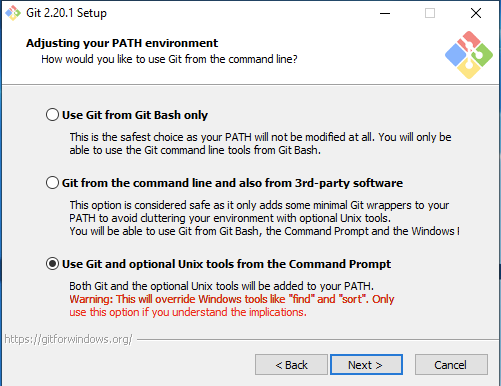
  • That output suggests the scripts are being ran inside bash instead of Windows cmd/batch. Which I think indicates that machine has dangerous/breaking deep git-bash integration installed or some other non-typical environment setup, like running everything through the WSL bash, idk.

Example:
image

Also this npm build script doesn't do any code signing.

I recommend leaving the existing codesigned-msi-producing setup alone - let it remain using the old build scripts. Or setup a fresh environment/VM that won't cause these issues.

@zone117x
Copy link
Contributor Author

Here's an appveyor.yaml for building and producing an msi artifact (not codesigned). Just set it up here https://ci.appveyor.com/project/zone117x/blockstack-browser/build/artifacts

image: Visual Studio 2017
environment:
  nodejs_version: 10
install:
- cmd: >-
    powershell -Command "(new-object System.Net.WebClient).DownloadFile('https://github.com/wixtoolset/wix3/releases/download/wix3111rtm/wix311.exe', 'wix311.exe')"

    wix311.exe /install /quiet /norestart

    npm i
build_script:
- cmd: npm run win32
artifacts:
- path: '**\BlockstackSetup.msi'

@kantai
Copy link
Contributor

kantai commented Jan 15, 2019

This works great for me @zone117x -- tested by using the built artifact to install over existing install.

@kantai
Copy link
Contributor

kantai commented Jan 15, 2019

I'm ready to approve this, but why did the /branch check failed ?

@zone117x
Copy link
Contributor Author

I'm ready to approve this, but why did the /branch check failed ?

I accidentally removed it from the build queue on AppVeyor's end while testing. If we close then re-open the PR it should work. Want me to try that?

@kantai
Copy link
Contributor

kantai commented Jan 15, 2019

Nope -- this is fine.

Copy link
Contributor

@kantai kantai left a comment

Choose a reason for hiding this comment

The reason will be displayed to describe this comment to others. Learn more.

The build on AppVeyor worked smoothly -- it installed over existing installations of blockstack browser on Windows just as it should.

@hstove
Copy link
Contributor

hstove commented Jan 16, 2019

Unfortunately I'm not sure how to review this, since I'm on a Mac. I do have a computer with bootcamp and windows around the house but it's not setup for anything development related. I could spend some time setting up node and trying to build this. But, I trust Aaron's review if it works for him.

@zone117x
Copy link
Contributor Author

@hstove for verifying signature, I think the unix tool osslsigncode that we've been using for signing, can also verify the signature on the msi artifact from appveyor. Not sure about the usage args though.

Unfortunately I'm not sure how to review this, since I'm on a Mac.

I use a Windows VM on my Mac. VMWare Fusion and Parallels both work pretty well. But that would take quite some time to setup and install all the requisite tooling.

I think the fact that the build scripts works on a clean Windows CI (appveyor) is good enough.

@kantai good to merge?

@kantai
Copy link
Contributor

kantai commented Jan 16, 2019

@kantai good to merge?

Yep, go ahead.

@zone117x zone117x merged commit 9310a98 into develop Jan 16, 2019
Sign up for free to subscribe to this conversation on GitHub. Already have an account? Sign in.

Labels

None yet

Projects

None yet

Development

Successfully merging this pull request may close these issues.

4 participants