Repository navigation
Home
modbus-sim simulates Modbus devices that behave: an energy meter whose counters count, a temperature controller that heats towards its set point, a PV inverter that follows the sun. They answer Modbus TCP, RTU over TCP and RTU on a serial line or a virtual serial port, so you can develop and test SCADA links, data loggers, gateways, Node-RED flows or your own Modbus code without the hardware — also in CI.
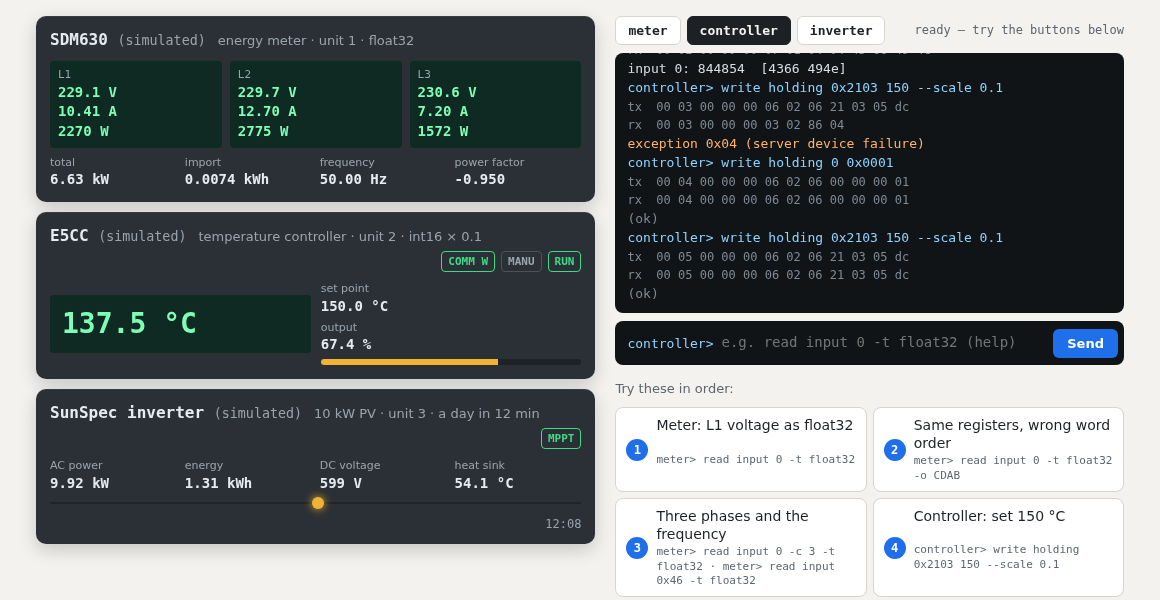
Try it without installing anything: https://modbus-sim.steitec.net runs the real simulator in your browser — see Browser demo.
- Developing integrations before the devices are there — or while the plant is running and nobody lets you touch it.
- Running Modbus code in CI. A simulated bench starts in milliseconds, in a pytest fixture or as a background process.
- Testing the unhappy paths. Silent devices, late answers, busy devices, exceptions, bad CRCs, dropped connections, drifting values, a lost phase, a broken sensor, a grid failure — switched on at runtime.
- Getting the details right that break integrations: word order, scale factors, 0- vs 1-based addresses, gaps in the register map, write protection.
| If you want to … | read |
|---|---|
| see it working in two minutes | Browser demo |
| install it and read a first register | Getting started |
| simulate an Eastron SDM630, Omron E5CC or a SunSpec inverter | Real-device profiles |
| use it in pytest and CI pipelines | Testing in CI |
| check that your code copes with misbehaving devices | Fault injection recipes |
| find out why something does not answer or reads nonsense | Troubleshooting |
The README is the complete reference: protocol details, the profile format, bench files, the control channel, the Python client. This wiki adds walkthroughs and background.
| Install |
pip install modbus-sim (Python 3.10+, only dependency PyYAML; [serial] adds pyserial) |
| Transports | Modbus TCP, RTU over TCP, RTU on a serial port or a pty (Linux/macOS) |
| Function codes | 01–08, 15, 16, 22, 23, 43/14 (device identification) |
| Profiles after real devices |
eastron-sdm630, omron-e5cc, sunspec-inverter
|
| Invented devices |
energy-meter, temperature-controller, vfd (frequency converter) |
| Your own devices | YAML: points in all four tables, 16/32/64-bit integers, floats, strings, word order, scale, limits, signal sources |
| Faults |
no_response, delay, exception, busy, drop_connection, bad_crc, wrong_transaction, wrong_unit, truncate, freeze, drift, plus device faults (phase_loss, sensor_break, trip, grid_loss, ground_fault, over_temp) |
| Tested on | Linux, Windows, macOS; Python 3.10 and 3.13; cross-checked against pymodbus |
| License | MIT |
The real-device profiles follow public documentation and are not verified on real hardware. If you own one of these devices and something answers differently, please open an issue.