Repository navigation
Product profiles
These profiles make the simulated server look like a real product to your client: same namespace URIs and indices, same form of node IDs, same data types, as far as public sources describe them.
None of them is a complete copy of a product, and none has been compared with real hardware.
Run opcua-sim map <profile> to see every node ID together with the sources and limits of that profile.
A PLC server publishes whatever program runs on it, so no profile can contain "the" address space of an S7-1500. These profiles present one small example program (run and reset bits, a ramp, a part counter, a latching fault) the way each server would. That tests what breaks when you move between brands.
| Profile |
Speed is |
Based on | Assumed or missing |
|---|---|---|---|
siemens-s7-1500 |
ns=3;s="DB_Line"."Speed" |
Siemens application document 109737901 for the ID form; third-party guides for the URI and folders | folders and URI not confirmed by Siemens |
beckhoff-twincat3 |
ns=4;s=MAIN.fSpeed |
Beckhoff Information System for the URI, a Cybus guide for the IDs | real defaults are stricter |
phoenix-plcnext |
ns=2;s=Arp.Plc.Eclr/MainInstance.rSpeed |
PLCnext documentation for the URI and ID form | namespace index, folders |
omron-nx |
ns=2;s=new_Controller_0.GlobalVars.Speed |
Omron manual W588 for the tree, types and status nodes | the manual gives no URI or ID strings: placeholders |
codesys-control |
ns=4;s=|var|CODESYS Control for Linux SL.Application.PLC_PRG.rSpeed |
forum reports only | the URI is a placeholder, folders; the weakest of the six |
opcua-sim serve --profile siemens-s7-1500 --name plc
opcua-sim browse --depth 4
opcua-sim write 'ns=3;s="DB_Line"."Run"' true
opcua-sim read 'ns=3;s="DB_Line"."Speed"'
opcua-sim inject plc trip code=12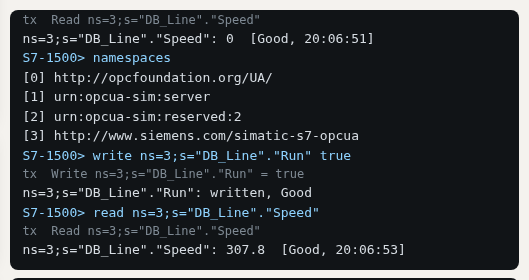
The picture is from the Browser demo, which answers by the same rules.
Their own faults are trip, which latches until the Reset bit rises, and plc_stop, where the program
stops calculating. Omron's status nodes follow them: Mode goes to PROGRAM, ErrorStatus to MajorFault.
leuze-bcl300 is a bar code reader with node IDs, browse names and data types from the manufacturer's
table (Leuze technical description 50141930). It covers 19 of the 136 nodes listed for the BCL 300.
| Node | Name | |
|---|---|---|
ns=4;i=6006 |
DeviceStatus |
0 idle, 1 error, 2 scanning, 3 busy |
ns=4;i=6205 |
LastScanData |
the last code |
ns=4;i=6202 |
ScanActive |
writable here; the manual does not say |
ns=4;i=6043 |
Ok |
good reads |
ns=4;i=6042 |
NotOk |
bad reads |
ns=4;i=7002 |
ScanStop |
method on ns=4;i=5001
|
opcua-sim serve --profile leuze-bcl300 --name reader
opcua-sim read 'ns=4;i=6006' 'ns=4;i=6205'
opcua-sim call 'ns=4;i=7002' --object 'ns=4;i=5001'
opcua-sim inject reader read_fail
ScanStart and Scan are missing, because they need the AutoID ScanSettings structure. The DI and
AutoID namespaces exist only as URIs, without their types, and DeviceStatus is Int32 here rather
than the enumeration.
- Each one is a whole server and must be the only device of its bench.
- They have no alarms and no
DeviceHealthnode. - Security and users are not preset. Where a real product is stricter, as TwinCAT and Omron are, set
security,usersandanonymousin your bench to match. - Not included: Rockwell, Mitsubishi and gateways such as KEPServerEX, because the sources found were not good enough to copy them.
If you have one of these products, the NamespaceArray and the address tree from a client such as
UaExpert would replace the assumptions here. Please
open an issue.