Stencil Component attributes are missing typing info in Angular #2909

Description

Stencil version:
@stencil/core@2.5.2
I'm submitting a:
[x] bug report
[ ] feature request
[ ] support request => Please do not submit support requests here, use one of these channels: https://stencil-worldwide.herokuapp.com/ or https://forum.ionicframework.com/
Current behavior:
After building my components with Stencil and generating an Angular version of it using the output target, I can access my component and its attributes. However, my attributes don't have any typing information in Angular.
After seeing this in my own component library, I tried to do the same with some public ones built in Stencil: DuetDS and Ionic. I got the exact same results.
Expected behavior:
Intellisense/Autocompletion would tell me what type the attribute expects (at least string), just like it would for an Angular component which has an @Input() defined.
Steps to reproduce:
The easiest way would be to:
- create a new Angular application
- add DuetDS (
npm install @duetds/angular) and/or Ionic (ng add @ionic/angular) - for DuetDS: add
DuetComponentsto theimports: []array inapp.module.ts - go to
app.component.htmland at the button write:- DuetDS:
<duet-button [variation]=""></duet-button>, and hover over[variation] - Ionic:
<ion-button [fill]=""></ion-button>and hover over[fill]
- DuetDS:
Both libraries do not display the values that the attribute accepts. You can find the attributes by following the type definitions in both libraries.
Related code:
If my component has this @Prop:
@Prop() iconPlacement: 'left' | 'right = 'left';Inside a fresh Angular app (v12), I get this as typing info:

In contrast: if we generate an Angular component and give it the following code:
@Input() placement: 'left' | 'right' = 'left';This is what Intellisense/Autocompletion would display:

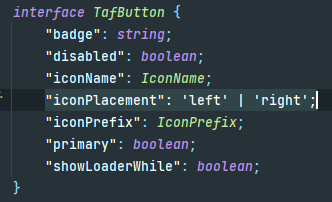
Following the type definitions (I work in IntelliJ, so I follow it using Ctrl+Click), you can see that the definitions are present on the component interface:
Other information: