Open source memory infrastructure for teams.
Turn scattered company knowledge into AI-ready context.
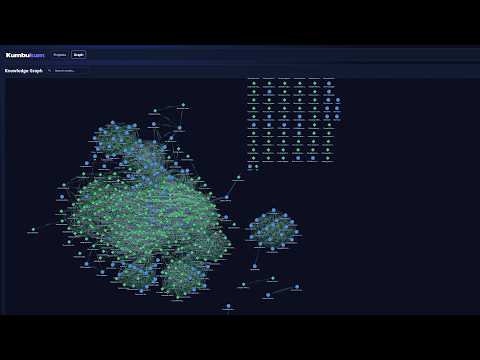
Stop reset loops. Give every AI tool trusted memory your team can inspect, control, and reuse.
Streamient is an open-source memory layer for AI-native teams and MCP-compatible tools. Store notes, memories, URLs, and relationships in one place, then let assistants retrieve the right context across sessions, projects, and clients.
Website · Cloud · Docs · Self-Hosted Guide · MCP Docs · API Reference

AI tools are great at reasoning and terrible at remembering.
Streamient gives you a shared, searchable, editable memory layer that sits between your team and your AI tools:
- Persistent context — keep preferences, decisions, docs, and bookmarks across sessions
- Works across tools — use the same memory store with Claude Desktop, Cursor, and other MCP clients
- Open and inspectable — your memory is not trapped in a black box
- Built for teams — organize knowledge by project, connect related items, and make it reusable
- Notes — rich-text documents with full-text and semantic search
- Memories — short-form context for preferences, decisions, and learnings
- URLs — saved pages with extracted content and optional full-site crawling
- Knowledge Graph — manual, tag-based, and semantic links between items
- AI Chat — search and manage knowledge with natural language
- MCP Server — 44 tools for notes, memories, URLs, projects, graph, and search
- Browser Extension — save notes and URLs from anywhere
- Bidirectional Git Sync — sync project knowledge to and from Git repositories
- Capture knowledge — add notes, store memories, save URLs, or import documents
- Connect your tools — plug Streamient into Claude Desktop, Cursor, or another MCP client
- Retrieve the right context — your assistant searches and reuses what matters, instead of starting from zero every time
Streamient Cloud and the self-hosted edition share the same product features. The difference is who runs the infrastructure.
| Cloud | Self-Hosted | |
|---|---|---|
| Features | All | All |
| Hosting | Managed by us | You manage |
| Updates | Automatic | Manual |
| Backups | Included | You configure |
| Pricing | Subscription | Free (open source) |
- Sign up at app.streamient.com
- Create your first project
- Generate a personal access token in Settings → Tokens
- Add Streamient to your AI tool
Example Claude Desktop config on macOS:
{
    "mcpServers": {
        "streamient": {
            "command": "npx",
            "args": ["-y", "mcp-remote", "https://mcp.streamient.com/mcp"],
            "env": {
                "ACCESS-TOKEN": "your-access-token"
            }
        }
    }
}Requirements:
- Node.js >= 24
- Docker & Docker Compose
- pnpm 10+ (for local development)
- MongoDB 6+
- Redis 6+
- Typesense 31+
Grab the production Compose file and pass configuration as shell environment variables:
curl -O https://raw.githubusercontent.com/streamient/streamient/main/compose.prod.yml

APP_URL=https://your-instance.com \
SESSION_SECRET=your-session-secret \
JWT_SECRET=your-jwt-secret \
TYPESENSE_API_KEY=your-typesense-key \
SMTP_HOST=smtp.example.com \
SMTP_USER=you@example.com \
SMTP_PASS=your-smtp-password \
SMTP_FROM=noreply@example.com \
GOOGLE_API_KEY=your-google-api-key \
docker compose -f compose.prod.yml up -d
For multiple outbound SMTP servers, set SMTP_SERVERS to a JSON array of server objects. Streamient sends through them round-robin.
Example:
SMTP_SERVERS='[
	{
		"name": "smtp-1",
		"host": "smtp1.example.com",
		"port": 587,
		"secure": false,
		"user": "smtp-user-1",
		"pass": "smtp-pass-1",
		"from": "server@streamient.com"
	},
	{
		"name": "smtp-2",
		"host": "smtp2.example.com",
		"port": 465,
		"secure": true,
		"user": "smtp-user-2",
		"pass": "smtp-pass-2",
		"from": "server@streamient.com"
	}
]'
In Docker Compose YAML, quote it as a single JSON string:
environment:
    SMTP_FROM: server@streamient.com
    SMTP_SERVERS: >-
        [{"name":"smtp-1","host":"smtp1.example.com","port":587,"secure":false,"user":"smtp-user-1","pass":"smtp-pass-1","from":"server@streamient.com"},{"name":"smtp-2","host":"smtp2.example.com","port":465,"secure":true,"user":"smtp-user-2","pass":"smtp-pass-2","from":"server@streamient.com"}]
Only host is required per server. port defaults to 587, secure defaults to true only for port 465, and from falls back to SMTP_FROM.
No .env file is required for this setup.
Default service ports:
| Service | Port |
|---|---|
| App | 3000 |
| WebSocket | 3001 |
| MCP Server | 3002 |
| MongoDB | 27017 |
| Redis | 6379 |
| Typesense | 8108 |
For repository development, make sure MongoDB, Redis, and Typesense are available, then run:
git clone https://github.com/streamient/streamient.git
cd streamient
pnpm install
pnpm dev
Useful scripts:
pnpm dev— run the app with auto-reloadpnpm build— build frontend assetspnpm test— run the test suitepnpm test:mcp— run MCP-specific testspnpm docs:dev— run the docs site locally
Streamient includes a built-in Model Context Protocol server with:
- 44 tools across notes, memories, URLs, projects, graph, search, and AI chat
- Shared memory across tools so Claude Desktop, Cursor, and others pull from the same context
- Three transports — stdio, SSE, and Streamable HTTP
- Token-based auth via
Authorization: Bearer,access-token, or stdio env vars - Automatic default project selection so tools work without extra setup
Self-hosted example:
env 'ACCESS-TOKEN'=your-access-token API_BASE_URL=https://your-instance.com node apps/mcp/server.js- Backend — Node.js + Express
- Database — MongoDB
- Search — Typesense for full-text and semantic retrieval
- Cache / real-time — Redis + Socket.IO
- Frontend — Pug templates + vanilla JavaScript
- MCP app —
apps/mcp/for agent integrations
Licensed under AGPL-3.0.