Don't know how to recover data from backup #1227


-
|
Hi, first of all, I think superProductivity is awesome! Now, let's go to the question: My superProductivity 7.0.0 crashed, so I had to reinstall it. I reinstalled the stable version (6.5.2). I confirmed that I have all the data daily backed-up in json files (projects, subprojects, tasks, date, times, etc.), nevertheless I don't know how to restore it. In Settings, I configured 'Automatic Backups'. There, the help message states: "Auto save all data to your app folder in order to have it ready in case something goes wrong." It would be great to know what to do in case something goes wrong. Thanks! |
Beta Was this translation helpful? Give feedback.
Replies: 4 comments 2 replies

-
|
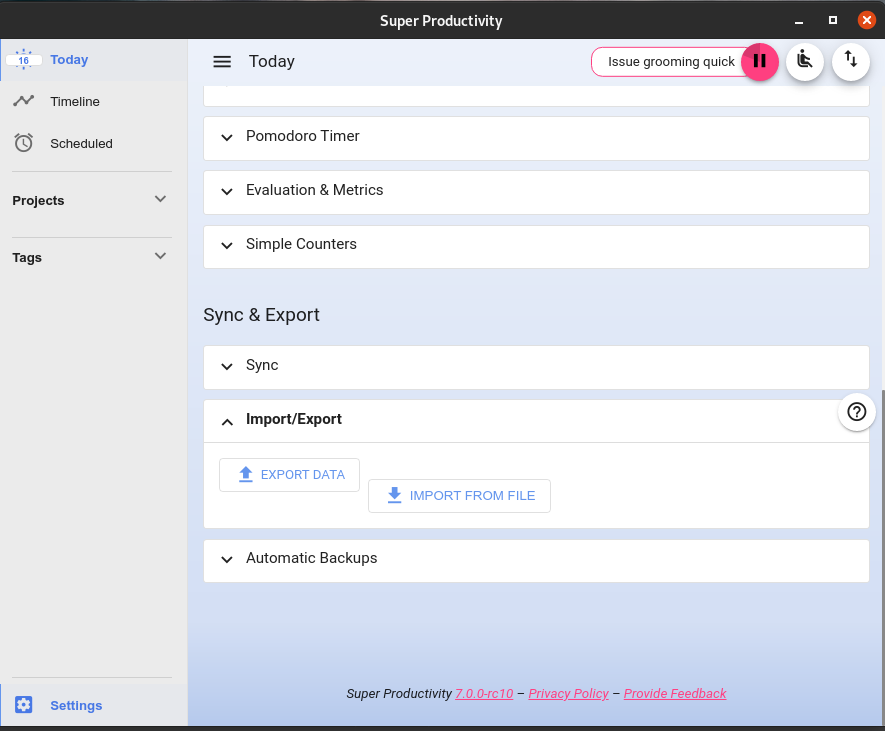
Hi there! Thank you very much for your question! You should be able to restore your backups from Settings -> Import/Export -> Import from File. Then you just select the backup you want to restore.
|
Beta Was this translation helpful? Give feedback.

-
|
Thank you for this app, it really seems to have everything I need in a to-do list/time management software. |
Beta Was this translation helpful? Give feedback.

-
|
If you expand "Automatic Backups" there is a link to your file system. Syncing and backups are distinct features. The data format of the two should be almost identical. |
Beta Was this translation helpful? Give feedback.
-
|
Great! I did it and it worked!In one of the versions (I don't remember which one) I tried this function but it only accepted .csv files, so I discarded it.But now I tried again and I recovered everything!Thanks a lot!!!
El viernes, 21 de mayo de 2021 07:04:31 ART, Johannes Millan ***@***.***> escribió:
Hi there! Thank you very much for your question! You should be able to restore your backups from Settings -> Import/Export -> Import from File. Then you just select the backup you want to restore.
—
You are receiving this because you authored the thread.
Reply to this email directly, view it on GitHub, or unsubscribe.
|
Beta Was this translation helpful? Give feedback.

-
|
This discussion was automatically closed because it has been inactive for 180 days without an accepted answer. If the topic is still relevant, please feel free to reopen the discussion and add some more context or detail. |
Beta Was this translation helpful? Give feedback.
-
|
This discussion was automatically closed because it was answered but has had no further activity in 90 days. If the topic is still relevant, please feel free to reopen the discussion and add some more context or detail. |
Beta Was this translation helpful? Give feedback.


Hi there! Thank you very much for your question! You should be able to restore your backups from Settings -> Import/Export -> Import from File. Then you just select the backup you want to restore.