An End-to-End azure implementation for DevOps, focusing on automation, security, and observability.
-
Infrastructure as Code (IaC) & Configuration
Fully automated provisioning using Terraform modules (Compute, Network, Monitoring) and Cloud-Init. Ensures environments are reproducible, immutable, and free from configuration drift. -
Automated DevOps Pipeline
End-to-end GitHub Actions workflow that enforces quality and security at every stage: Linting (ESLint), Infrastructure Planning, Container Vulnerability Scanning (Trivy), and Automated Smoke Testing post-deployment. -
Enterprise-Grade Security
Built-in hardening with Azure Key Vault for secret management (no hardcoded credentials), Managed Identity (RBAC) for secure resource access, and strict Network Security Groups to minimize attack surface. -
Full-Stack Observability
Integrated monitoring ecosystem using Azure Monitor and Log Analytics. Includes custom Dashboards for real-time visualization and Action Groups for automated alerting on critical system metrics (CPU, HTTP Errors).
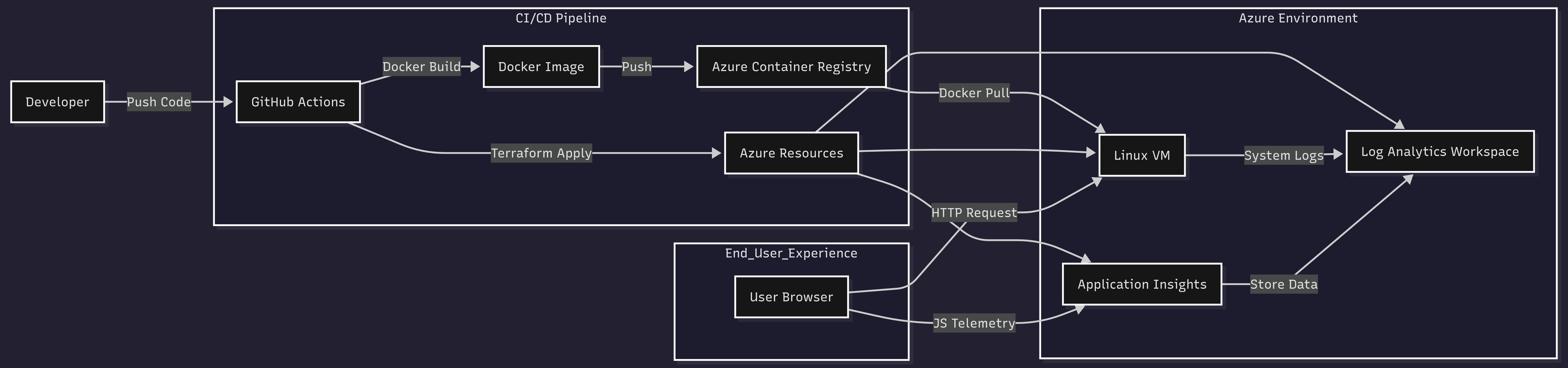 (See Architecture Docs for details)
| Category | Technologies |
|---|---|
| Cloud Provider | Microsoft Azure (VM, VNET, ACR, Key Vault, Monitor) |
| Infrastructure | Terraform (HCL), Cloud-Init |
| Containerization | Docker, Nginx (Alpine) |
| CI/CD | GitHub Actions |
| Security | Trivy, Azure Managed Identity, Azure Key Vault |
| Observability | Azure Application Insights, Log Analytics, Azure Monitor |
| Scripting | Bash (Automation & Testing) |
Fork or Clone this repository to your GitHub account.
-
Obtain Credentials
Since this requires a Service Principal, please refer to the official documentation on how to generate these credentials or request them from your Azure Administrator: -
Add Secrets to GitHub
In your repository, navigate to Settings > Secrets and variables > Actions > New repository secret. Add the following secrets:AZURE_CLIENT_IDAZURE_CLIENT_SECRETAZURE_SUBSCRIPTION_IDAZURE_TENANT_ID
-
Backend Configuration
Editterraform/backend.tfto match your existing Azure Storage Account (used for storing Terraform state):resource_group_name = "<YOUR_RESOURCE_GROUP>" storage_account_name = "<YOUR_STORAGE_ACCOUNT>" container_name = "<YOUR_CONTAINER_NAME>" key = "terraform.tfstate"
-
Environment Variables
Check.github/workflows/main.ymland update the environment variables (underenv:) to match your project details (Resource Group name, Location, etc.).
- Navigate to the Actions tab in your repository.
- Select the Deploy to Azure workflow.
- Click Run workflow (or simply push a commit to the
mainbranch). - Wait for the pipeline to complete. The workflow will output the VM Public IP.
- Web App
Visithttp://<VM_PUBLIC_IP>to see the deployed application. - Monitoring
Go to theAzure Portal, find the created Dashboard, and view live metrics. - Logs
Check theLog Analytics Workspaceto query Nginx access logs.
This project is licensed under the MIT License - see the LICENSE file for details.