Cognitor is an observability platform for self-hosted SLMs and LLMs that helps developers monitor, test, evaluate and optimize their language model-powered applications in one environment.
It can be self-hosted in minutes and provides a unified dashboard for understanding model behavior, system performance and training outcomes.
Self-hosted language models require a different observability approach than API-first AI platforms. Cognitor is built for teams running models in their own infrastructure, with Small Language Models (SLMs) as the primary focus and design center:
- Self-Hosted by Default: when models run on your own machines, clusters or edge environments, you need visibility into both model behavior and infrastructure health.
- SLM-Specific Failure Modes: small models are more sensitive to prompt changes, fine-tuning quality, resource ceilings and regressions introduced by rapid iteration.
- Training Data Sensitivity: data quality issues can have an outsized impact on SLM performance, making data and run observability critical.
- Resource Constraints: SLM deployments often operate under tighter CPU, memory, storage and latency budgets than larger hosted systems.
- Behavior Drift: both self-hosted SLMs and LLMs can drift over time, but SLMs often show larger behavioral swings from smaller changes.
- Fast Local Experimentation: teams working with self-hosted models need an observability stack that keeps pace with frequent prompt, model and training updates.
Traditional observability tools usually stop at infrastructure metrics, while many LLM tools assume a hosted provider API. Cognitor bridges that gap for self-hosted model teams.
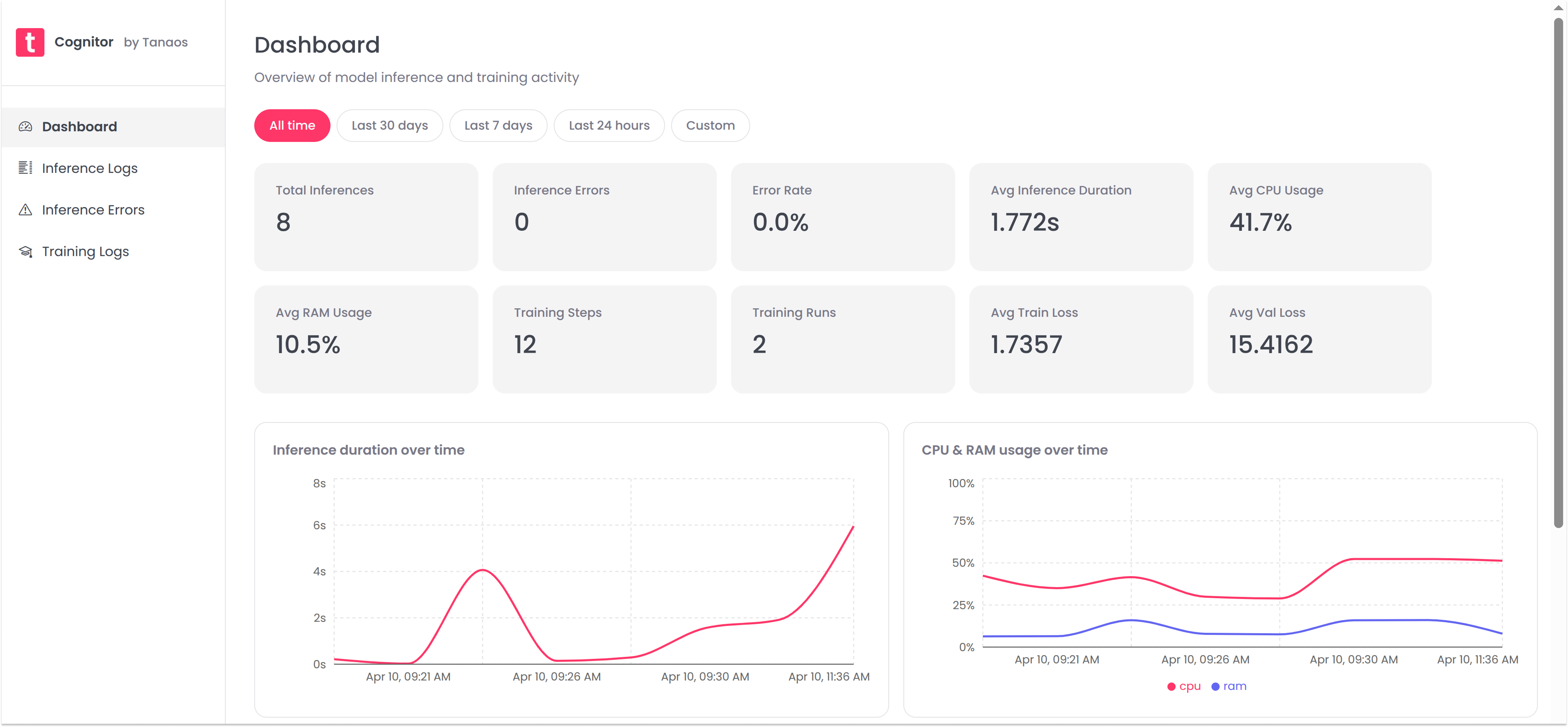
- Self-Hosted Model Monitoring: Instrument your application and start tracking inference calls, training runs and data quality signals for self-hosted SLM and LLM workloads.
- Unified Dashboard: Visualize model performance, system behavior and data quality in one dashboard. Identify trends, outliers and regressions across inference and training activity.
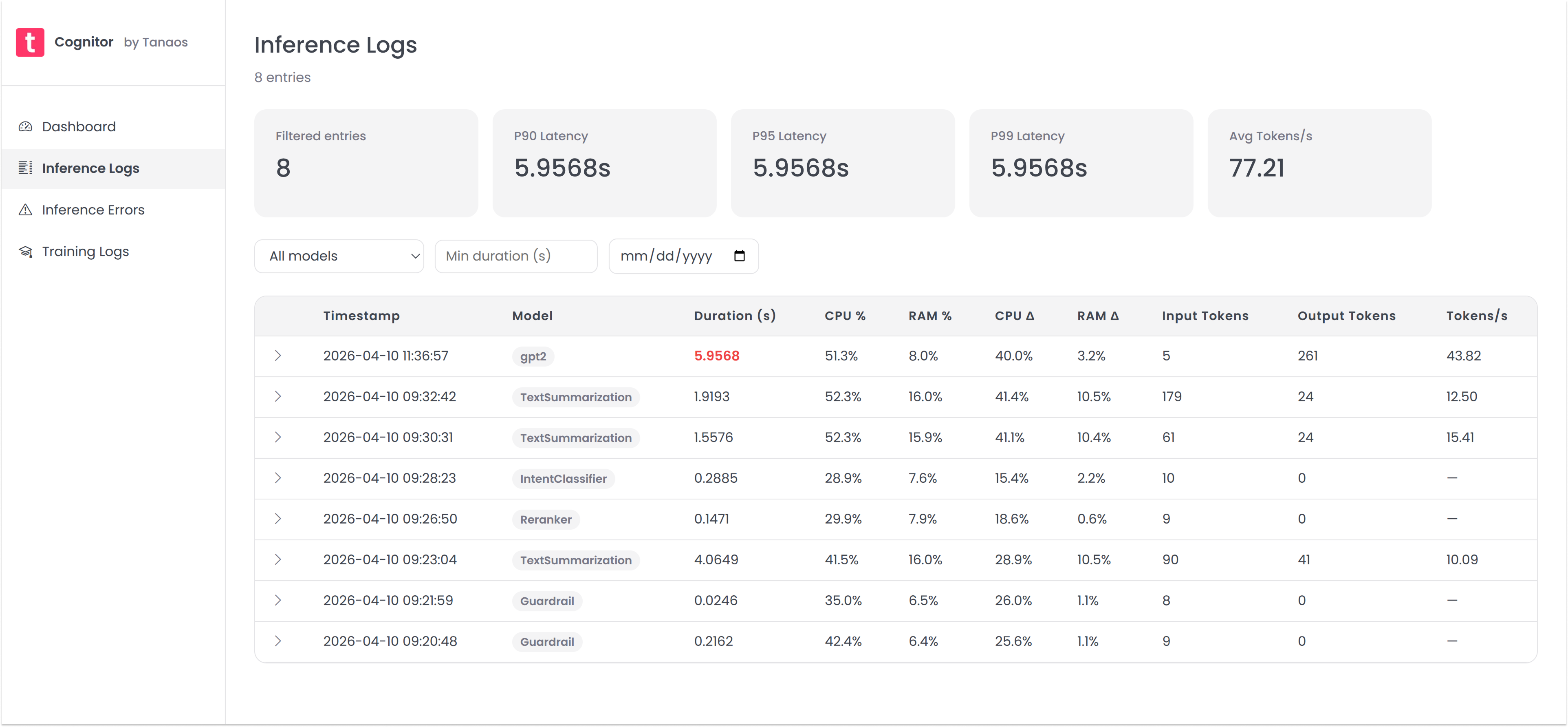
- Inference Logging: Capture detailed logs of inference calls, including input data, output, latency, tokens, resource usage and anomalous values. Spot performance drift and model behavior changes with full request visibility.
- Inference Errors: Capture and analyze inference errors, including error type, message, stack trace and frequency.
- Training Run Tracking: Monitor training runs, including hyperparameters, train and eval loss, accuracy and resource usage. This is especially valuable for SLM workflows where small data or configuration changes can have large downstream effects.
Get a local copy of cognitor, instrument your self-hosted model application and start ingesting data in minutes.
# Get a copy of the latest Cognitor repository
git clone https://github.com/tanaos/cognitor.git
cd cognitor

# Run the cognitor docker compose
docker compose upIf you are running the published GHCR package directly, use the same port mappings and persistent volume as docker compose up:
docker run --name cognitor-app --rm \
    -p 3000:3000 -p 3001:3001 -p 5432:5432 \
    -v cognitor_pgdata:/var/lib/postgresql/data \
    ghcr.io/tanaos/cognitor:latest
Then open http://localhost:3000.
Use the cognitor Python SDK to log inference calls and start monitoring the performance of your self-hosted SLM or LLM application.
pip install cognitorfrom cognitor import Cognitor
from transformers import AutoTokenizer, pipeline
# Initialize your model and tokenizer
model_name = "gpt2"
tokenizer = AutoTokenizer.from_pretrained(model_name)
pipe = pipeline("text-generation", model=model_name, tokenizer=tokenizer)
cognitor = Cognitor(
model_name=model_name,
tokenizer=tokenizer
)
# Run inference within the monitor context
with cognitor.monitor() as m:
input_text = "Once upon a time,"
with m.track():
output = pipe(input_text, max_length=50)
m.capture(input_data=input_text, output=output)Want to track training metrics? Check out the cognitor-py SDK GitHub repo for more examples and documentation.
See your logged data in the Cognitor dashboard at http://localhost:3000.
Contributions are welcome! Whether it's a bug fix or a new feature you want to add, we'd love your help. Check out our Contribution Guidelines to get started.