TkCode is a "visual clone" of modern dark themed editors, that shall be considered as a silly tkinter code demo of flat design.
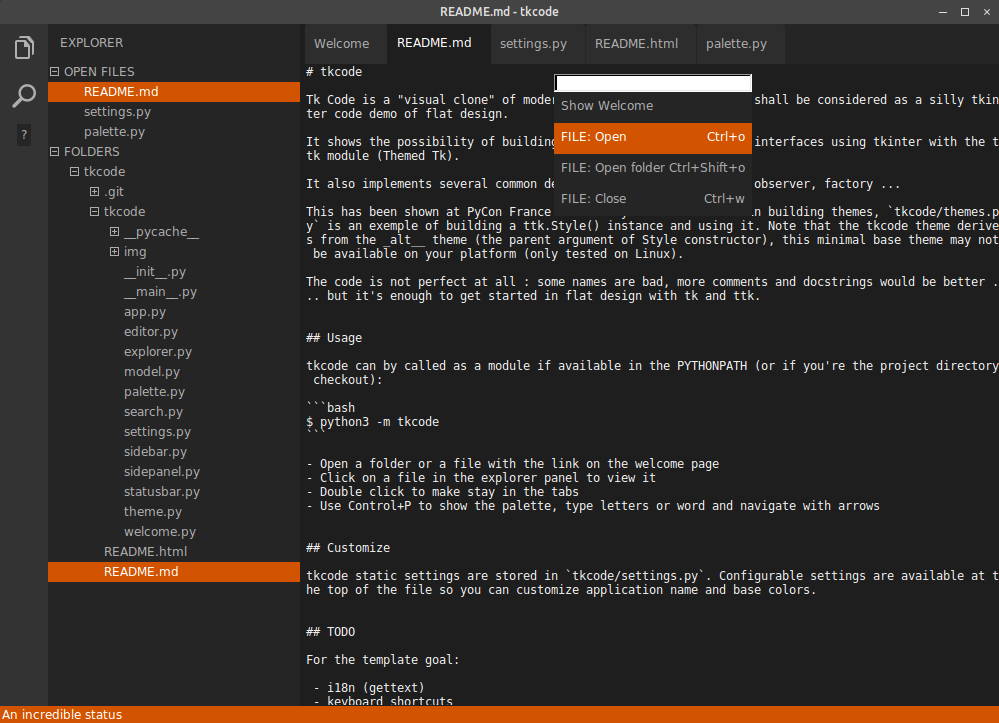
It shows a possibility of building minimal user interfaces using tkinter with the ttk module (Themed Tk) that are included in the standard library.
It also implements several common design patterns like command, observer, factory ...
This has been shown at PyCon France 2018. If you're interested in building themes, tkcode/themes.py is an exemple of building a ttk.Style instance and using it. Note that the tkcode theme derives from the alt theme (the parent argument of Style constructor), this minimal base theme may not be available on your platform (only tested on Linux).
The code is not perfect at all : some names are bad, more comments and docstrings would be better, there are surely bugs ...
But it's enough to get started in flat design ui with tk and ttk by understanding the usage of base components and global architecture.
- Python 3
Yes, only Python and its so-great standard library :) I love bare-python.
Note that if you're using Linux, most distribution have a separate package for tkinter, like python3-tkinter for debian-based OS.
Sorry if you're using Python 2, this code does not backport but you can use the recipes in your own project.
TkCode can be called as a module if available in the PYTHONPATH (or if you're already in the project checkout directory):
$ python3 -m tkcodeYou can:
- Open a folder or a file with the link on the welcome page
- Click on a file in the explorer panel to view it
- Double-click to open it in a new tab
- Use Control+P to show the palette, type letters or word and navigate with arrows typing word matching what you want to do
TkCode static settings are stored in tkcode/settings.py. Configurable settings are available at the top of the file so you can customize application name and base colors.
For the template goal:
- i18n (gettext)
- keyboard shortcuts
- help screen
- add feedback when rolling over clickable ui elements (highlight and cursor)
- status bar api
- image directory loader so usign icons does not requires instantiating PhotoImage at each image usage
- plugin architecture
Add edit functions (lower priority):
- save
- search (there's some async challenge here)
- syntax highlighter
- try to integrate idle3 editing widget ? or fork idle3 to make some silly ux things ?
- line number
Take over the world:
- build a framework
- redesign idle