by Jonathan Ahrens

HighSchool Students (16-18)
At the end of this lesson you will know
- what is the
box model? - the importance of
height - properties that conform the box model
- Margin
- Border
- Padding
- Content
- How to set and modify these properties
- top, right, bottom, left
- Use the Google Chrome inspector
- how to add
- basic HTML templating
- No linking to CSS or JS (inline)
- How to target id's in CSS
- How to target classes in CSS
As simple as that, ANY HTML element = BOX, that simple.
HTML elements can be Inline or Block elements. We are going to focus on the block elements.
When the box is empty, it's collapsed

Let's head over to our index.html!!
Let's try adding background-color: firebrick in the body <body> tag, like this:
body {
    background-color: firebrick;
}
Why don't we see red in the page right now? 😫 😩 😤
If body has no content or no defined height it will not show red at all. Same goes for any block element: it's collapsed
By adding content we can make the box appear in the HTML page...

body {
    background-color: firebrick;
    height: 100%;
}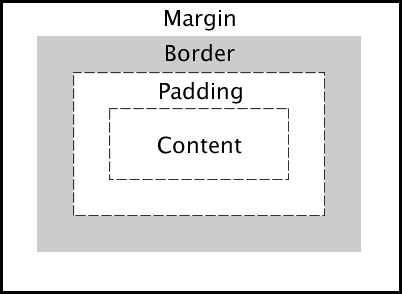
Margin - most exterior space around the HTML object, it's like the force, it pushes our box away from others (INVISIBLE SPACE).
Border - delimits the surroundings, like a fence. The fence has thickness too!
Padding - the filling between our content and the border (INVISIBLE SPACE).
Content - Whatever we put inside of this box (THINK KITTY ABOVE).
We can modify the values of these by tagetting our div...
Observe closely and let's discuss what we see...
div {
    height: 100px;
    width: 100px;
    /*with no height and width our div would not appear*/
    margin: 100px 100px 100px 100px;
    /*why four values?? ^^ any ideas?*/
    border: 20px solid black;
    /*hmmm three things, what do they mean?*/
    padding: 20px;
    /*were we not expecting 4 values here? */
}
The order for these values in CSS
TOP, RIGHT, BOTTOM, LEFT
margin: 100px 100px 100px 10px
IMPORTANT: when you add values to each one of these they will SUM UP as part of the perimeter of the whole element (read, the bigger our values, the more garden, fence and sidewalk we are going to have).
Look into index.html file and let's start styling:
- Make a div, with a thick fancy border of 25px with the color
rebeccapurple - Give me the dimmensions considering thickness of the box-model
What did we learn?
- box model: everything is a box in HTML
- Margin: exterior separation from the element, invisible
- Border: delimiter of the exterior of the HTML element
- Padding: spacing between the border and the content, invisible
- Content: whatever you want to put there
- How to set and modify these properties
- top, right, bottom, left