
Replies: 2 comments

|
I also ran update.sh but still loophole restarting . |

|
@v4lt0n doesn't identify the root cause by itself—it only means that one of the prerequisites for From your description:
this suggests the failure is happening before Docker Compose starts the stack, rather than being caused by an individual honeypot. I'd recommend checking the following in order: 1. Inspect the systemd logsInstead of just systemctl status tpot.service
journalctl -xeu tpot.serviceThese usually show which dependency or command failed. 2. Check whether Docker is healthySince T-Pot depends entirely on Docker, verify it first: systemctl status docker
docker info
docker versionIf Docker isn't running correctly, 3. Try bringing up the compose stack manuallyThis often produces a much more useful error than systemd: For newer releases: cd ~/tpotce
docker compose upFor older releases: docker-compose -f /opt/tpot/etc/tpot.yml upIf there's a YAML error, missing image, or configuration problem, it should be printed directly. 4. Check the installation logsAlthough you mentioned you couldn't find Also check: cat ~/tpotce/data/tpotinit.logif the directory exists. 5. Verify system requirementsA clean installation failing before any containers start can also be caused by:
For example, there have been reports where Docker images failed to download because the host couldn't resolve Docker Hub, resulting in a seemingly successful installation but no runnable containers. :contentReference[oaicite:0]{index=0} At this point, the most helpful information would be the output of: systemctl status tpot.service
journalctl -xeu tpot.service
systemctl status docker
docker info
docker compose upThat should reveal whether this is:
If this solves your problem, feel free to mark it as the accepted answer so others can find it easily. |


Uh oh!
There was an error while loading. Please reload this page.
Hi,
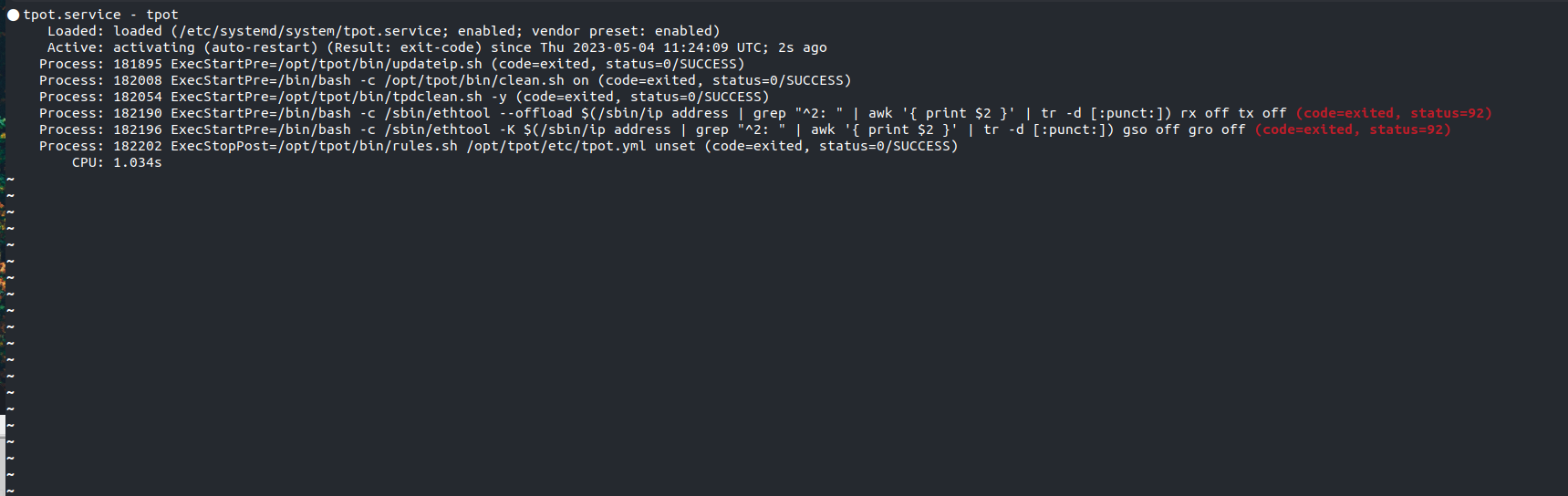
I installed tpot on my debian 11 bulleye I installed it with installer type conf but it is failing without any reason and i cannot see any log only journalctl.
root)lsb_release -aanduname -a?/install.log/install.err.glancesandhtop.df -h)?dps.sh)?systemctl status tpot)?systemctl stop tpotand runnetstat -tulpenDOWNyou can rundocker logs <container-name>for the latest log entriesit wont show any containers
htop :
All reactions