Real-time FLUX.2 image editing pipeline optimized for consumer GPUs.
FluxRT enables low-latency live image transformation from webcam, video files, or other live inputs with interactive prompt updates and full reference image conditioning support.
Unlike offline image-to-image or video-to-video workflows, FluxRT supports:
- continuous streaming inference,
- live prompt changes,
- interactive reference-image conditioning,
- low-latency frame scheduling,
- spatially-aware KV reuse.
And unlike Stream Diffusion it uses Instruct image editing model FLUX.2-Klein that opens very precise control and refernce image conditioning.
The system is intended for:
- AI VTubing
- live stylization
- virtual try-on
- interactive art tools
- creative coding
On a single NVIDIA RTX 5090, FluxRT achieves:
| Metric | Value |
|---|---|
| Resolution | 512 × 512 |
| Frame Rate | 20–40 FPS |
| End-to-End Latency | ~0.2 seconds |

FluxRT natively supports all FLUX.2 reference image features.
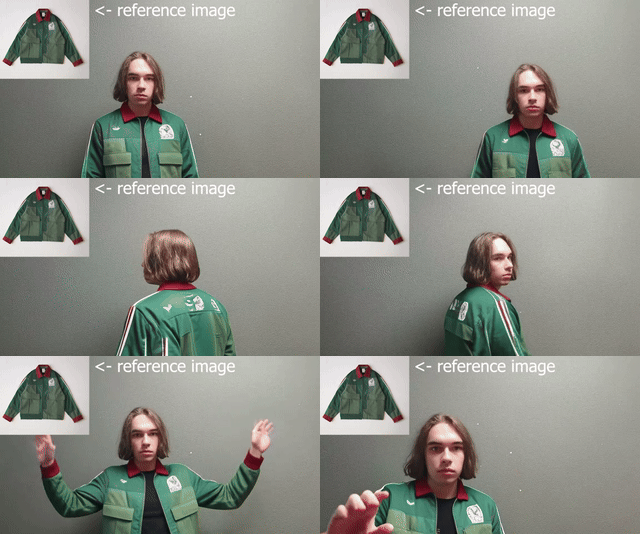
Example: a simple real-time AI fitting room using a clothing item image as reference input.
Example 2: interactive paint-style app with iterative image updates.

| Component | Requirement |
|---|---|
| GPU | NVIDIA RTX 5090 or higher |
| VRAM | 32 GB+ |
| RAM | 64 GB recommended |
| Python | 3.12+ |
| CUDA | 12.8+ |
git clone https://github.com/tensorforger/FluxRT
cd FluxRT# Create environment
conda create -n fluxrt python=3.12 pip -y
conda activate fluxrt
# Install PyTorch with CUDA support (adjust if needed)
pip install torch torchvision --index-url https://download.pytorch.org/whl/cu128
# Install project dependencies
pip install -r requirements.txt
pip install -e .Original RIFE model lives here: https://github.com/hzwer/ECCV2022-RIFE
But it is stored as a pkl file on the google drive.
So I have converted it to safetensors format and uploaded to https://huggingface.co/TensorForger/RIFE-safetensors
You can simply clone the repo now:
cd FluxRT
git clone https://huggingface.co/TensorForger/RIFE-safetensorsDownload from Hugging Face:
https://huggingface.co/black-forest-labs/FLUX.2-klein-4B
cd FluxRT
git clone https://huggingface.co/black-forest-labs/FLUX.2-klein-4B
Required directory structure
FluxRT/
├── RIFE-safetensors/
│   └── flownet.safetensors
└── FLUX.2-klein-4B/
    ├── model_index.json
    ├── scheduler/
    ├── text_encoder/
    ├── tokenizer/
    ├── transformer/
    └── vae/
Interactive web UI with:
- live prompt editing
- live reference image swapping
- webcam input
- local video processing
python scripts/run_gradio_demo.pyThen open:
http://127.0.0.1:7860/
Minimal local demo:
python scripts/run_cv2_demo.pypython scripts/run_cv2_reference_demo.pypython scripts/run_cv2_paint.pyThis script also supports CLI
python scripts/process_local_video.py --input input.mp4 --output out.mp4 --prompt "Turn this into oil on canvas art"This will show throughput (FPS) with various dynamic area values and end-to-end latency. The generated benchmark report will include the current configuration and hardware parameters.
python scripts/run_benchmark.pyYou can check report generated on my machine in benchmark_report.txt
I would appreciate it if you could share your report in the issues, especially if it was generated on different hardware setup.
FluxRT combines multiple system-level and model-level optimizations to enable real-time inference.
Spatial KV Cache is a custom KV-cache variant tailored for rectified flow models.
FLUX.2 models exhibit highly similar diffusion trajectories across adjacent frames. This temporal coherence allows reuse of intermediate computations between frames. Instead of recomputing all tokens, FluxRT selectively caches and reuses tokens from previous frames.
We initially applied caching to:
- Text tokens
- Reference image tokens
However, real-world video streams often contain static or slowly changing regions (e.g., backgrounds). FluxRT extends caching to these spatial regions, further reducing per-frame computation.
In practice, only 20–50% of tokens need to be recomputed per frame.
This results in:
- Higher throughput (FPS)
- Lower latency
- Reduced GPU utilization
-
Keys and Values are cached per token, per layer, per diffusion step
-
Cached values are reused directly in attention layers
-
The model forward pass is patched to skip computation for cached tokens, including:
- Feed-forward networks (FFN)
- Linear projections
- Query computation
- Attention operations
Below is a comparison against the baseline (resolution: 576 × 320, 2 inference steps per frame, interpolation ×4):
| Dynamic Area | Baseline (No Cache) | With Spatial Cache |
|---|---|---|
| Demo |  |
 |
| 0–10% | 20 FPS | 50 FPS |
| 50% | 20 FPS | 30 FPS |
| 90–100% | 20 FPS | 20 FPS |
The spatial update mask is shown in the corner: white pixels = recomputed, black pixels = reused.
To ensure smooth visual transitions, FluxRT integrates real-time frame interpolation using the RIFE model.
It generates intermediate frames between model outputs.
Interpolation factor is configurable (see interpolation_exp in the config)
This significantly improves perceived motion smoothness without increasing core model latency.
FluxRT uses a multi-process architecture to decouple computation, I/O, and rendering:
-
Main Process
- Handles non-blocking input/output
- Manages UI and user interaction
-
Inference Process
- Runs all models
- Executes the generation loop sequentially
-
Output Scheduler Process
- Streams interpolated frames
- Ensures smooth playback timing
To minimize overhead, inter-process communication uses shared memory, enabling near-zero-copy frame transfer and minimal latency.
All models are compiled using TorchInductor to maximize runtime performance.
We'd be happy if you'd like to build something on top of this project. We've created a high-level API for easy integration.
Here is the minimal example:
from fluxrt import StreamProcessor
from fluxrt.utils import crop_maximal_rectangle
import cv2

config_path = "configs/stream_processor_config.json"

stream_processor = StreamProcessor(config_path)
input_tensor = stream_processor.get_input_tensor()
output_tensor = stream_processor.get_output_tensor()

stream_processor.start()
stream_processor.set_prompt(
    "Turn this image into cyberpunk night street scene, "
    "red and blue neon lamps, cinematic lighting"
)

resolution = stream_processor.get_resolution()
cap = cv2.VideoCapture(0)

while True:
    ret, frame = cap.read()
    if not ret:
        break

    resized = crop_maximal_rectangle(
        frame,
        resolution["height"],
        resolution["width"]
    )

    input_tensor.copy_from(resized)

    output = output_tensor.to_numpy()
    cv2.imshow("FluxRT", output)

    if cv2.waitKey(1) & 0xFF == ord("q"):
        break

cap.release()
cv2.destroyAllWindows()
stream_processor.stop()FluxRT is a research-oriented project under active development. Please report any issues: https://github.com/tensorforger/FluxRT/issues.
Feature requests and improvement suggestions are welcome.