change_speaker_color
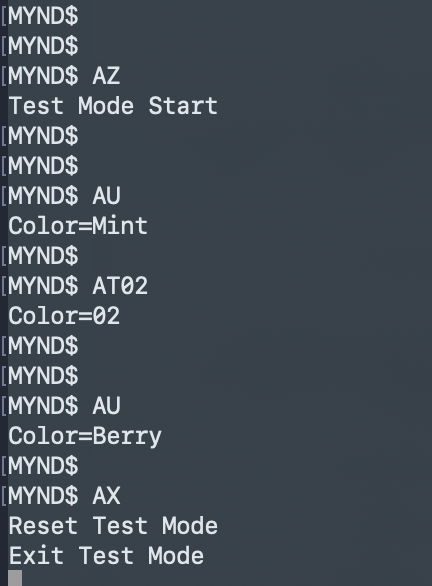
This is an example of using the MYND CLI.
First, gain CLI access using one of the methods here:
-
CLI access (see
use_tshell_cli.md) -
MYND firmware binaries
-
mynd-factory-update-firmware-mcu.bin(factory firmware, needed for USB‑C CLI method) -
mynd-update-firmware-mcu.bin(restore production)
-
- Update MYND with
mynd-factory-update-firmware-mcu.binusing drag & drop.
See: Perform a Drag & Drop USB Firmware Update
- Follow the generic CLI guide and verify you get a
MYND$prompt: Gain CLI access to the MYND speaker (UART)
- Enter
AZto activate test mode - Enter one of the following to set color:
-
AT00— Black -
AT01— White -
AT02— Wild Berry -
AT03— Light Mint
-
- Enter
AUto confirm the new color - Enter
AXto deactivate test mode
- Update MYND with the production firmware binary using USB-C drag & drop