
Docker image for DBT-labs (former FishtownAnalytics) data build tool (DBT).



Since version 1.0.0 my images are optimized for two different architectures: AMD 64 and ARM 64. Last one is really helpful for running on Apple M1 machines.
= 1.0 = latest
= 0.21
= 0.20
= 0.19
= 0.18


= 1.0-bigquery = bigquery
= 1.0-snowflake = snowflake
= 1.0-redshift = redshift


More images you can find on tags page
 ___________
<    DBT    >
 -----------
    \
     \
      \
                    ##        .
              ## ## ##       ==
           ## ## ## ##      ===
       /""""""""""""""""___/ ===
  ~~~ {~~ ~~~~ ~~~ ~~~~ ~~ ~ /  ===- ~~~
       \______ o          __/
        \    \        __/
          \____\______/
The main idea is to give possibility to work with DBT without unnesessary components and via Docker way.
The image is more tiny than official one but provides the same functionality.
DBT supports several plugins and full docker image contains all of them.
However in most of cases we don't use such stuff because of technological lanscape in our work. Thus you don't need to work with unnecessary plugins and fuctionality.
I've additionaly prepared three spins dedicated to main cloud datawarehouses supported by DBT (all other plugins have been removed at build stage):
And those spins are really tiny!
One spin I prepared especially to have the minimal size. It is based on Alpine linux and contains Google BigQuery plugin only.


Feel the difference :)
dbt is a development environment that speaks the preferred language of data analysts everywhere—SQL. With dbt, analysts take ownership of the entire analytics engineering workflow, from writing data transformation code to deployment and documentation.
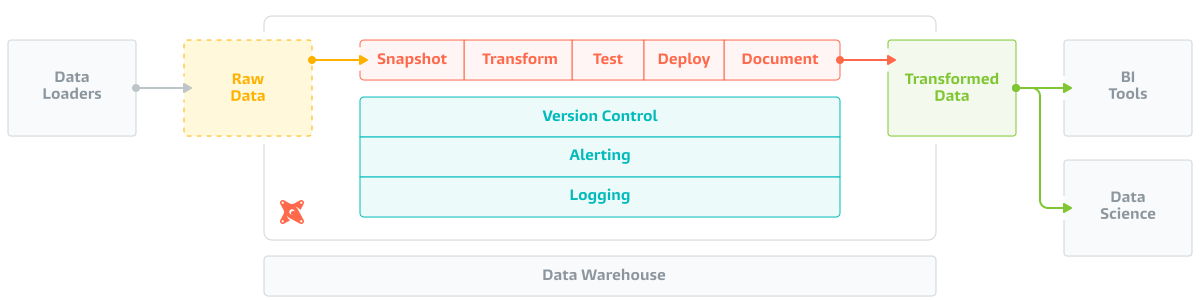
All official documentation can be found on DBT Docs
You can build the image with desired plugins set and/or DBT version.
docker build -t <YOUR_TAG> --build-arg VERSION=<DESIRED_VERSION> --build-arg PLUGINS='bigquery redshift, snowflake' <YOUR_DOCKER_FILE>
-
docker build -t myorg/dbt:bigquery --build-arg PLUGINS=bigquery - < ~/Projects/Docker/dbt/Dockerfile.multistage.universal -
docker build -t myogr/dbt:0.21 --build-arg VERSION='0.21.1' --build-arg PLUGINS='bigquery snowflake,redshift' - < ~/Projects/Docker/dbt/Dockerfile.multistage.universal
Just grab Dockerfile and build desired version and/or plugins list as build parametes. If no parameters will be passed into the build then image will be built using latest release version from this page and following components:
- DBT version before 1.0.0 - DBT core + BigQuery + Snowflake + Redshift + Postgres
- DBT version 1.0.0 and after - DBT core only
Version list can be found on DBT-labs GitHub repo.
Plugins list can be found in DBT documentation site.
Please use plugin name from Install from PyPi section (without dbt- prefix) to pass it as a build argument
To avoid auto-downgrading of DBT-core version during outdated plugin installation, I've added strict condition that plugin's version must be equal to version of DBT-core.