This is a dummy dbt (data build tool) project you can use to populate dbt seeds, models, snapshots and tests for testing purposes or experimentation.
The docker-compose.yml file consists of two services:
postgresdbt
that are used to build the data models defined in the example project into a target Postgres database.
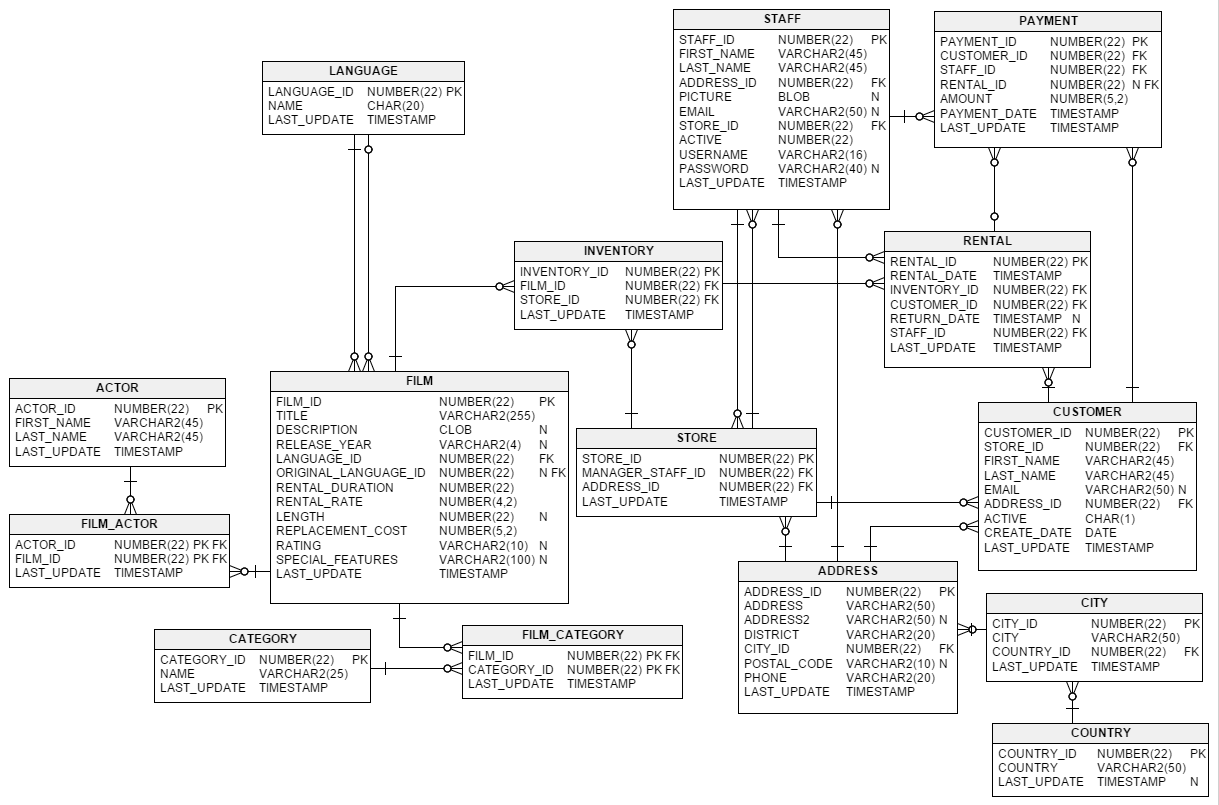
This is an instance of a Postgres database initialised with Sakila database (and thus we are using the
frantiseks/postgres-sakila image which is available on Docker Hub).
The database models a DVD rental store and contains several normalised tables that correspond to films, payments, customers and other entities.
Sakila Database was developed by Mike Hillyer, who used to be a member of the AB documentation team at MySQL. For more
information regarding Sakila Database you can refer to the
official MySQL documentation.
This service is built out of the Dockerfile and is responsible for creating dbt seeds, models and snapshots
snapshots.
First, let's build the services defined in our docker-compose.yml file:
docker-compose buildand now let's run the services so that the dbt models are created in our target Postgres database:
docker-compose up
This will spin up two containers namely dbt (out of the dbt-dummy image) and postgres (out of the
frantiseks/postgres-sakila image).
Notes:
- For development purposes, both containers will remain up and running
- If you would like to end the
dbtcontainer, feel free to remove the&& sleep infinityinCMDcommand of theDockerfile
Once the containers are up and running, you can still make any modifications in the existing dbt project and re-run any command to serve the purpose of the modifications.
In order to build your data models, you first need to access the container.
To do so, we infer the container id for dbt running container:
docker ps
Then enter the running container:
docker exec -it <container-id> /bin/bash
In order to query and verify the seeds, models and snapshots created in the dummy dbt project, simply follow the steps below.
Find the container id of the postgres service (postgres):
docker ps
Then run
docker exec -t <container-id> /bin/bash
We will then use psql, a terminal-based interface for PostgreSQL that allows us to query the database:
psql -U postgres