A Claude Code skill that lets Claude pass images to (and request images from) the OpenAI Codex CLI without writing temp files by hand.
Claude Code can run codex exec via Bash, but the upstream codex CLI's image flag (-i / --image) is what actually unlocks Codex's vision features. The companion plugin most people use (codex-companion.mjs) doesn't pass -i through. This skill is a thin, opinionated wrapper that:
- Calls
codex exec -i ...directly (skipping the companion that drops the flag) - Picks predictable session/log names so the user always knows what Claude spawned
- Adds an opt-in tmux mode for long-running observable runs (
--tmux <name>→claude-codex-<name>) - Distinguishes three modes Claude actually uses: review, generate, edit
All five images and the critique below were produced by running this skill on a vanilla MacBook in under 90 seconds each. No design tools, no Figma, no manual prompt-stitching — just one shell command per artifact.
When you want to argue for a refactor, a single image of before vs after carries more weight than any RFC paragraph. The same skill that generates a fresh mock can render the comparison directly:
codex-vision generate "Side-by-side before/after redesign comparison of a developer-tool dashboard, both shown inside identical Chrome browser frames stacked vertically. Top: 'Before — cluttered v1' (busy admin dashboard, tiny tables, gray-on-gray, no whitespace). Bottom: 'After — refined v2' (same data, generous whitespace, three KPI cards, one focused chart, single primary CTA). Both same fictional product 'Console' in nav. 16:10 each, light-cream background." \
  --out ~/Desktop/console-v1-vs-v2.png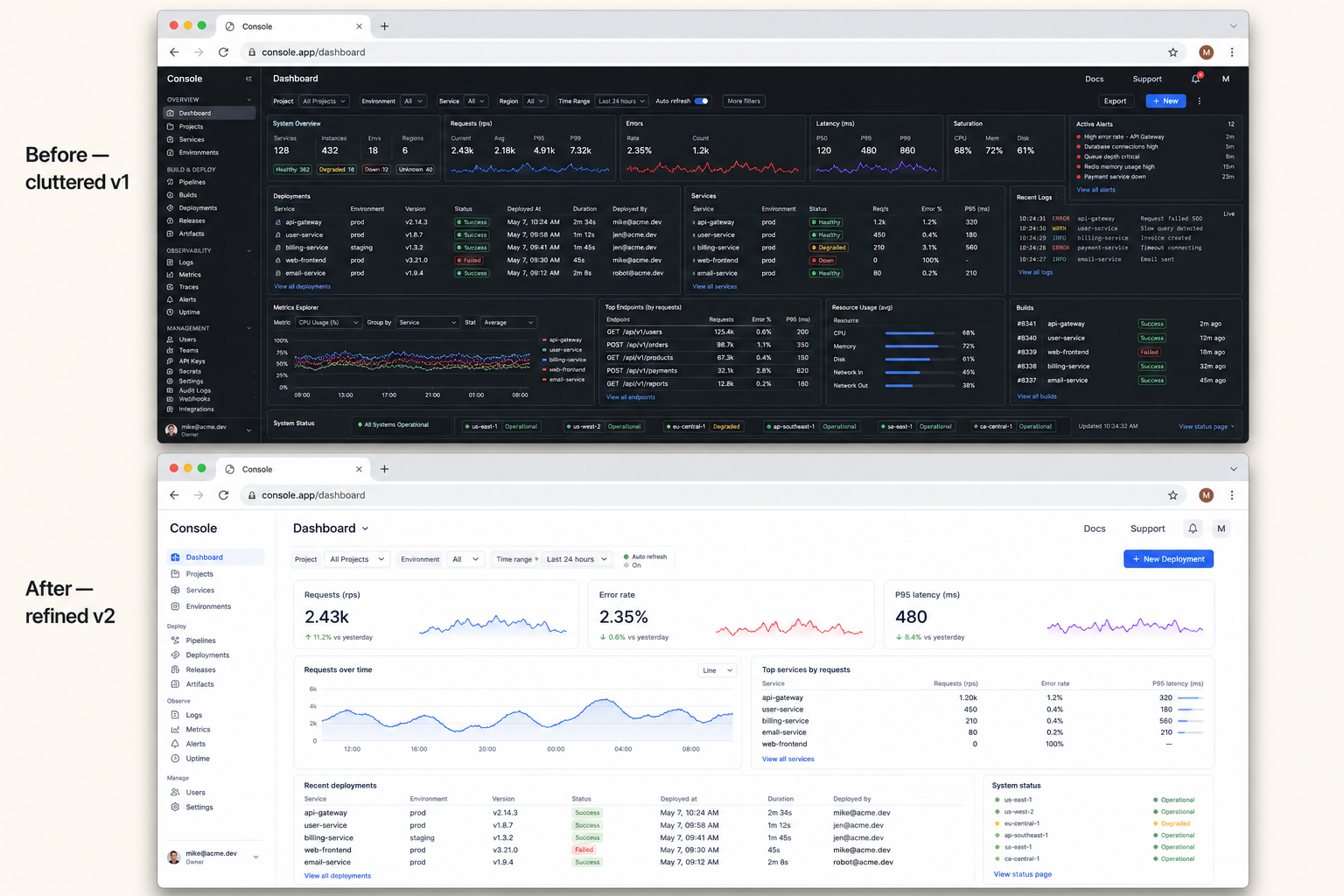
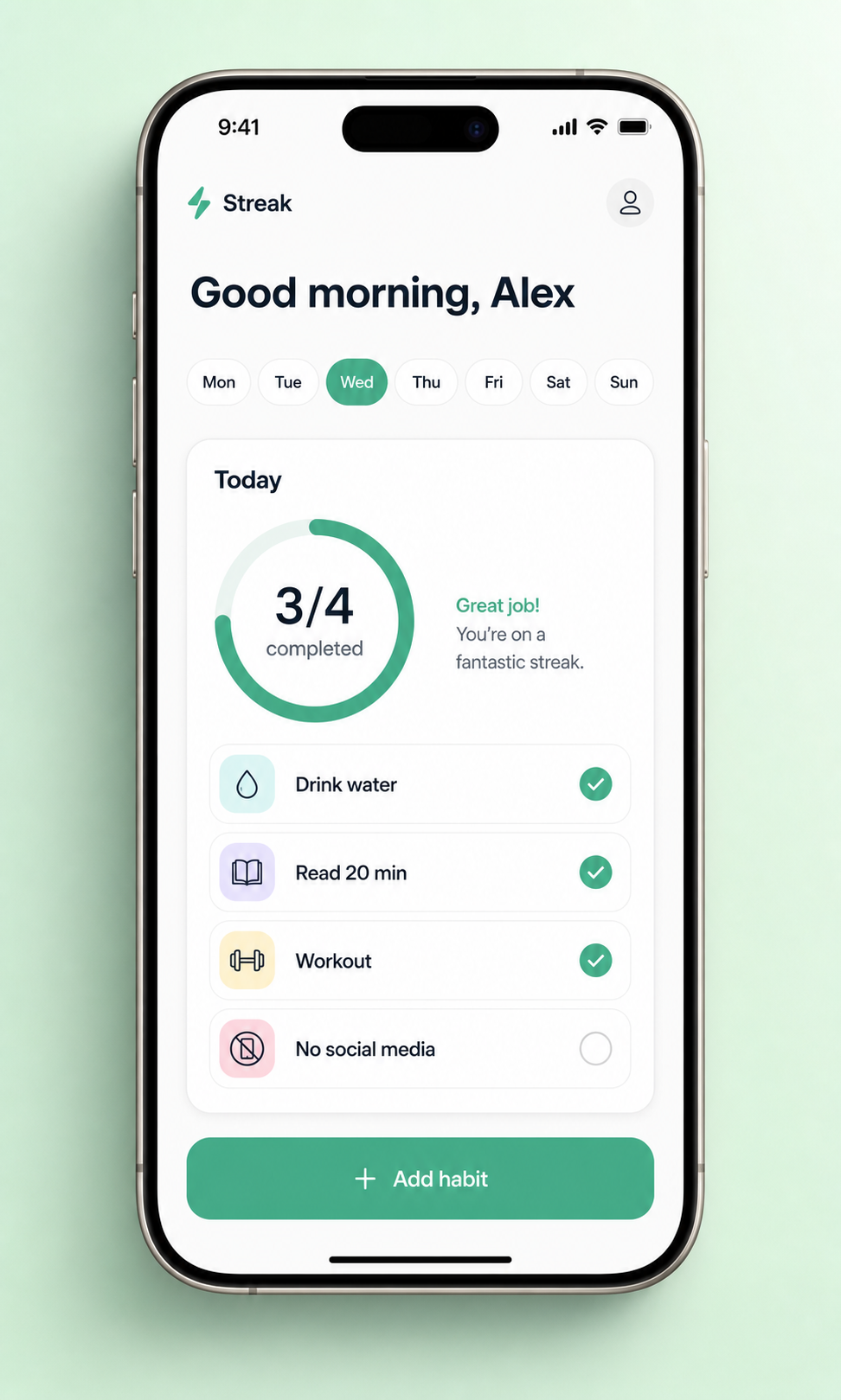
ASCII wireframes don't convey feel and stock device frames look dated. Generate one inside a current-gen device, ready to paste into Slack:
codex-vision generate "Minimalist mobile app screen for a fictional habit-tracker called 'Streak', shown inside a realistic titanium iPhone 15 Pro, viewed straight-on. Clean light theme: greeting, horizontal day-of-week pills with today highlighted, a 'Today' card with a circular progress ring (3/4) and 4 habit rows each with an icon and check, primary 'Add habit' button at bottom. iOS-native typography. Mint-green seamless paper backdrop, soft drop shadow. 9:16 phone aspect inside a 4:5 image, App Store screenshot quality." \
  --out ~/Desktop/streak-app.png
Browser-framed renders make a 5-line proposal look like a real product decision:
codex-vision generate "Clean SaaS pricing page mock displayed inside a realistic Chrome browser window, URL bar reading 'app.example.com/pricing'. Centered heading 'Simple, transparent pricing'. Three pricing cards (Hobby \$9, Pro \$29, Team \$79). Pro tier visually elevated with a 'Most popular' label. Below: a 3-question FAQ accordion. Crisp Inter typography, neutral palette with deep-teal accent. 16:10, full browser chrome visible." \
  --out ~/Desktop/pricing.png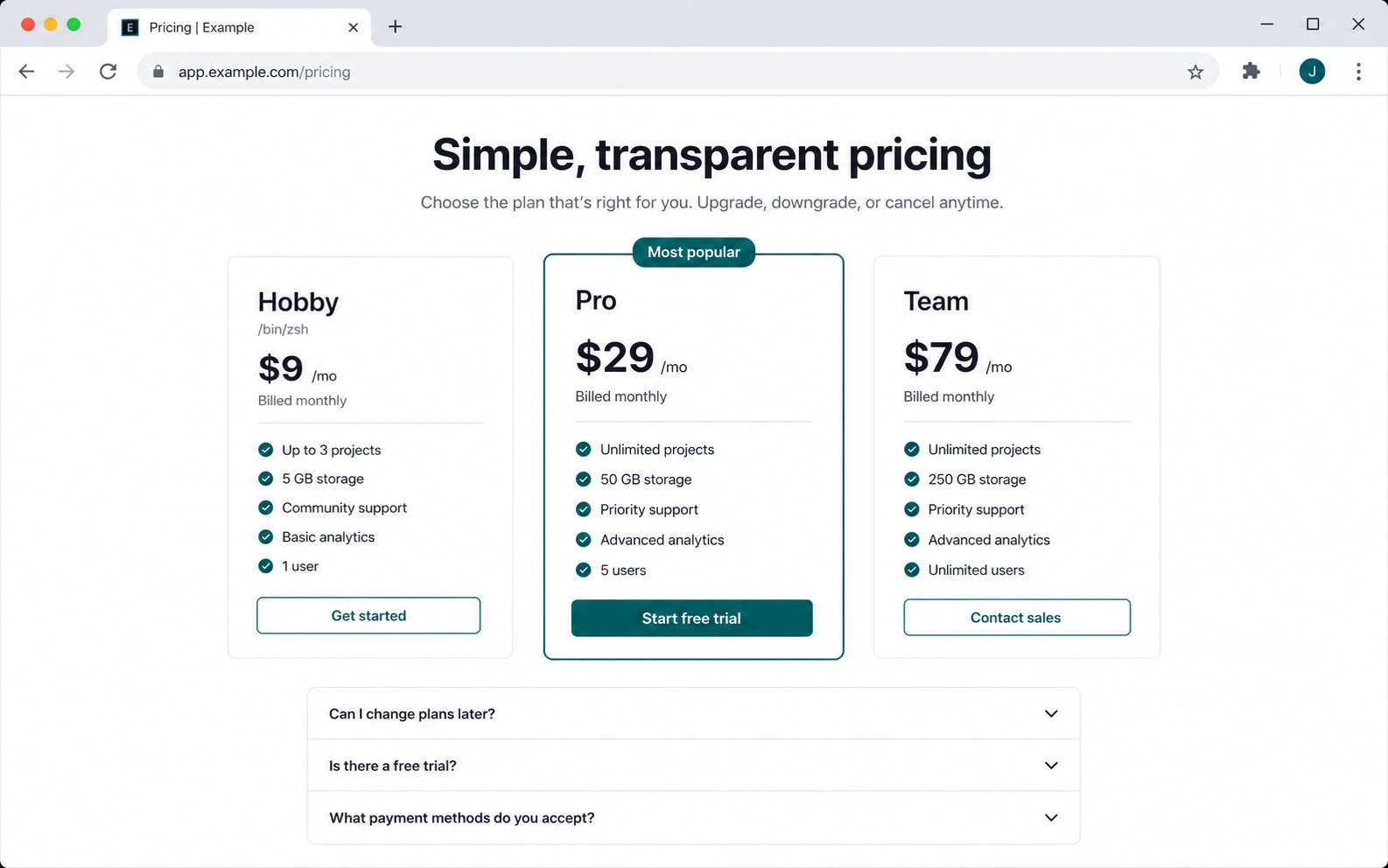
Same skill, opposite direction: feed any screenshot in and ask for a structured drive-by review. Below is the actual review output run against the pricing mock from #3 — five prioritized issues with concrete fixes:
codex-vision review ~/Desktop/pricing.png \
  "Act as a senior product designer. Critique on visual hierarchy, scannability, CTA prominence, tier differentiation, trust. Return exactly 5 prioritized issues, each one line, with a one-line fix."
- The Pro card dominates by border but the CTA hierarchy is uneven; make Pro's CTA primary and keep Hobby/Team as clearly secondary with consistent button weight.
- Tier differentiation is weak because features repeat with small deltas; add short tier descriptors under each plan name like "For solo projects," "For growing teams," "For organizations."
- Pricing is scannable, but feature lists are visually dense; group features by value area or bold the differentiators like storage, users, and support level.
- Trust is thin before asking for payment; add reassurance near CTAs such as "No credit card required," cancellation terms, security badges, or customer logos.
- (etc.)
Drawing infra diagrams in Figma or Excalidraw eats an hour. First draft from a one-line description is usually 80% there:
codex-vision generate "Minimalist boxes-and-arrows system architecture diagram: Client at top, API Gateway below it, three services beneath (Auth, Payments, Notifications), and shared Postgres + Redis at bottom. Monochrome on a light cream background. Clean labels, technical-sketch style. 16:10." \
  --out ~/Desktop/arch.png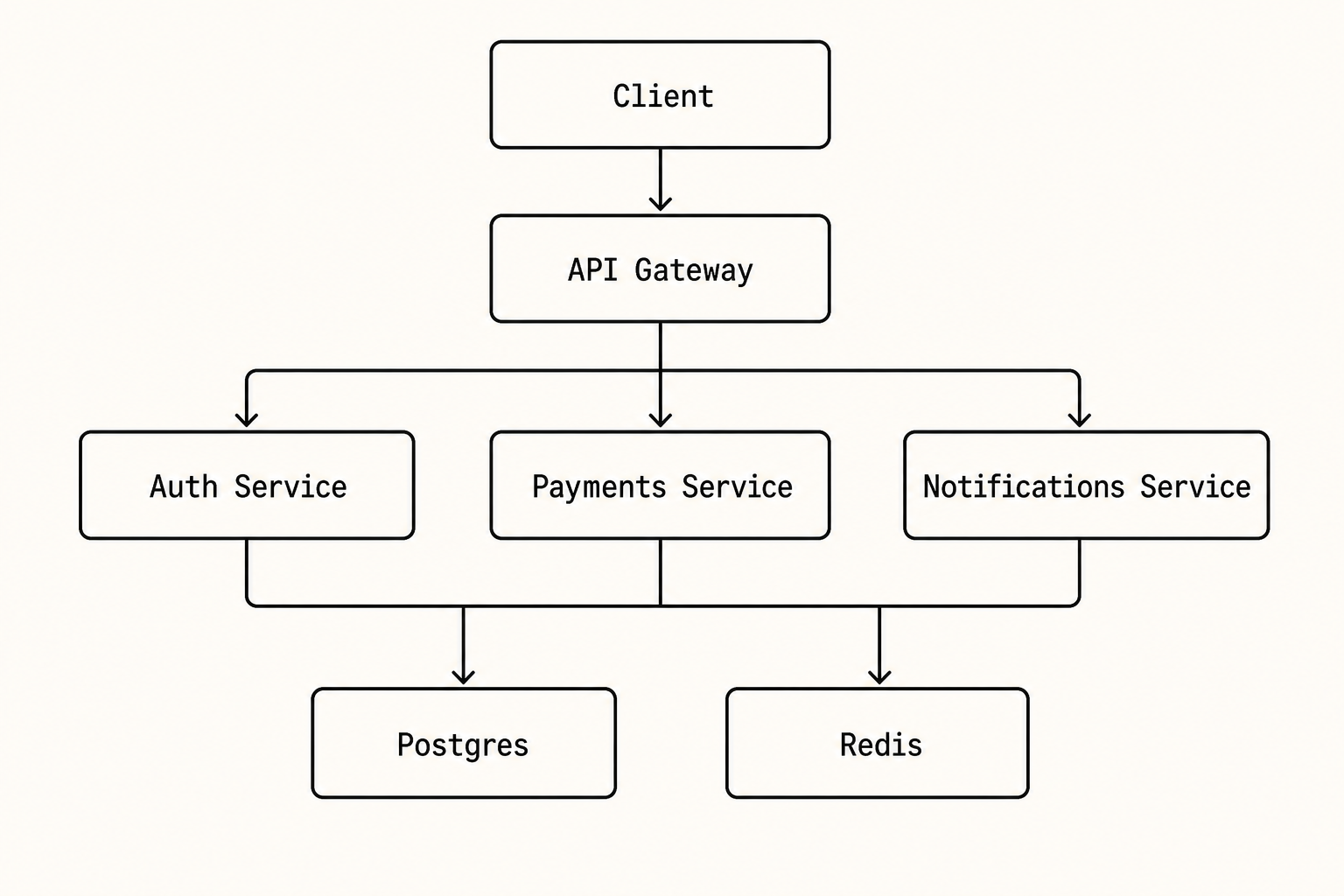
You're proposing a new landing page in a Linear ticket or design doc. Hand-wavy descriptions don't sell, but spinning up a Figma mock for an idea you might throw away is overkill. Generate a photoreal device shot in one command — the front-facing iMac framing reads more like a product hero than any laptop angle:
codex-vision generate "High-fidelity SaaS landing page mock displayed inside a 27-inch Apple iMac (silver/aluminum), viewed front-on with the screen filling most of the frame. Dark navy hero with bold left-aligned 'Ship faster with Atlas', a tight subhead, primary coral CTA + outlined secondary, and a floating product UI preview card in the lower hero. 3-column features row below. Top nav with the Atlas wordmark, 5 small links, and a Sign-in button. Off-white canvas, single coral accent, Inter typography, generous whitespace. Soft cream-to-peach gradient backdrop, photoreal display reflection, soft top-left key light, minimal stand visible at the bottom. 16:9, magazine-quality." \
  --out ~/Desktop/atlas-landing.png
Drop the PNG straight into the ticket — reviewers immediately get the vibe.
What makes a good prompt. Specify device frame, lighting, background, palette (with hex if you have it), typography, and aspect ratio. The difference between "a UI for a habit tracker" and the prompt above is the difference between a generic stock-image render and a portfolio-grade mock. Be opinionated — bad prompts make bad images.
Recommended: via npx skills
One command, agent-agnostic — installs into Claude Code, Cursor, Codex, Gemini CLI, and any other agent that respects ~/.claude/skills/ or its sibling directories:
npx skills add thenamangoyal/codex-visionVerify the install:
~/.claude/skills/codex-vision/scripts/codex-vision.sh doctor
~/.claude/skills/codex-vision/scripts/codex-vision.sh selftest
To uninstall:
npx skills remove codex-visionIf you'd rather skip npx skills:
git clone https://github.com/thenamangoyal/codex-vision ~/.claude/skills/codex-vision
~/.claude/skills/codex-vision/scripts/codex-vision.sh doctor
~/.claude/skills/codex-vision/scripts/codex-vision.sh selftest
~/.claude/skills/ is the user-level skills directory, so the skill auto-loads cross-project.
To uninstall:
rm -rf ~/.claude/skills/codex-visionA Claude Code plugin is the wrapper format for bundles that include MCP servers, agents, slash commands, and skills. codex-vision is just a skill — a single shell script with a SKILL.md — so the plugin layer was overhead. The npx skills registry handles distribution directly, and the skill works in every coding agent that reads from ~/.claude/skills/ (or symlinks to it).
The skill activates whenever a user prompt mentions Codex + an image, or explicitly invokes /codex-vision. Internally it shells out to:
~/.claude/skills/codex-vision/scripts/codex-vision.sh <mode> [options] <args>| Mode | Args | Use case |
|---|---|---|
review |
IMAGE [IMAGE...] PROMPT |
Have Codex look at one or more screenshots and report back |
generate |
PROMPT |
Have Codex generate an image via its image_gen.imagegen tool |
edit |
IMAGE PROMPT |
Have Codex edit an image via its image_gen.imagegen tool |
--out PATH         Output path for generated/edited image (default /tmp/codex-vision-out/<slug>-<ts>.png)
--tmux NAME        Run in claude-codex-<NAME>; user attaches with `tmux attach -t claude-codex-<NAME>`
--keep             Keep tmux session + log after completion
--model MODEL      Pass to `codex exec --model`
# Quick review
codex-vision review screenshot.png "what's wrong here?"

# Generate
codex-vision generate "isometric GRPO group diagram" --out /tmp/grpo.png

# Edit
codex-vision edit raw.png "remove the red overlay" --out /tmp/clean.png

# Long-running, watchable
codex-vision review screenshot.png "deep walk-through of every issue" --tmux ui-review
# user runs: tmux attach -t claude-codex-ui-review| Operation | What it triggers in Codex |
|---|---|
review |
codex exec -i <png> → Codex's functions.view_image tool |
generate |
Prompt: "Use the built-in image_gen tool to generate ... Save to ..." |
edit |
codex exec -i <png> + prompt: "Use the built-in image_gen tool to edit the attached image..." |
The exact tool name image_gen.imagegen and the natural-language convention come straight from Codex's own self-report. There is no @image or /image prefix — phrasing alone routes to the tool.
- Codex CLI installed (Codex.app on macOS, or
codexon PATH) - Codex authenticated (
codex loginonce) - tmux installed if you use
--tmuxmode
MIT — do whatever you want, no warranty.