Conversation


|
✔️ Deploy Preview for oslmap ready! 🔨 Explore the source changes: 54bf583 🔍 Inspect the deploy log: https://app.netlify.com/sites/oslmap/deploys/614afcc599f80000085aa53a 😎 Browse the preview: https://deploy-preview-60--oslmap.netlify.app |
 melzreal
force-pushed
the
feature/scale-bar
branch
from
melzreal
force-pushed
the
feature/scale-bar
branch
from
13a307b to
71e586d
Compare

 jessicamcinchak
left a comment
jessicamcinchak
left a comment
jessicamcinchak
left a comment
There was a problem hiding this comment.
very exciting & useful first feature contribution 🎉
left a couple comments, happy to talk through if anything is unclear!
| attribution: true, | ||
| zoom: !this.staticMode, | ||
| }), | ||
| }).extend([scaleControl()]), |
There was a problem hiding this comment.
this scale bar is a super handy visual feature for map orientation! my only suggestion is that we don't make it visible by default all the time, but rather add a Lit property so that end users can opt in or out of showing it for various use cases/implementations.
one way to do that could be like this:
- in
my-map.tsaround L114, add:
@property({ type: Boolean })
showScale = false;
configurable properties are just a long unordered list with most recent additions at the bottom currently, open to organization ideas here! current rule of thumb is that boolean properties are always false by default, see here for context
- then this line could use a conditional ternary operator to only add the scale when the property is true:
...}).extend(this.showScale ? [scaleControl()] : []),- finally, in our individual implementations of this component, we would specify that we want to show the scale bar in our html element like this:
<my-map zoom="18" drawMode showScale />omitting the showScale property would simply hide it
There was a problem hiding this comment.
thanks this is super thorough! Sounds good to me - I've put the question to the partners since the ticket we had seems to suggest they always need a scale bar for legal purposes, so it seemed logical to just enforce it everywhere - but actually it is probably best that the base map just has that option as you suggest and then we turn it on everywhere we need it - just double checking what they want
There was a problem hiding this comment.
ok cool got the confirmation we only need it in one place - have made the amendments exactly as you suggested and thy code works great 🥳
There was a problem hiding this comment.
awesome, glad this worked out! on our side, toggling it on/off will be super helpful as we're often trying to keep the public-facing applicant maps as least cluttered & technical as possible.
will approve this now & once you merge it I'll add it to the next release I have queued up here -- which we can plan to merge/publish first thing tmrw morning 🙂 🚀
There was a problem hiding this comment.
thanks for the approval! It occurred to me today though that instead of hard coding the bar type they decided on, we could instead pass it on as an argument since Os does provide two different bar types - just in case they change their mind and then want the other one..
There was a problem hiding this comment.
(will figure out how to do it and incorporate) - also should I update documentation somewhere? Was wondering how would anyone apart from us know that showScale can be turned on and off
There was a problem hiding this comment.
cool! the bar style seems like a nice argument to have available for more custom implementation options. of course feel to keep working even though i approved, just re-request when you're done i guess?
as for documentation, i've been adding examples direct to the README for now! there's also this issue to figure out a longer term solution, maybe Storybook or something similar. we're still pre-v1, so can stay lightweight & flexible about this for now in my opinion until we settle on a solution we like 🙂
melzreal
force-pushed
the
feature/scale-bar
branch
2 times, most recently
from
e91eca5 to
5366005
Compare
melzreal
force-pushed
the
feature/scale-bar
branch
2 times, most recently
from
70b656f to
9146f45
Compare
| units: 'metric', | ||
| bar: false, | ||
| }); | ||
| } |
There was a problem hiding this comment.
i think this if/else can be simplified to:
export function scaleControl(showBar: boolean) {
  return new ScaleLine({
    units: 'metric',
    bar: showBar,
    steps: 4,
    text: true,
    minWidth: 140,
  });
}
small detail: typescript is lowercase boolean, while Lit property type is uppercase B ! Linter will complain about that.
| showScale = false; | ||
|
|
||
| @property({ type: Boolean }) | ||
| showBar = false; |
There was a problem hiding this comment.
👍 another property makes sense to me here! I do find this naming slightly confusing though, wonder if useBarStyleScale is more descriptive for the second one here? up to you though!


Co-authored-by: Rhian Lewis <rhianatwork@gmail.com>
melzreal
force-pushed
the
feature/scale-bar
branch
from
9146f45 to
54bf583
Compare

2 participants


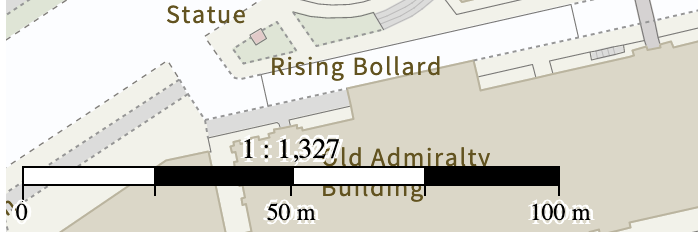
Description of change
Add scale bar to maps
Story Link
https://trello.com/c/3LkxI6Kd/448-map-scale-bar-required-on-decision-notice
Co-authored-by: Rhian Lewis rhianatwork@gmail.com