Releases: timlinux/baboon
v1.4.0 - Web Frontend & Documentation

Baboon v1.4.0 - Web Frontend & Documentation
A major release bringing web deployment capabilities, integrated documentation, and production-ready Kubernetes deployment.
Highlights
Web Subcommand
Serve the beautiful React web frontend alongside the REST API:
baboon web -port 8787
baboon web -adsense ca-pub-xxx  # With Google AdSense
baboon web -adsense preview     # Preview ad placement
Integrated Documentation
Hugo-based documentation site seamlessly integrated at /docs/:
- Deep CSS integration with the web app styling
- Kartoza brand theme
- Getting started guides, feature docs, and API reference
Kubernetes Ready
Production-ready deployment with session affinity:
- Sticky sessions for in-memory game state
- Support for NGINX, Traefik, and AWS ALB
- Horizontal Pod Autoscaler and Pod Disruption Budget
- Comprehensive deployment documentation
New Features
- Ctrl+W - Clear all typed characters in current word
- Browser local storage - Web version persists your history locally
- AdSense support - Monetize with Google Ads (keyboard enthusiast targeting)
- Kartoza branding - "Made with ♥ by Kartoza" footer on all screens
Developer Experience
- Neovim keybindings under
<leader>pfor all dev tasks - Hugo tooling in Makefile (
make docs-dev,make docs-build) - Nix flake apps (
nix run .#docs-serve) - Docker multi-stage build for production
Performance
- Reduced terminal flicker with optimized 500ms tick interval
- Integer WPM display for stable updates
- Ticks only run when timer is active
Installation
Using Nix
nix run github:timlinux/baboonUsing Go
go install github.com/timlinux/baboon@v1.4.0Using Docker
docker run -p 8787:8787 ghcr.io/timlinux/baboon:v1.4.0Made with ♥ by Kartoza | Donate | Documentation
v1.3.3: Improved Statistics Colour Display
What's Changed
Improved Statistics Colour Display with Relative Scaling
Fixed an issue where finger, row, and letter accuracy statistics all appeared as identical green colours when accuracy values were clustered together.
The Problem:
- When accuracy values are similar (e.g., 92-97% for all fingers), the absolute colour thresholds (≥95% = green, ≥90% = lighter green) caused everything to appear the same colour
- This made it impossible to visually identify weaker fingers, rows, or letters
The Solution:
- Implemented relative colour scaling that spreads the colour gradient across your actual data range
- Now your worst-performing items show red/orange, best show green, with meaningful gradient between
- Items with no data display in gray
Example: If your finger accuracies range from 92% to 97%:
- 92% finger → Red (worst in your range)
- 97% finger → Green (best in your range)
- Others spread proportionally across the gradient
Changes
- Add
GetRelativeColour()function for relative value visualization - Update finger, row, letter accuracy displays to use relative scaling
- Update seek time display to use relative scaling (inverted: fast = green)
- Items with no data now display in gray (colour 240)
- Add FR-027 (Relative Colour Scaling) functional requirement
- Add BR-006 (Relative Colour Scaling) business rule
Downloads
| Platform | Architecture | File |
|---|---|---|
| Linux | AMD64 | baboon-linux-amd64 |
| Linux | ARM64 | baboon-linux-arm64 |
| macOS | Intel | baboon-darwin-amd64 |
| macOS | Apple Silicon | baboon-darwin-arm64 |
| Windows | AMD64 | baboon-windows-amd64.exe |
| Debian/Ubuntu | AMD64 | baboon_1.3.3_amd64.deb |
macOS Users
If you get "cannot be opened because the developer cannot be verified", run:
xattr -d com.apple.quarantine baboon-darwin-*v1.3.2 - Keybinding Fix

What's Changed
Bug Fix
- Changed options keybinding from 'o' to Ctrl+O - This prevents the 'o' key from being trapped during user typing sessions. The options screen is now accessed via
Ctrl+Oinstead ofofrom both the typing screen (before timer starts) and the results screen.
Downloads
| Platform | Architecture | Download |
|---|---|---|
| Linux | x86_64 | baboon-linux-amd64 |
| Linux | ARM64 | baboon-linux-arm64 |
| macOS | Intel | baboon-darwin-amd64 |
| macOS | Apple Silicon | baboon-darwin-arm64 |
| Windows | x86_64 | baboon-windows-amd64.exe |
| Debian/Ubuntu | x86_64 | baboon_1.3.2_amd64.deb |
Installation
Linux/macOS
# Download the appropriate binary
chmod +x baboon-*
./baboon-linux-amd64  # or appropriate binary for your platform
Debian/Ubuntu
sudo dpkg -i baboon_1.3.2_amd64.deb
baboon
Windows
Download and run baboon-windows-amd64.exe
Full Changelog: v1.3.1...v1.3.2
v1.3.1 - Fixed Screen Layout
🐒 Baboon v1.3.1
Bug Fix
Fixed a regression where the top header and bottom footer were not properly pinned to the terminal window boundaries.
Changes
-
Fixed layout structure: All screens (typing, results, options) now use a consistent three-section layout:
- Header at the top of the terminal (line 0) displaying "🐒 BABOON - Typing Practice"
- Content vertically centered in the available space
- Footer at the bottom of the terminal with context-sensitive help text
-
The header and footer now remain at the terminal boundaries regardless of window size or content height
Downloads
| Platform | Architecture | File |
|---|---|---|
| Linux | x64 | baboon-linux-amd64 |
| Linux | ARM64 | baboon-linux-arm64 |
| macOS | Intel | baboon-darwin-amd64 |
| macOS | Apple Silicon | baboon-darwin-arm64 |
| Windows | x64 | baboon-windows-amd64.exe |
| Debian/Ubuntu | x64 | baboon_1.3.1_amd64.deb |
Installation
Linux/macOS:
chmod +x baboon-*
./baboon-linux-amd64  # or appropriate binary for your platform
Debian/Ubuntu:
sudo dpkg -i baboon_1.3.1_amd64.deb
baboon
Windows:
Download and run baboon-windows-amd64.exe
v1.3.0 - Options Screen
What's New
Options Screen
Press 'o' before typing starts or on the results screen to access the new options menu!

Configurable Advance Key
Choose how you want to advance to the next word:
| Option | Description |
|---|---|
| Space (default) | Press Space to advance to the next word |
| Enter | Press Enter to advance to the next word |
| Either | Press Space or Enter to advance |
Features
- Navigate options with ↑/↓ arrows or Tab/Shift+Tab
- Quick-select with number keys 1-3
- Settings automatically save to
~/.config/baboon/settings.json - Help text dynamically updates to show your configured key
Installation
Quick Install (Linux/macOS)
# Using Nix
nix run github:timlinux/baboon

# Or build from source
go install github.com/timlinux/baboon@v1.3.0
Download Binaries
Pre-built binaries will be available shortly from the CI pipeline.
Full Changelog
Full Changelog: v1.2.1...v1.3.0
v1.2.1 - Quick Restart
What's New
Quick Round Restart with Tab Key ⌨️
You can now press Tab at any time to instantly restart with a fresh set of words:
- During typing: Press Tab to abandon the current round and start over with new words
- On results screen: Press Tab (or Enter) to begin a new round
This is perfect for when you make an early mistake and want a fresh start without waiting to complete the round.
Keyboard Shortcuts
| Key | Action |
|---|---|
Tab |
Restart round (new feature!) |
Enter |
Start new round (results screen) |
Space |
Submit word and advance |
Backspace |
Delete last character |
Esc / Ctrl+C |
Quit |
Downloads
| Platform | Architecture | File |
|---|---|---|
| Linux | x86_64 | baboon-linux-amd64 |
| Linux | ARM64 | baboon-linux-arm64 |
| macOS | Intel | baboon-darwin-amd64 |
| macOS | Apple Silicon | baboon-darwin-arm64 |
| Windows | x86_64 | baboon-windows-amd64.exe |
| Linux | Debian/Ubuntu | baboon_1.2.1_amd64.deb |
| Linux | Fedora/RHEL | baboon-1.2.1-1.x86_64.rpm |
| Linux | Flatpak | baboon-1.2.1.flatpak |
Installation
Download the appropriate binary for your platform, make it executable, and run:
chmod +x baboon-*
./baboon-linux-amd64  # or your platform's binary
Full Changelog: v1.2.0...v1.2.1
v1.2.0 - Show next 3 upcoming words
What's New
3-Word Look-Ahead in Carousel
The typing screen now shows the next 3 upcoming words below the current word, giving you better preparation for what's coming next.
- First upcoming word displayed with decorative arrows (▼)
- Subsequent words shown with decreasing opacity
- All words centered horizontally for clean alignment
- Provides visual context to improve typing flow
Technical Changes
- Added
NextWordsslice to GameState API (array of up to 3 words) - Backwards compatible: falls back to
NextWordifNextWordsis empty - Updated REST API to include
next_wordsin state response
Downloads
| Platform | File |
|---|---|
| Linux (AMD64) | baboon-linux-amd64 |
| Linux (ARM64) | baboon-linux-arm64 |
| macOS (Intel) | baboon-darwin-amd64 |
| macOS (Apple Silicon) | baboon-darwin-arm64 |
| Windows (AMD64) | baboon-windows-amd64.exe |
| Debian/Ubuntu | baboon_1.2.0_amd64.deb |
| Fedora/RHEL | baboon-1.2.0-1.x86_64.rpm |
| Flatpak | baboon-1.2.0.flatpak |
macOS Users
If you get a security warning, run: xattr -d com.apple.quarantine baboon-darwin-*
Full Changelog: v1.1.0...v1.2.0
Baboon v1.1.0 - Carousel Animations
Baboon v1.1.0 - Carousel Animations
Beautiful word carousel animations and accuracy fix!
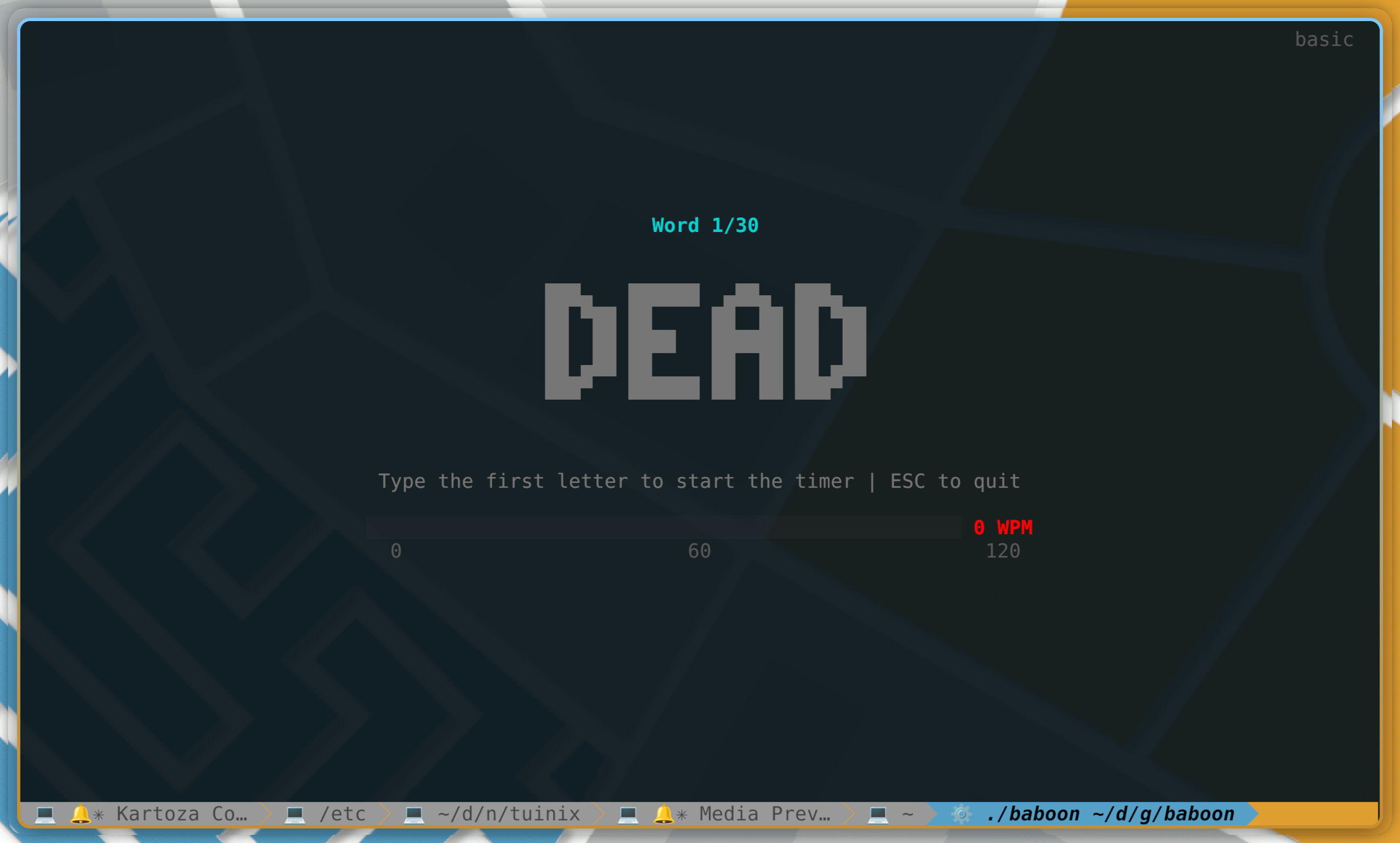
What's New
Beautiful Carousel Animations
Words now flow smoothly in a vertical carousel when you advance to the next word:
Terminal UI (TUI)
- Previous word fades and scrolls up with smooth harmonica spring physics
- Current word slides in from below with bouncy spring animation
- Next word preview fades in below with staggered timing
- Animated greyscale opacity for natural fade effects
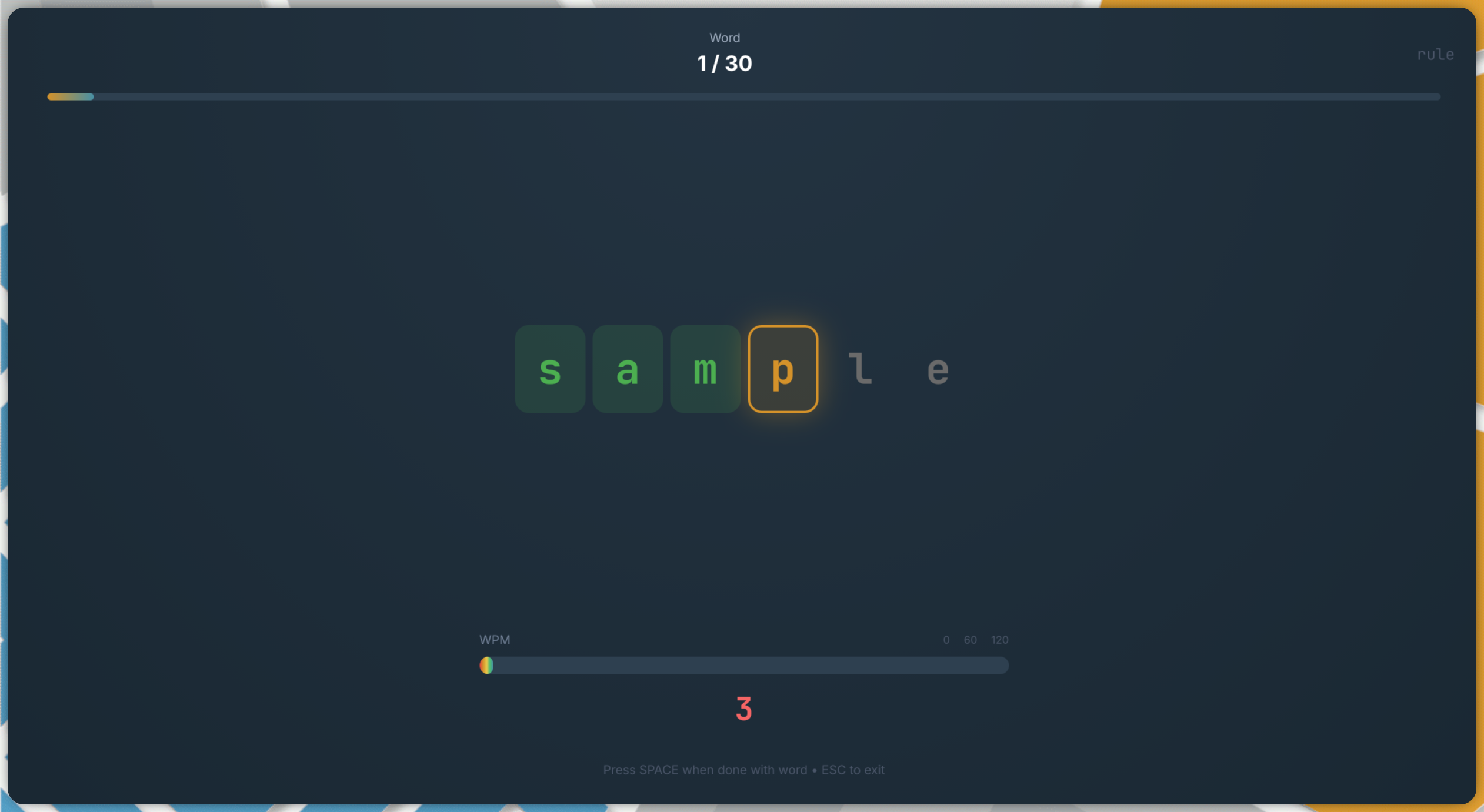
Web UI
- Previous word floats above at 50% scale with blur effect
- Current word displays prominently with spring-based transitions
- Next word floats below at 50% scale with blur
- Decorative glow effect behind the current word
Bug Fix: Accuracy Over 100%
Fixed a bug where accuracy statistics could exceed 100%:
- Issue: When backspacing and retyping a character, the "Correct" count was incremented again while "Presented" was only counted once
- Fix: Now tracks which character positions have been recorded as correct, preventing double-counting
- Timing stats are still recorded for all keystrokes (useful data regardless of retypes)
Downloads
All binaries are built automatically by GitHub Actions:
| Platform | Architecture | Download |
|---|---|---|
| Linux | AMD64 | baboon-linux-amd64 |
| Linux | ARM64 | baboon-linux-arm64 |
| macOS | Intel | baboon-darwin-amd64 |
| macOS | Apple Silicon | baboon-darwin-arm64 |
| Windows | AMD64 | baboon-windows-amd64.exe |
| Debian/Ubuntu | AMD64 | baboon_1.1.0_amd64.deb |
| Fedora/RHEL | AMD64 | baboon-1.1.0-1.x86_64.rpm |
| Flatpak | AMD64 | baboon-1.1.0.flatpak |
macOS Users
The binaries are unsigned. To run on macOS:
```bash
xattr -d com.apple.quarantine baboon-darwin-arm64
chmod +x baboon-darwin-arm64
./baboon-darwin-arm64
```
Quick Start
```bash
Download and run
chmod +x baboon-linux-amd64
./baboon-linux-amd64
Or with Nix
nix run github:timlinux/baboon
```
Full Changelog: v1.0.0...v1.1.0
Baboon v1.0.0 - First Stable Release
Baboon v1.0.0 - First Stable Release
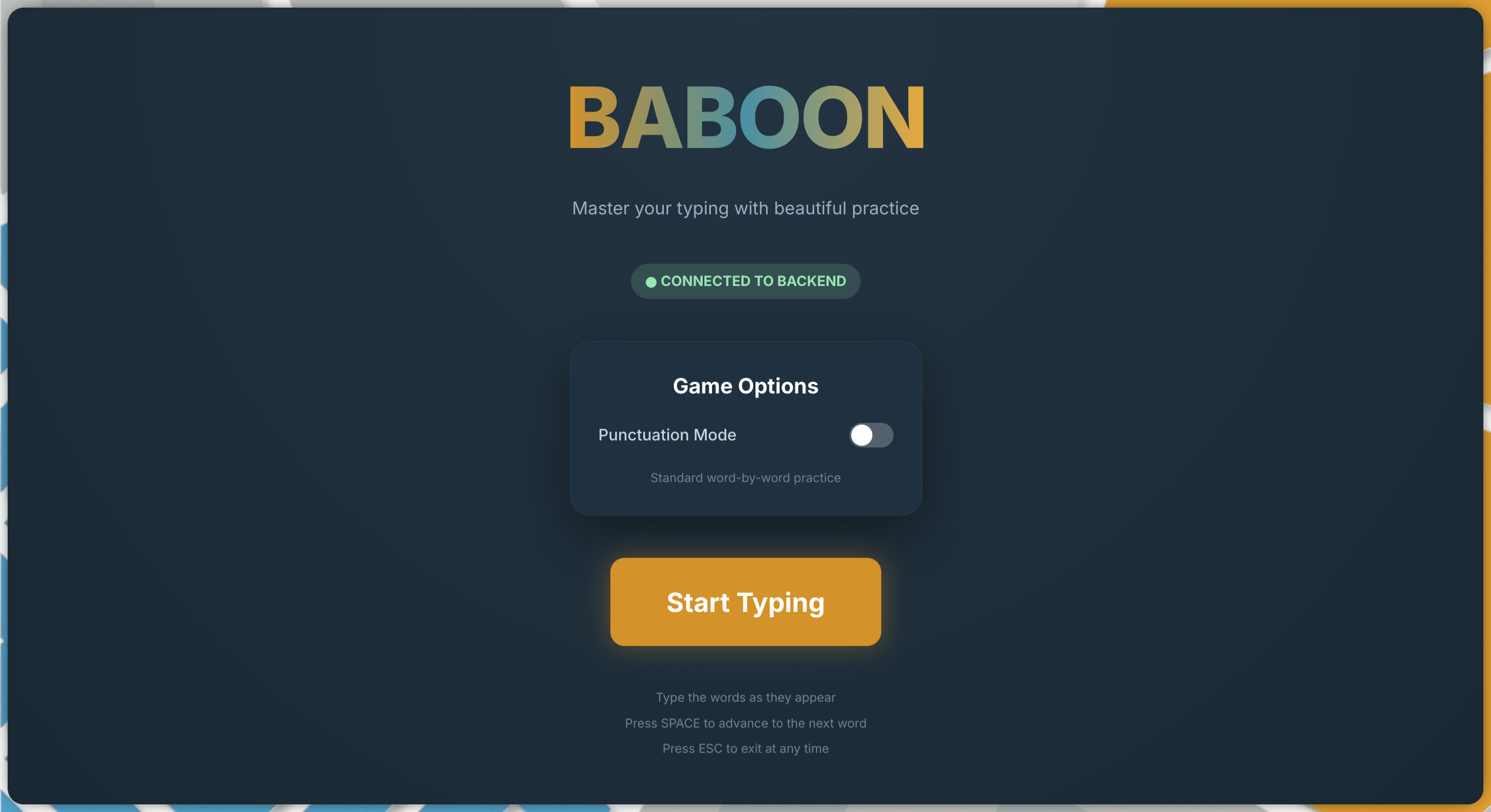
Master your typing with beautiful practice! Baboon is a cross-platform typing practice application that helps you improve your typing speed and accuracy.
Highlights
Two Beautiful Interfaces
Terminal UI - Large block letters with real-time colour feedback
Web UI - Modern React interface with physics-based animations
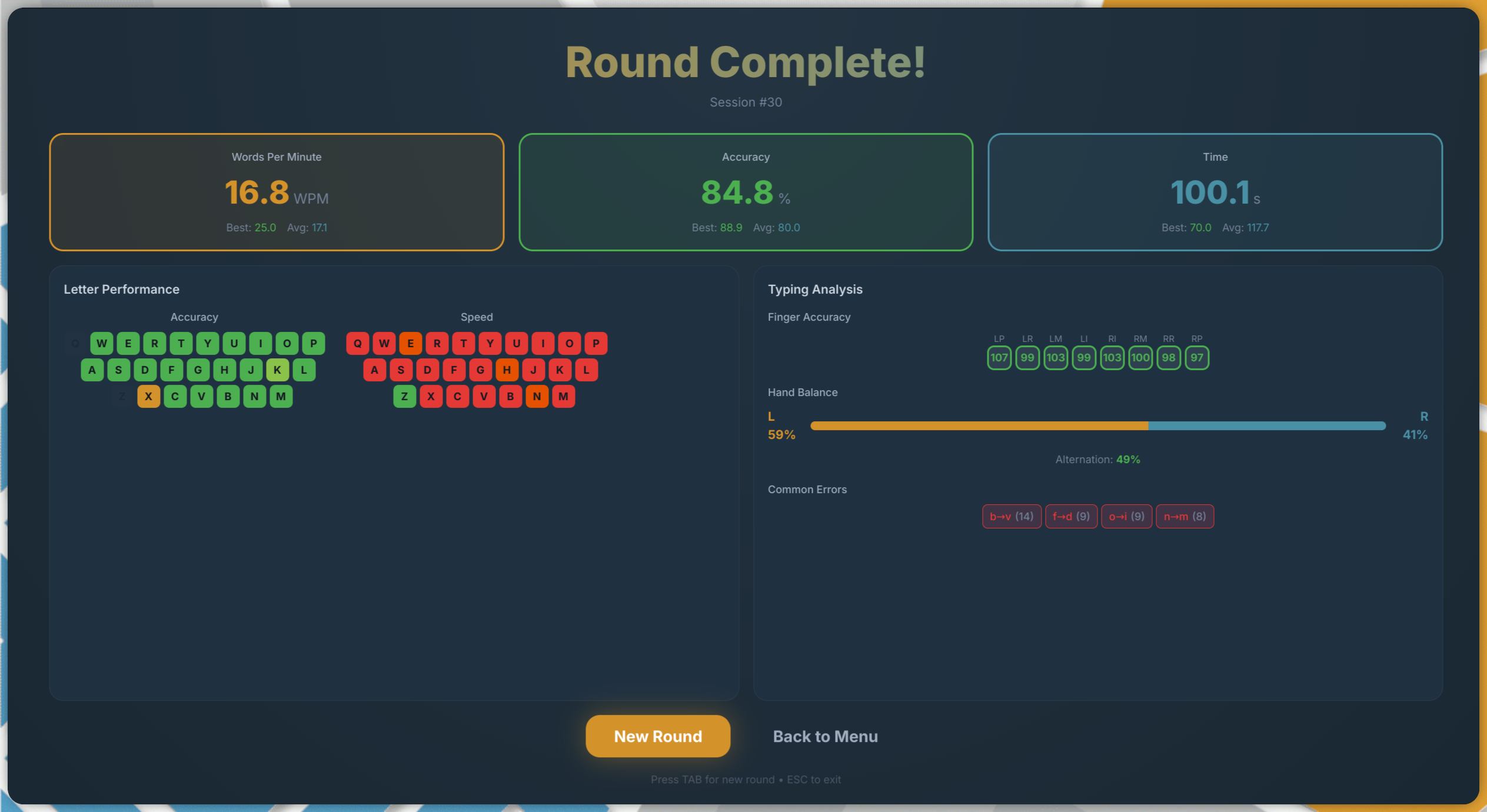
Comprehensive Statistics
Track your progress with detailed metrics including per-letter accuracy heatmaps, finger performance analysis, and hand balance statistics.
Features
- Intelligent Practice - Adaptive word selection prioritises letters you struggle with
- Real-time Feedback - Characters change colour as you type (green = correct, red = incorrect)
- Live WPM Bar - Watch your speed with a gradient-coloured progress bar
- 30-word Rounds - Consistent 150-character rounds for accurate comparison
- Per-letter Statistics - See accuracy and speed for each letter A-Z
- Finger Analysis - Track performance by finger (touch typing layout)
- Hand Balance - Monitor left/right hand distribution and alternation rate
- Error Patterns - Identify which letters you commonly mistype
Downloads
| Platform | Architecture | Download |
|---|---|---|
| Linux | AMD64 | baboon-linux-amd64 |
| Linux | ARM64 | baboon-linux-arm64 |
| macOS | Intel | baboon-darwin-amd64 |
| macOS | Apple Silicon | baboon-darwin-arm64 |
| Windows | AMD64 | baboon-windows-amd64.exe |
| Debian/Ubuntu | AMD64 | baboon_1.0.0_amd64.deb |
| Fedora/RHEL | AMD64 | baboon-1.0.0-1.x86_64.rpm |
| Flatpak | AMD64 | baboon-1.0.0.flatpak |
Quick Start
# Download and run (Linux example)
chmod +x baboon-linux-amd64
./baboon-linux-amd64

# Or with Nix
nix run github:timlinux/baboon

# Debian/Ubuntu
sudo dpkg -i baboon_1.0.0_amd64.deb
baboon

# Fedora/RHEL
sudo rpm -i baboon-1.0.0-1.x86_64.rpm
baboon
Web Interface
Start the backend and web frontend:
./baboon-linux-amd64 -server &
cd web && npm install && npm start
Then open http://localhost:3000
Technology
- Backend: Go with REST API
- Terminal UI: Bubble Tea + Lipgloss
- Web UI: React 18 + Chakra UI + Framer Motion
- Animations: Harmonica spring physics
Acknowledgements
- Built with the excellent Charm libraries
- British English spelling throughout
- Kartoza brand colours in web interface
Full Changelog: https://github.com/timlinux/baboon/commits/v1.0.0