Add script for checking the HDMI status #1924
Conversation


 db39
left a comment
db39
left a comment
db39
left a comment
There was a problem hiding this comment.
Automated comment from CodeApprove ➜
In: debian-pkg/opt/tinypilot-privileged/scripts/check-hdmi-status:
> Line 25
  --power     Check whether the capture chip is powered on.
I believe --power (power_present) reports whether the capture chip's 5V pin is receiving power, implying that there's an HDMI cable connected to a powered target, rather than checking whether the chip is powered on (the chip should always be on when the device is on).
Does "Check a powered HDMI cable is connected to the capture chip." work?
In: debian-pkg/opt/tinypilot-privileged/scripts/check-hdmi-status:
> Line 27
              (This implies that the chip is powered on.)
Similar to my note about --power, --signal the chip should always be powered when the device is on.
Suggest: "(This implies that a powered HDMI cable is connected.)"
In: debian-pkg/opt/tinypilot-privileged/scripts/check-hdmi-status:
> Line 47
    --signal)
This script currently allows you to call it with both the --power and --signal options at the same time. Is it possible to force a single option at a time?
In: debian-pkg/opt/tinypilot-privileged/scripts/check-hdmi-status:
> Line 67
readonly VIDEO_DEVICE='/dev/video0'
While we expect the video input to be at /dev/video0, we cannot guarantee it, but I'm not sure if that's an issue right now.
We can use something like sudo v4l2-ctl --list-devices to get a list of available interfaces and then check for:
unicam (platform:fe801000.csi):
	/dev/video0
To match the tc358743 capture chip on Voyager devices.
My USB capture device appears like this (connected to a Voyager device, which may be why it's on /dev/video1):
USB3 Video: USB3 Video (usb-0000:01:00.0-1):
	/dev/video1
But the interface may differ (USB2 for instance) depending on the capture hardware. Considering there are too many cases for other capture hardware, I'm happy to restrict this script to only support tc358743 capture chips.
In: debian-pkg/opt/tinypilot-privileged/scripts/check-hdmi-status:
> Line 73
  # Note that on devices prior to Voyager 3, the output will stay
I think this is devices prior to Voyager 2a based on my testing, but we may need someone else to confirm with their own 2a hardware.
In: debian-pkg/opt/tinypilot-privileged/scripts/check-hdmi-status:
> Line 74
  # 'power_present: 1' persistently once the chip had been powered on
Apologies for the nits - I believe the behavior here is that power_present is 0 until the capture chip's 5V pin is being powered via HDMI from a powered target, and then it flips to 1 and persists, regardless of whether the user disconnects the cable from the HDMI input.
In: debian-pkg/opt/tinypilot-privileged/scripts/check-hdmi-status:
> Line 76
  OUTPUT="$(v4l2-ctl --device "${VIDEO_DEVICE}" --get-ctrl power_present)"
Slightly related to my earlier comment about non-tc358743 hardware, we cannot guarantee other hardware has the power_present option available.
We can guard against this using something like v4l2-ctl --device /dev/video0 --list-ctrls to list the controls available. If we're not supporting other capture hardware for this script, we can probably leave this as-is.
In: debian-pkg/opt/tinypilot-privileged/scripts/check-hdmi-status:
> Line 98
  if [[ "${OUTPUT}" == *'(Camera 0: ok)'* ]]; then
Another point related to capture hardware (for reference), the output for non-tc358743 hardware can differ:
Video input : 0 (Input 1: ok)
👀 @jotaen4tinypilot it's your turn please take a look

 jotaen4tinypilot
left a comment
jotaen4tinypilot
left a comment
jotaen4tinypilot
left a comment
There was a problem hiding this comment.
Automated comment from CodeApprove ➜
In: debian-pkg/opt/tinypilot-privileged/scripts/check-hdmi-status:
Ah right, thanks for helping clarify this.
In: debian-pkg/opt/tinypilot-privileged/scripts/check-hdmi-status:
Resolved
In: debian-pkg/opt/tinypilot-privileged/scripts/check-hdmi-status:
Resolved
In: debian-pkg/opt/tinypilot-privileged/scripts/check-hdmi-status:
I’ve just double-checked on my Voyager 2a again, and for me it reports power_present: 1 right away after booting, even if no HDMI cable is plugged in. So far, I wasn’t able to make it report power_present: 0 at all yet (on Voyager 2a).
I’ve also left a note in the help output to make this more transparent. I’d think for our purposes, it should be fine like this.
The only thing we could consider is adding another note in the debug logs output, to help us remember about this quirk when evaluating the logs for support purposes?
In: debian-pkg/opt/tinypilot-privileged/scripts/check-hdmi-status:
> Line 53
    --signal)
Resolved
In: debian-pkg/opt/tinypilot-privileged/scripts/check-hdmi-status:
> Line 77
readonly VIDEO_DEVICE='/dev/video0'
Also related to your other comments (https://codeapprove.com/pr/tiny-pilot/tinypilot/1924#thread-e2f032eb-078a-4928-9068-7e71f6836eac, https://codeapprove.com/pr/tiny-pilot/tinypilot/1924#thread-571204ce-1a40-4c79-9871-c54db7fd27ad), I’m wondering whether it may be most pragmatic for us to add the following checks to the script:
- Check whether
/dev/video0is available (like[[ -e /dev/video0 ]]) - Check whether the device is configured for a tc358743 capture chip (like
grep -q 'dtoverlay=tc358743' /boot/config.txt)
Otherwise, the script would exit 1. Of course, we should make this behaviour explicit in the help/docstring.
Would that work?
👀 @db39 it's your turn please take a look
db39
left a comment
db39
left a comment
There was a problem hiding this comment.
Automated comment from CodeApprove ➜
In: debian-pkg/opt/tinypilot-privileged/scripts/check-hdmi-status:
> Line 77
readonly VIDEO_DEVICE='/dev/video0'
That sounds good to me!
👀 @jotaen4tinypilot it's your turn please take a look
jotaen4tinypilot
left a comment
jotaen4tinypilot
left a comment
There was a problem hiding this comment.
Automated comment from CodeApprove ➜
In: debian-pkg/opt/tinypilot-privileged/scripts/check-hdmi-status:
👍
In: debian-pkg/opt/tinypilot-privileged/scripts/check-hdmi-status:
(See https://codeapprove.com/pr/tiny-pilot/tinypilot/1924#thread-c83dc5fb-ccd7-43a5-914c-07391de307c7)
In: debian-pkg/opt/tinypilot-privileged/scripts/check-hdmi-status:
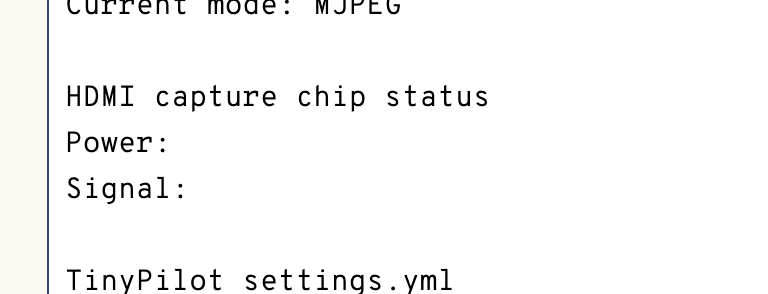
Btw., when running this script on unsupported hardware (i.e., without tc358743 chip), the corresponding debug logs entries will stay blank:
In: debian-pkg/opt/tinypilot-privileged/scripts/check-hdmi-status:
> Line 101
  OUTPUT="$(v4l2-ctl --device "${VIDEO_DEVICE}" --get-ctrl power_present)"
(See https://codeapprove.com/pr/tiny-pilot/tinypilot/1924#thread-c83dc5fb-ccd7-43a5-914c-07391de307c7)
In: debian-pkg/opt/tinypilot-privileged/scripts/check-hdmi-status:
> Line 123
  if [[ "${OUTPUT}" == *'(Camera 0: ok)'* ]]; then
(See https://codeapprove.com/pr/tiny-pilot/tinypilot/1924#thread-c83dc5fb-ccd7-43a5-914c-07391de307c7)
👀 @db39 it's your turn please take a look
db39
left a comment
db39
left a comment
There was a problem hiding this comment.
Automated comment from CodeApprove ➜
⏳ Approval Pending (1 unresolved comments)
Approval will be granted automatically when all comments are resolved
LGTM, thanks!
In: debian-pkg/opt/tinypilot-privileged/scripts/check-hdmi-status:
If running on unsupported hardware, is it possible to format this as the following (or similar so that they're not blank)?:
HDMI capture chip status
Power: n/a
Signal: n/a
Maybe that would require a different exit code for no tc358743 capture chip.
👀 @jotaen4tinypilot it's your turn please take a look
jotaen4tinypilot
left a comment
jotaen4tinypilot
left a comment
There was a problem hiding this comment.
Automated comment from CodeApprove ➜
In: debian-pkg/opt/tinypilot-privileged/scripts/check-hdmi-status:
Done.
If the script errors it doesn’t output anything to stdout, so we can fallback to n/a in this case regardless of reason.

db39
left a comment
db39
left a comment
There was a problem hiding this comment.
Automated comment from CodeApprove ➜
Approved: I have approved this change on CodeApprove and all of my comments have been resolved.

Resolves tiny-pilot/tinypilot-pro#1636.

This PR adds a script for determining the status of the USB data
connection, based on the power state. (See docstring comment.)

Note that in contrast to the [HDMI check
script](#1924), we don’t
need root privileges here, so the script can live in
`/opt/tinypilot/scripts`. Otherwise, the mechanics of the script are
equivalent. I’ve also added the info to the debug logs, just in case and
mostly for the sake of completeness.

<img width="824" height="902" alt="Screenshot 2025-10-20 at 19 53 13"
src="https://github.com/user-attachments/assets/ab471090-e612-44f0-97d3-597b84bfc890"
/>
<a data-ca-tag
href="https://codeapprove.com/pr/tiny-pilot/tinypilot/1925"><img
src="https://codeapprove.com/external/github-tag-allbg.png" alt="Review
on CodeApprove" /></a>

---------

Co-authored-by: Jan Heuermann <jan@jotaen.net>


Resolves https://github.com/tiny-pilot/tinypilot-pro/issues/1635.
This PR adds a privileged script for checking the status of the HDMI capture chip. The check status is also included in the debug logs.