Configuration
Things like the min/max desk height, units, and decoder variant are now set at runtime instead of being statically configured within the ESPHome config. This simplifies things a lot, and lets you configure these options without having to compile the firmware yourself.
The stock firmware comes with reasonable defaults for an Uplift v2 desk, but you will need to change them if you have a different desk or wish to change the min/max height. You can find these configuration options in Home Assistant under Settings > Devices & Services > ESPHome > (node name).
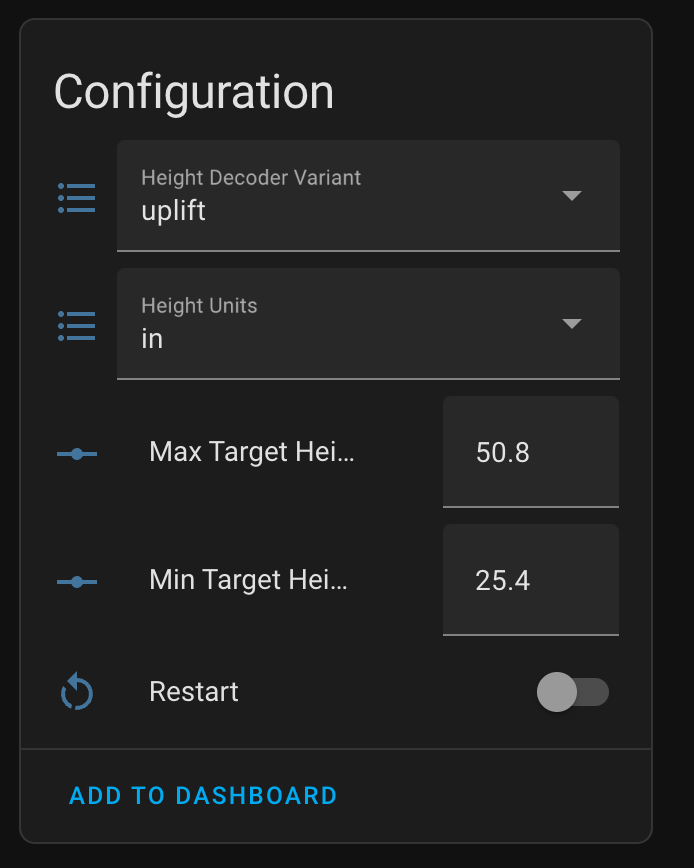
Most of these require a restart to take effect; just flick the "Restart" switch to restart your Upsy Desky. Once reconnected to Home Assistant, the values will update and persist across reboots.
- Height Decoder Variant: The firmware has several "decoders" baked in for various protocols — choose the one that matches your desk brand. If it doesn't work, try each of the others to see if they work instead.
- Height Units: Units to display in Home Assistant for desk height and target desk height.
- Min/Max Target Height: Sets the min/max value the target height slider will be able to be set to.