Repo for Module 2 work
The purpose of this analysis was to compare stocks using a refactored script to sort and format the data. This scrip took data from the 2017 and 2018 sheets as selected within the input box, and then returned the stock values based on each ticker, which were ordered in an array. After going through each row to each ticker, it returned the total volume and yearly returns for each stock in either 2017 or 2018. This script then formatted the title to update with the sheet selection, headers to be bold with border underneath, and formatted returns above 0 to be green and those below 0 to be red. This script also contains a timer, which starts on script execution and ends on completion, returning the amount of time it took to run the script based on the year selection. Lastly, the output sheet contains a button to run the analysis which promts the input box, and a button to clear the worksheet.
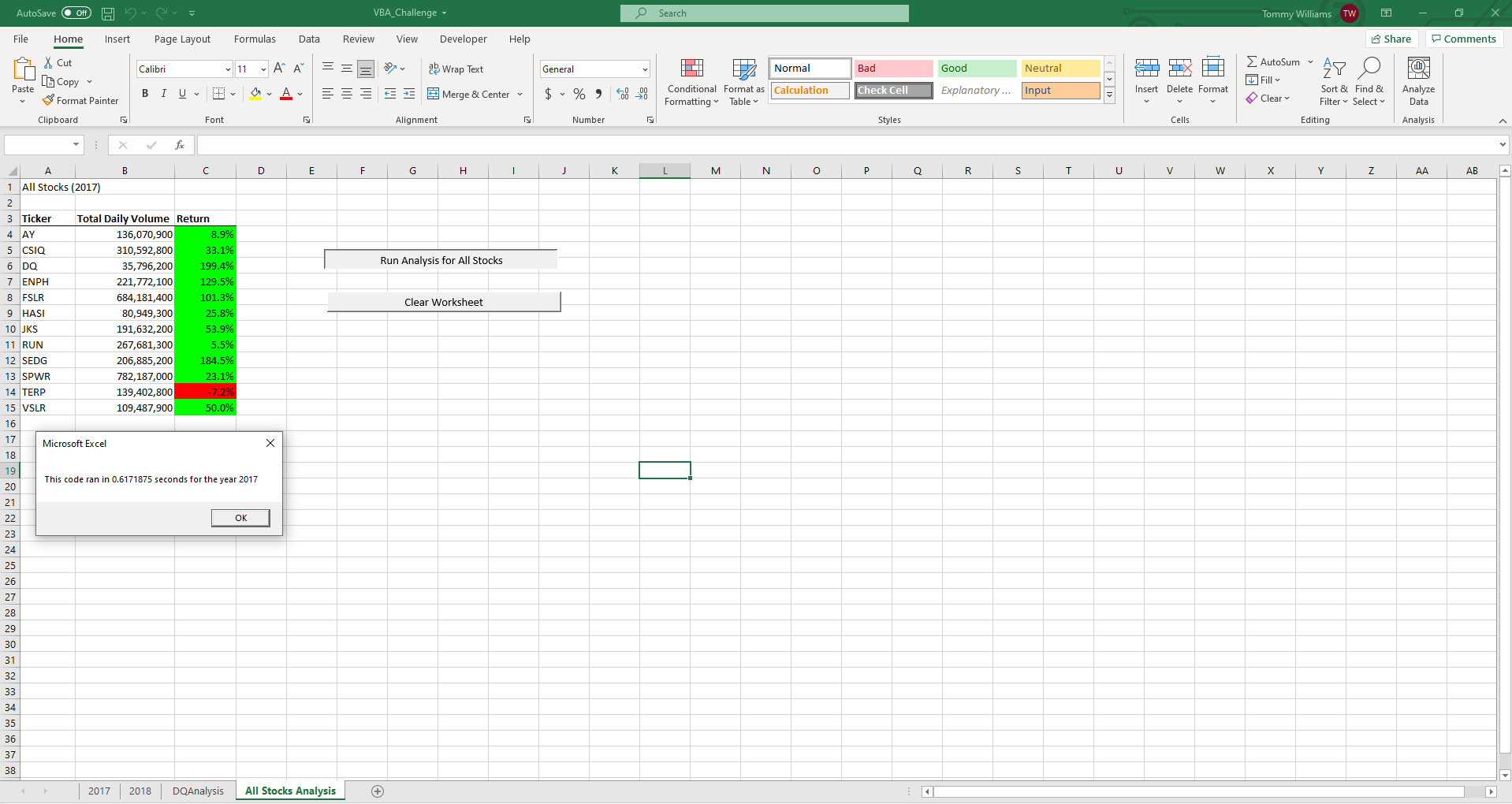
For the year 2017, nearly all stocks saw a positive return, except for the TERP stock, which saw a negative return of 7.2%. All but two of these stocks, being DQ and HASI, saw a trading volume of over 100 million.
 Conversely, 2018 saw a mostly negative return, except for the ENPH and RUN stocks, which saw positive returns over 80%. All but AY saw a trading volume over 100 million for the year.
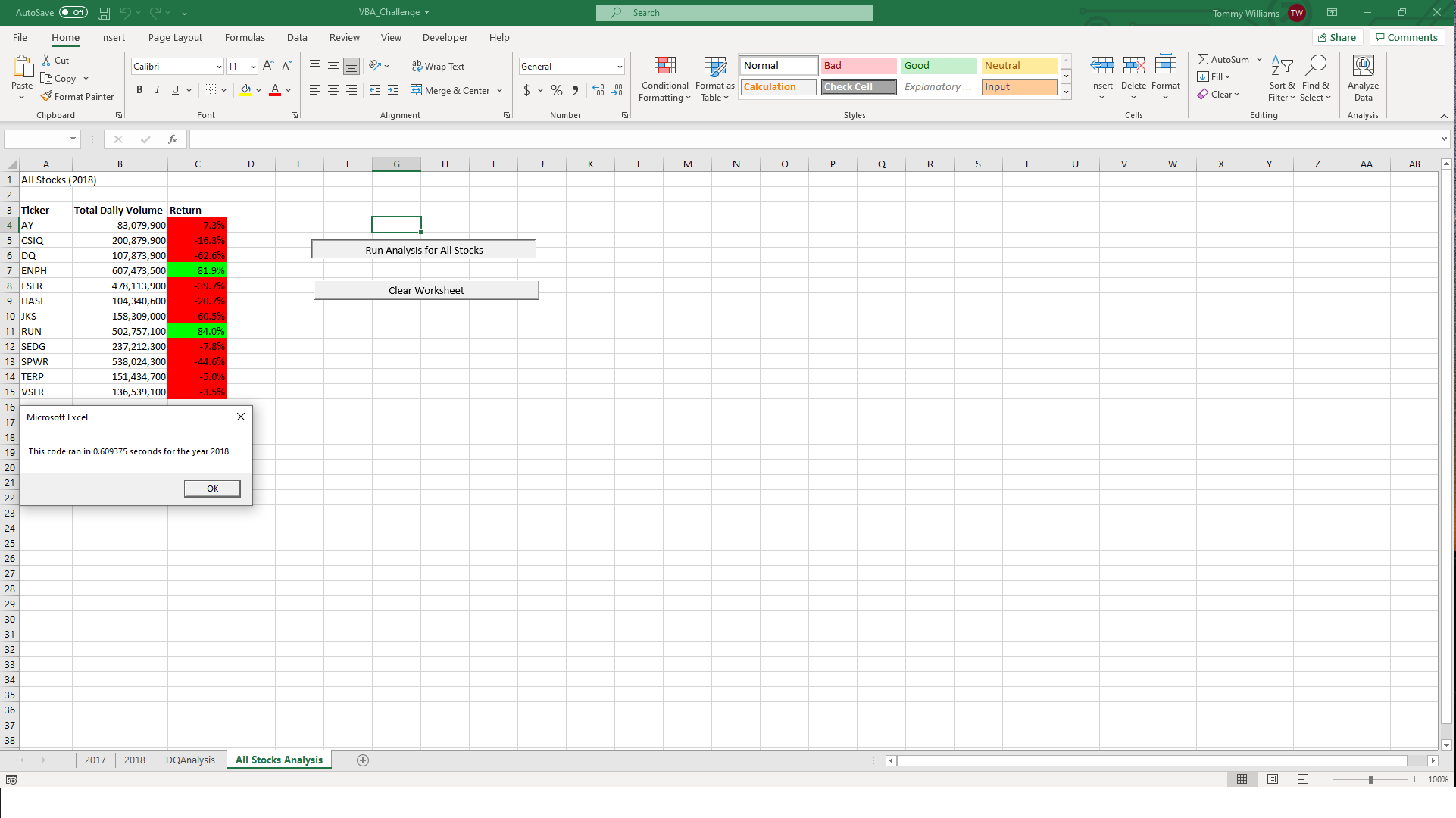
The script had similar execution times when it was ran for both the 2017 and 2018 data sets. The 2017 data set was one one-thousandth of a second faster. For both years, the script took less than a second to run.
The original script was much easier to write, as it allowed for the functions of a subroutine to be broken down into multiple macros. Additionally, this allowed for individual testing of each separate function we wanted to implement; However, this required much more coding in order to separate each subfunction for the calculation. The refactored script was more difficult to write, due to the fact that all functions were condensed into one subroutine. This required more precise placement of each function, as an incorrect order would return an inaccurate result or throw an error. The refactored script worked much better, as we were able to condense the input box, loops, conditions, and formatting all into one macro and run it all with the press of a button.
Refactoring code comes with several advantages and disadvantages. Some of the main advantages are that it allows us to build on existing code that ourselves or others have created, in order to solve a similar problem. We can use these patterns to solve similar questions with a vast amount of different data sets that include similar data. Additionaly, refactored code is easier to run and display as several macros can be combined into one subroutine to produce the same effect, which allows us to condense multiple functions into the press of a button. Refactoring code also comes with disadvantages, as with reward comes risk. Refactoring code can take more time to work with, as you will have to identify which pieces of the pattern code you need to change and adapt to make it fit your needs. Since we are condensing multiple macros into one subroutine, the code is more sensitive to the order and positiong of certain pieces, and may require you to add additional indices to make the code work.
Building the original VBA code was easier, as we took a step by step approach to all the functions that we wanted. Each macro we used was contained within one subroutine, allowing us to build and test it one step at a time. If subroutine step had errors, it was easier to identify and debug this because we could test them one at a time to ensure proper function. This approach also allowed us to see and understand what each macro and piece of code meant and how it influenced the worksheet. The cons of the original script were that it was very verbose and at times, difficult to read. The original script required more coding as each macro was its own subroutine. Additionally, running all of the macros to achieve the end result took more time because each macro had to be run separately. The refactored script allowed us to take all of these functions, and combine them into one subrouting which included the input box, timer, calculations, and format. Also, it was difficult to refactor the code, as the order of functions mattered much more, since it would all be executed at once.