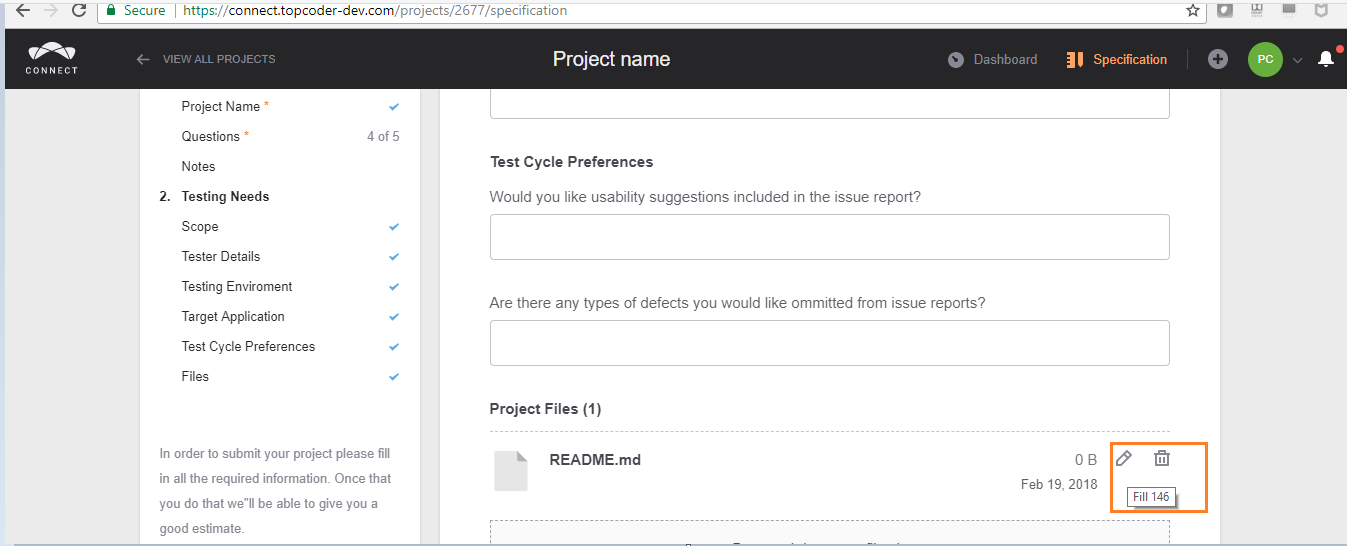
[$15] Inappropriate "Fill 146" tool-tip description when hovered over #1779


Description

From @8unn on February 19, 2018 7:8
Reported URL
https://connect.topcoder-dev.com/projects/2677/specification
Reproduction Steps
1.Login as: pshah_copilot/topcoder123
2. Go to the above URL, Scroll down to Project Files"
3. Upload any random file.
4. Hover over the Edit name option of the uploaded file.
Expected Result
The right tool-tip of "Edit" should be shown.
Actual Result
"Fill 146" tool-tip is shown when hovered over."
Screenshots
Issue Information
Frequency: Always
Device: Desktop
OS: Windows 10
Browser: Chrome Version 64.0.3282.140 (Official Build) (32-bit)
Copied from original issue: topcoderinc/connect-test-cycle-1#299