Talent Picker Component #3950


Description

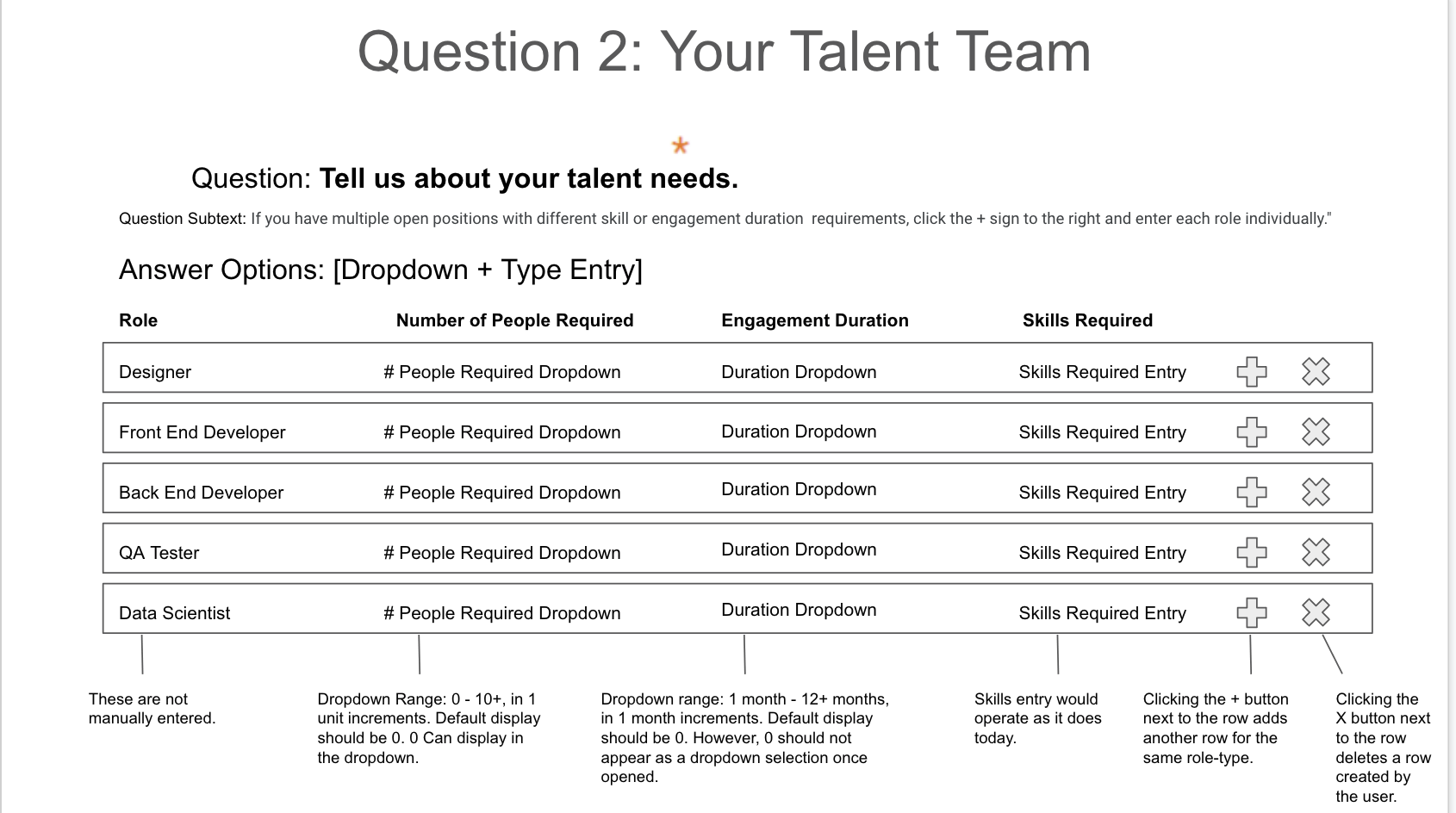
Implement a new component for project creation form to choose talents:
Functionality
- The user needs to enter # People, Duration, and Skills for a minimum of one row for the question to be considered “answered.”
- The user does not need to complete all rows for the question to be considered “answered.”
- Clicking the + button at the end of a row should generate another row for the same role.
Example: Clicking + at the end of the Designer row should create a second Designer row where the user can enter different numbers of people required/duration required/skills required. - Clicking the X button at the end of a row deletes a row created by the user. They cannot delete the default rows, but they can leave these default rows as blank (as long as one row is completed, to fulfill the required answer functionality).
Design
https://marvelapp.com/89h2ch3/screen/68335433/handoff with the following adjustments:
- don't show "months" inside, just a number. Add "months" to column header: "Duration (months)"
- If we enter too many skills, let the height of the input of the skills become multiline and grow down
- Reuse the existent style of inputs for peoples, duration and skills, don't implement a new design for inputs
- Don't make the component wide as on design, it should be the same width as other components in the project creation form
- As there is not enough space for "skills" component on one line, put it to the second line, and make the duration and people inputs take the whole space
Read-optimized mode
- When we answer questions and click Next button, we render them in
read-optimizedmode inside an Accordion, see https://monosnap.com/file/5tHApYK9YEXh5IWXXXRdu2PTohEhJQ. We can open accordion and edit the values using normal UI https://monosnap.com/file/bkSCib1FWEovlfOGf60NutP7x0ZYPp. - For this component it should display the quantity of people per role: e.g. "Designer: 9, Developer: 5".
- When we open the accordion, it should show the normal UI to edit question as we implemented above. Similar to other question types.
QA guidelines
This new component should support some general form feature, and we should verify that they work:
- When we select some skills and click Back and after Next - the selected values should persist.
- When we select some skills and click Next and after Back - the selected values should persist.
- If we started filling the form, select some specialists, closed the browser tab and after follow project creation link again https://connect.topcoder-dev.com/new-project/talent-as-a-service-specialists we restore the form on the last place where the user left it. Selected specialists should be properly restored.
- After we create a project we can edit project scope on the Scope tab like this. We should make sure that after we created a project with selected specialists they are displayed properly on the Scope tab and we can edit them and Save changes.
Known Issues
value is not updated in read-optimized mode Talent Picker Component - Issue: value is not updated in read-optimized mode #3951fixed