Country selection - select by keyboard #2540 #2759
Conversation


Country selection - select by keyboard topcoder-archive#2540


 maxceem
left a comment
maxceem
left a comment
maxceem
left a comment
There was a problem hiding this comment.
Thanks, @suppermancool works great!
A few things:
-
When we focus select, after choosing any option with keyword and pressing Enter (to choose the option) select is closed as expected, but it loses focus. Can we keep the focus on the select as for native elements after chosing some option with a keyboard? See screencast https://monosnap.com/file/t5d0FDneKDf1hnUMNeNx8VR5xLkCqT
-
Selecting a country with typing currently supports only the first letter. While the native supports typing several letters as long as we type them fast. For example, if I want to choose
UkraineI can type fastukrand native select will chooseUkraine. While in the current implementation if I typeukrit will chooseReunion- by the last letter I typed. What do you think? Can we make it work same in our dropdown? -
Sorry, I didn't specify the exact way of getting rid of the scrollbar. But the excpected way was that dropdown has to adjust its width so all the countries can fit in and be displayed in one line. As it's hard to read them when they wrapped to several lines:
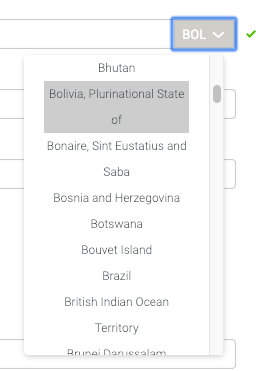
-
Could you please make the focus style same like for input here:
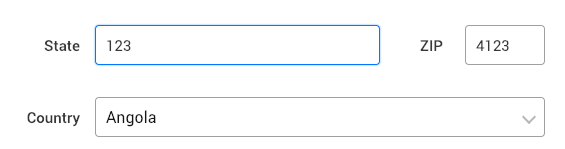
While the current focus style is different:
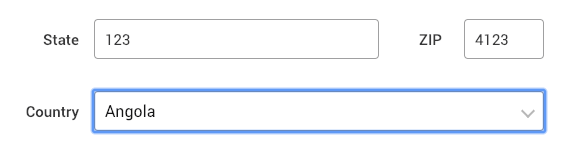
Thanks.

maxceem
left a comment
maxceem
left a comment
There was a problem hiding this comment.
Thanks @suppermancool
Just one issue. When I type the name of a country with a keyboard it is selected as expected. But when I press Enter to apply my selection and close the select Select is not closed and there is an error in console:
Uncaught TypeError: Cannot read property 'click' of undefined
See screencast https://monosnap.com/file/fPk38bIqfD4KxHj9n0tQMkPVSpRVxb
maxceem
left a comment
maxceem
left a comment
There was a problem hiding this comment.
Sorry, looks like I've missed one more small issue before:
- when we open select and press
UPit jumps to the last option, but it shouldn't same like for native select. It should ignore keypress and stay on the first option as we cannot go up. - when we select the last option by keyboard and after press
DOWN. First nothing will happen and error will be shown in console:If we pressDropdown.jsx?aa69:37 Uncaught TypeError: Cannot read property 'focus' of undefinedDOWNthe second time, it will jump to the first option, but it shouldn't same like for the first option.
See screencast https://monosnap.com/file/uq7Ykv2HYv81AhLPhphcdwTGAkL5TG
2 participants


Country selection - select by keyboard #2540