Make text fields expandable in Scope form #3139
Conversation


There was a problem hiding this comment.
Hi @mfikria
It looks like the issue is not fixed and the field still doesn't expand to show the whole text:
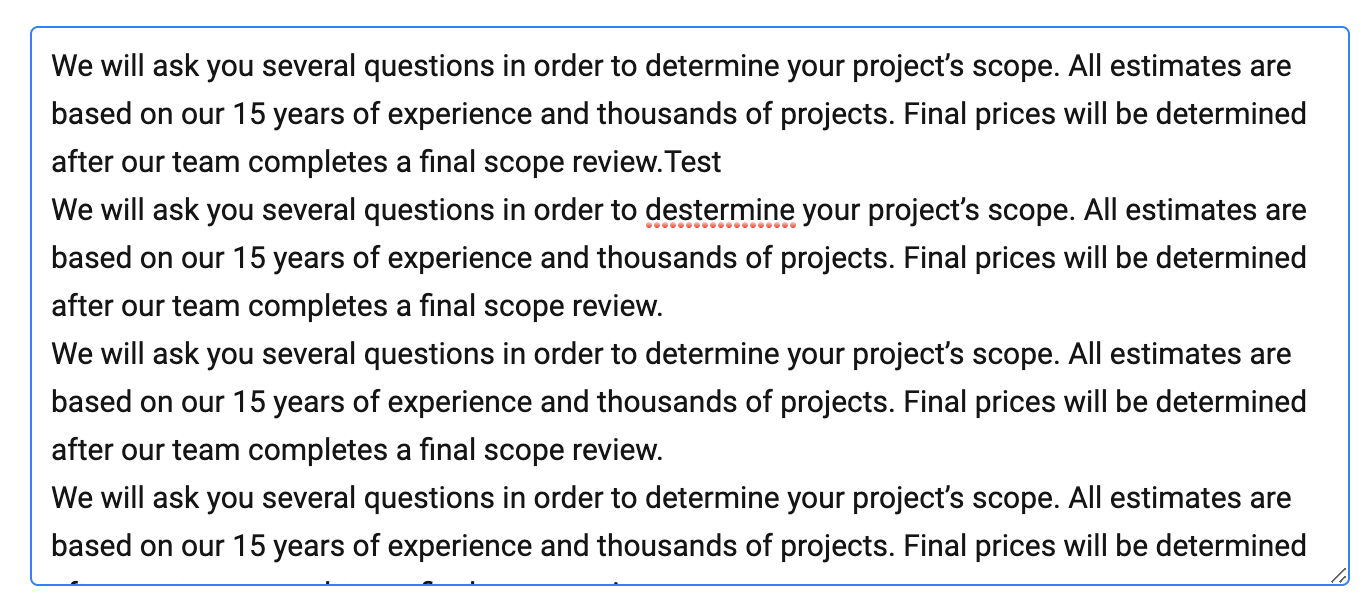
Also, if I resize the text field manually and after type "Enter" the field shrinks again and truncates some text.
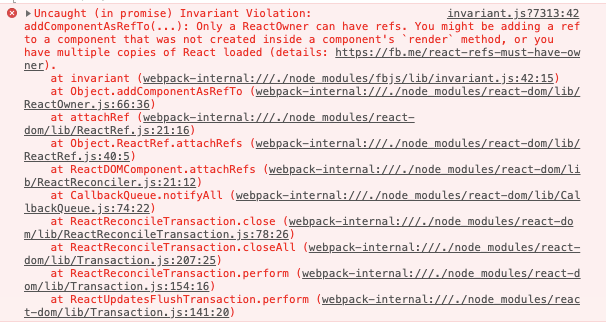
Also, every time I type in the texture there is an error in the browser console:

By the way, do the changes you did fix any case?

|
@maxceem here is the demo https://monosnap.com/file/AcNcnEQFdABqDnrBme6FV9oj8q6B9x |

|
@mfikria yes, I used a new version from |
|
@mfikria I've tested one more time and made sure that I use the updated code (I've added a comment to your new code and I can see it browser console), but it works with issues for me:
OS: macOS 10.14.5 |

|
@maxceem i 've updated the PR topcoder-platform/react-components#321 Demo: https://monosnap.com/file/owMNhzc5xlSO17Tr9WXOprTmxl4svf |
|
@maxceem about the Note that this error happened in local development that use
|
 maxceem
left a comment
maxceem
left a comment
maxceem
left a comment
There was a problem hiding this comment.
Great, @mfikria works good now.
I didn't manage to run connect with react-components using your guide in some reason, so I've just copied the code of updated react-components repo to the node_modules of Connect app and it works.
There are only a few questions regarding the code:
-
Do we need changes made in the Connect app? it feels that they don't do anything as function
handleAccordionOpen(accordion, index) {}doesn't have a code. -
In the react-components you've added a new prop
minRowsthough we already have an existent proprowswhich suppose to set the default rows quantity. Can we use the existentrowsprop, or there is some reason we have to introduce a new one, see https://monosnap.com/file/7835nxJZQShmyX2Q2VxMV8laXiEfoX
|
Got it. I guess, then as |
|

|
@maxceem seems good to me. I've updated the PRs. Thanks. |
maxceem
left a comment
maxceem
left a comment
There was a problem hiding this comment.
@mfikria thanks all the code is well updated.
I've just found one issue during the final testing: if I press Enter 3 times fast, the text got truncated again 😟, see demo video https://monosnap.com/file/6qHQWeRM1kEF1z7DeYHcjXZQTTvfwE
Btw, I've noticed there is a newer version of the package we are using in the NPM not sure if it would help with any of the issues we are facing https://www.npmjs.com/package/react-textarea-autosize.
|
@maxceem well, I'll try to update the library
…On Tue, 9 Jul 2019, 09:08 maxceem, ***@***.***> wrote:
***@***.**** requested changes on this pull request.
@mfikria <https://github.com/mfikria> thanks all the code is well updated.
I've just found one issue during the final testing: if I press Enter 3
times fast, the text got truncated again 😟, see demo video
https://monosnap.com/file/6qHQWeRM1kEF1z7DeYHcjXZQTTvfwE
Btw, I've noticed there is a newer version of the package we are using in
the NPM not sure if it would help with any of the issues we are facing
https://www.npmjs.com/package/react-textarea-autosize.
—
You are receiving this because you were mentioned.
Reply to this email directly, view it on GitHub
<#3139>,
or mute the thread
<https://github.com/notifications/unsubscribe-auth/ACGTFUN6SENFRM6IMYCNZQTP6PXI5ANCNFSM4H5YO7FA>
.
|
|
@maxceem i've updated the library. Hope this can resolve the issue |
|
@mfikria, unfortunately, it didn't help. Especially it can be easily reproduced in FireFox, see demo video https://monosnap.com/file/iOeebmreBl870v73wVPYAKPZVPMKQq The text is truncated when I quickly add lines using |
|
@maxceem ok noted will try it in firefox |
|
@maxceem how about change the library to https://www.npmjs.com/package/react-autosize-textarea ? |
|
@mfikria let's give it a try. Could you please, create a separate PR with that library, just in case if the current library works better, so we can keep it. |
|
Hey, @mfikria any luck with another library? |
|
@maxceem no, https://www.npmjs.com/package/react-autosize-textarea and current library use the same core library which is https://www.npmjs.com/package/autosize. The alternative is rewriting the library from scratch but it need too much effort |
|
Got it @mfikria. Thank you for looking into it, I think we would be fine with the way it works currently as it looks like further fixes would take too much efforts. |
maxceem
left a comment
maxceem
left a comment
There was a problem hiding this comment.
Works good in most cases.
There is still some edge-case issue:
it can be easily reproduced in FireFox, see demo video https://monosnap.com/file/iOeebmreBl870v73wVPYAKPZVPMKQq
The text is truncated when I quickly add lines using Enter or remove lines using Backspace, can you reproduce it?
Though it looks like efforts to fix this case would be too big. So we use the current fix provided in the react-components repo topcoder-platform/react-components#321 and would log a separate issue for the left edge-case.

|
@maxceem could you please log this summary in the issue as well so that we can close that issue with a final note. |
|
@vikasrohit summaries on the issue page and created a follow-up issue for the edge-case. |
3 participants


No description provided.