fix: add easymde #4298 #4302
fix: add easymde #4298 #4302
Conversation


|
@maxceem please review |

 maxceem
left a comment
maxceem
left a comment
maxceem
left a comment
There was a problem hiding this comment.
@yoution generally looks good, but it has a few issues for me:
-
If we have an empty field we show a validation error that is correct. When type one character I expect that the validation error is gone, but it doesn't. And after removing it, the validation error is gone, but it shouldn't. For example, check how title field works and how the description with editor works. It should work the same like title, see demo video https://monosnap.com/file/j1aSlQNabfysgrebw1W42qwL7rwzRy
-
If I type a lot inside the text editor and scrollbar appears, then I can also scroll editor buttons and bottom summary information. But I should only scroll what is inside editor. See demo video https://monosnap.com/file/NqVLbDBXgFY875RB3pHt02BR6TkUsn. And check how it's done in Work Manager for example

-
We already use a package to convert Makrdown to HTML https://www.npmjs.com/package/remarkable. Can we reuse it instead of introducing a new package
marked. We even have a method which we maybe can reuse markdownToHTML -
If we click "Preview Mode" then text would almost have no styles:
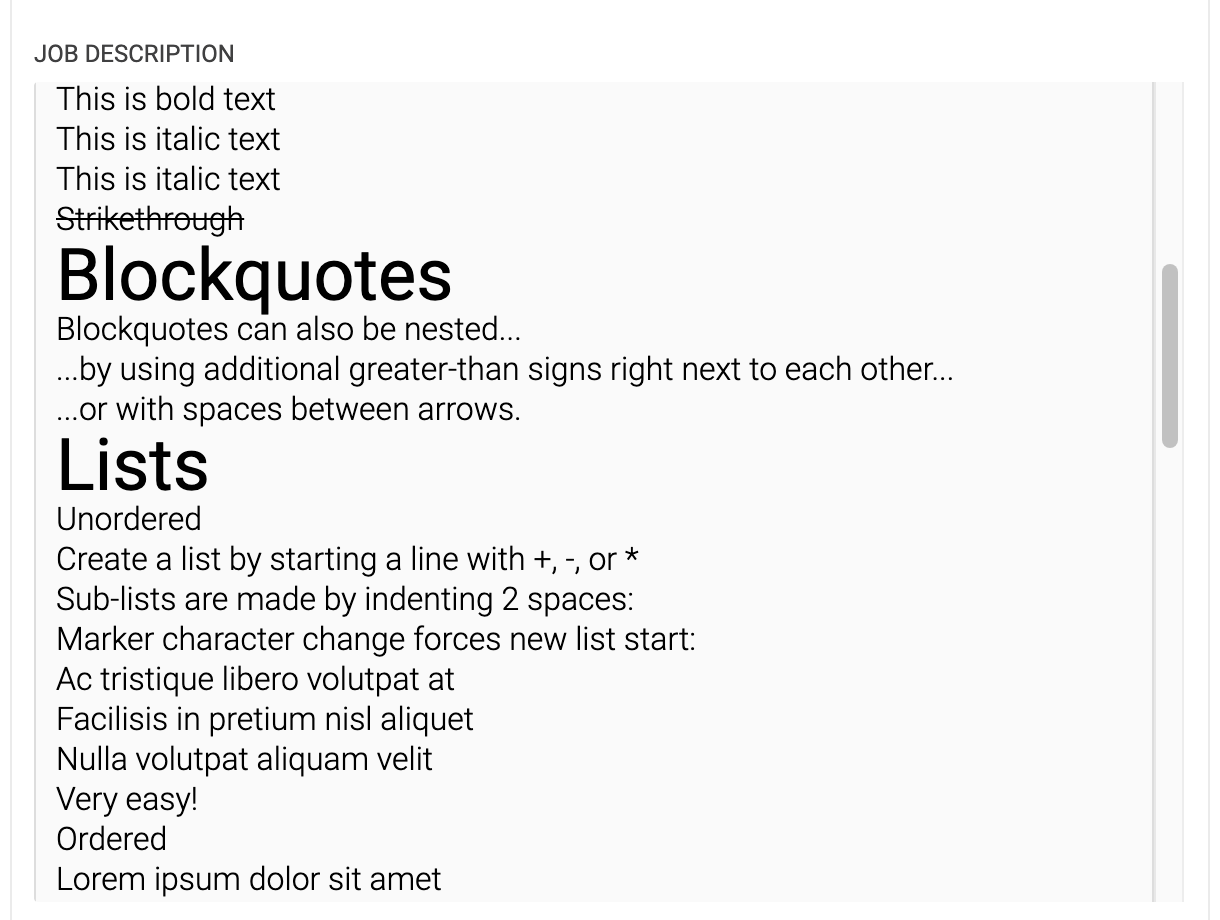
Can we have some basic styles for the features that we use: headings, bold/italic, ordered/unordered lists, blockquote, code? Similar to what we have in Work Manager:
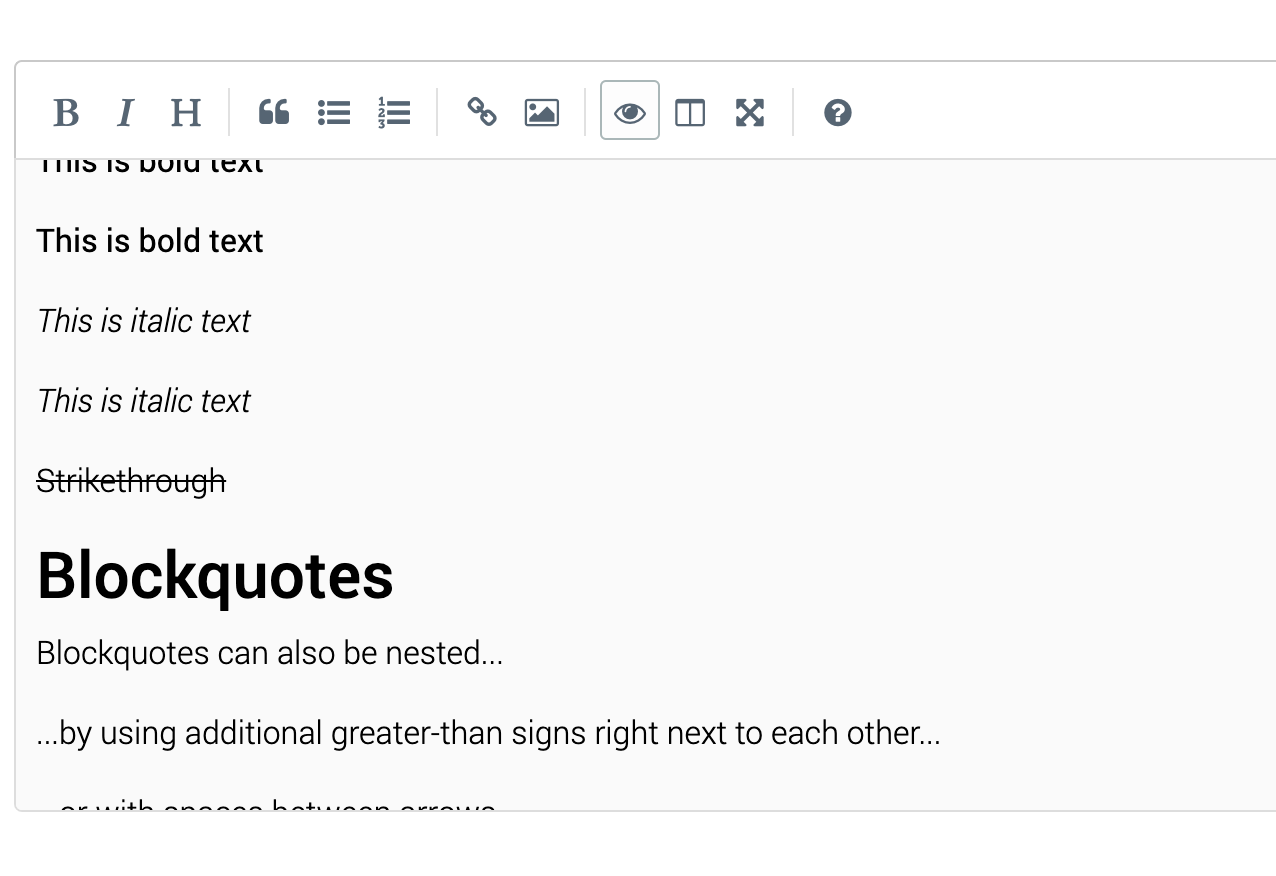
Example code:
# h1 Heading
## h2 Heading
### h3 Heading
#### h4 Heading
##### h5 Heading
###### h6 Heading

## Emphasis

**This is bold text**

__This is bold text__

*This is italic text*

_This is italic text_

~~Strikethrough~~


## Blockquotes


> Blockquotes can also be nested...
>> ...by using additional greater-than signs right next to each other...
> > > ...or with spaces between arrows.


## Lists

Unordered

+ Create a list by starting a line with `+`, `-`, or `*`
+ Sub-lists are made by indenting 2 spaces:
  - Marker character change forces new list start:
    * Ac tristique libero volutpat at
    + Facilisis in pretium nisl aliquet
    - Nulla volutpat aliquam velit
+ Very easy!

Ordered

1. Lorem ipsum dolor sit amet
2. Consectetur adipiscing elit
3. Integer molestie lorem at massa


1. You can use sequential numbers...
1. ...or keep all the numbers as `1.`

Start numbering with offset:

57. foo
1. bar


## Code

Inline `code`

Indented code

    // Some comments
    line 1 of code
    line 2 of code
    line 3 of code
Also, there are few comments for the code below.
There was a problem hiding this comment.
-
You've implemented the
readOnlymode which is nice to have. But if I enable it (setreadOnly = true) then there are is an error in the console and the component doesn't work. It can be fixed bythis.refs.textarea.innerHTML = value ? markdownToHTML(value) : ''and then readonly mode works, but styles looks broken:- height should be automatic or with a scrollbar
- content should not go out
- content should have the style look same as when preview

@yoution I wonder why did you add throttle initially? Does typing work slowly for you without throttle? Or what was the reason? maybe I'm missing something?

2 participants


No description provided.