PrimeTime is an interactive numbers game that tests your ability to identify prime numbers within the allotted time.
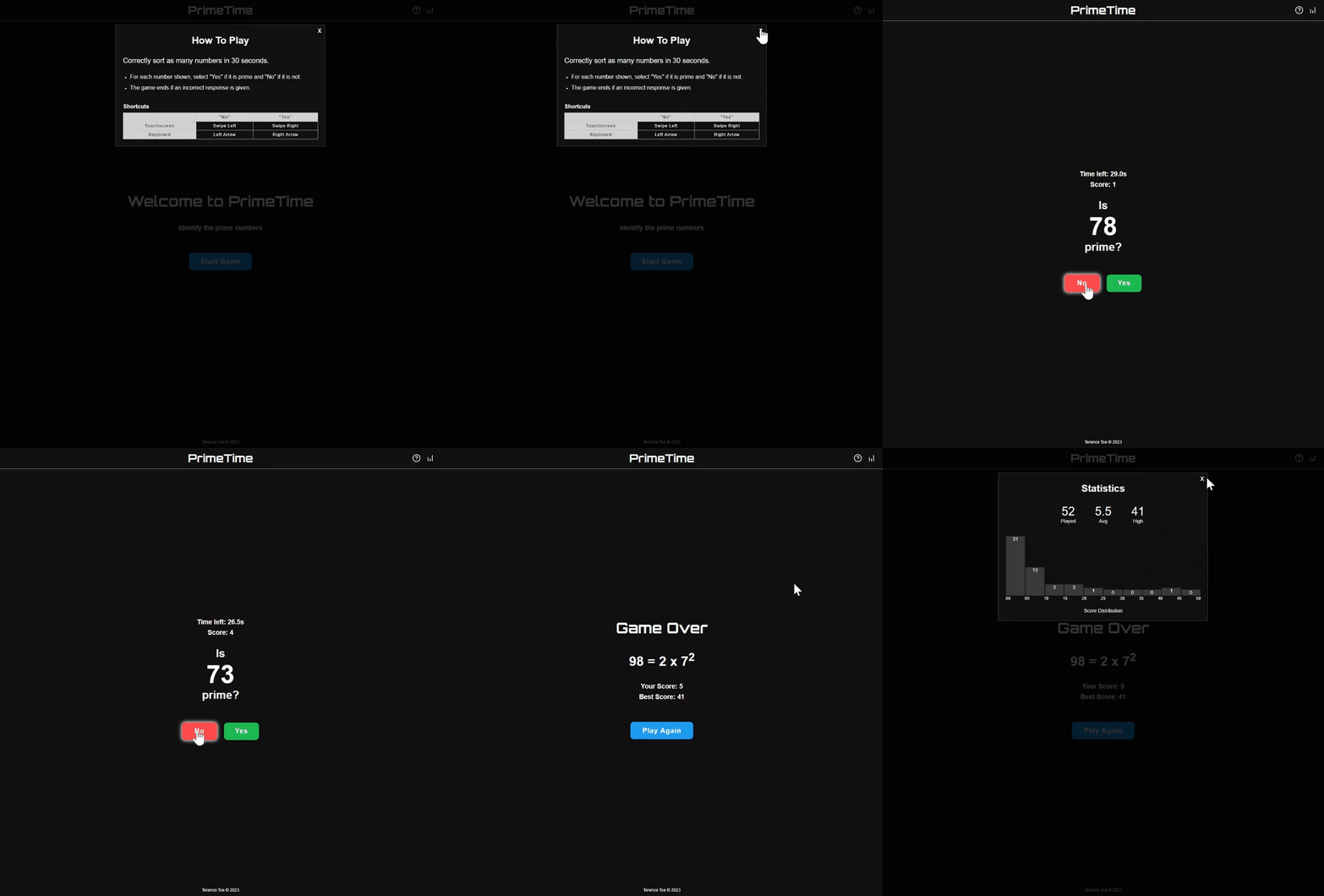
- Seamless countdown timer integration
- Modals for How To Play and Statistics
- Game statistics saved to localStorage
- Responsive web design
- Clean, minimalist UI design
Tech used: HTML, CSS, JavaScript
In order to create this game, I broke down the content into three distinct parts: the actual game itself, and two separate modals (How To Play and Statistics).
The main gameplay functions include:
getNum- randomly selects a number from 1 to n, inclusive (Note: n is defaulted to 100)isPrime- checks if a number is prime or notcheckAnswer- checks user's response, and gives explanation if incorrect
The logic of the game is as follows:
- Random number is selected and displayed
- User chooses YES or NO, indicating whether or not the displayed number is prime
- Check user's response
- If correct, score increases by one point, a new random number is selected and displayed, and the game continues from Step 1
- If wrong, the game is over, see Step 4
- Show explanation and final score, save game stat to localStorage
After getting the logic above to work as expected, I integrated a countdown timer to give the game a time limit (Note: timer is defaulted to 30 seconds). With the timer in place, the game now ends once either an incorrect response is given OR the timer reaches 0 seconds.
The How To Play modal lays out the game instructions in addition to the shortcut keys users may take advantage of. Keyboard users are able to use the Left Arrow (NO) and Right Arrow (YES) as well as the Spacebar (START/PLAY AGAIN) which is detected through the keydown event. Meanwhile, touchscreen users are able to Swipe Left (NO) and Swipe Right (YES) which is determined by comparing the touchend event x-coordinate to the touchstart event x-coordinate.
The Statistics modal shows user data on Total Games Played, Average Score, High Score, as well as a histogram visualizing the distribution of all the user's previous scores. This is possible by saving stats to localStorage upon completion of each game.
Drawing inspiration from the popular online game Wordle's UI, I took a mobile-first approach while designing this game and made it responsive through the use of media queries.
I think I could improve the user experience for PrimeTime by making the game more customizable. Here are some features that I would consider incorporating:
- Additional modal for Settings containing:
- Toggle for Hard Mode (only odd numbers are shown)
- Toggle for High Contrast Mode (for improved color vision)
- User-defined maximum number (instead of 100)
- User-defined time limit (instead of 30 seconds)
In order to successfully create this game, I had to combine my existing knowledge of HTML, CSS, and JavaScript (particularly on DOM manipulation and event listeners) with my new knowledge of modals and localStorage attained through the MDN website and other various resources.
While integrating the countdown timer into the game, I encountered an issue where the timer was not counting down appropriately whenever the window was minimized. After some research, I learned that for inactive tabs, browsers automatically force timers to run every 1 second (our setInterval specifies a delay of 1/10 seconds) to preserve device battery and reduce unwanted CPU consumptions. To fix this issue, I specified the endTime property as a function of the startTime using JavaScript's Date object. By making this modification, the endTime property remains constant once the timer starts and allows the timer to behave as expected, regardless of whether or not the window is active.